

Developing a clear, maintainable object-permissions strategy is essential to any Salesforce sharing model. Although Salesforce’s timeline around Profiles vs Permission Sets has shifted over time, provisioning permissions via Permission Sets and Permission Set Groups is widely regarded as the modern best practice. In this how-to guide tailored for iBirds Software Services, we’ll unpack a modular Permission Sets approach and show how to automate persona-based assignment to reduce manual work, lower risk, and simplify audits using a permission sets salesforce–aligned design.
Note: Scroll to the end for a downloadable Permission Set & Permission Set Group design template to document your model and speed implementation.
Why move from Profiles to Permission Sets in Salesforce? (permission sets salesforce)
Shifting permissions from Profiles to Permission Sets enables a modular permissions model: admins gain fine-grained control over object, field, and system permissions without exploding the number of Profiles. Permission Sets let you define discrete capabilities (for example, Create on Expense__c). Permission Set Groups then let you bundle those discrete Permission Sets into persona- or function-based containers (for example, “Finance Officer”), so assignment becomes a single step per user.
This modular permission sets salesforce approach improves maintainability: when permission needs change for a persona, update the Permission Set Group once and the change flows to all assigned users. It also reduces technical debt and makes org security easier to understand and audit.
Modularity supports maintainability (permission sets salesforce)
With Permission Set Groups, the singular point of maintenance helps administrators manage changes efficiently. Instead of creating multiple new Profiles whenever access requirements shift, maintain a flat baseline Profile and layer Permission Set Groups per user. This reduces duplication and makes reviews simpler — auditors and architects can see exactly which Permission Sets compose each persona.
Automate permission assignment (permission sets salesforce)
Salesforce’s User Access Policies (GA in recent releases) allow automatic assignment of Permission Set Groups based on criteria on the User record. Using automation means new users receive correct access on create, and updates to user attributes can trigger reassignment. This eliminates repetitive manual steps and reduces human error.
Learn more on Salesforce
Configuring a modular permissions model — step by step (permission sets salesforce)
Below is a practical set of steps to design Permission Sets, Permission Set Groups, and persona-based automation for your org.
Step 1: Define personas and permission requirements
Before reconfiguring permissions, inventory existing permissions (often buried in Profiles) and define the personas or functional groups you will support.
Persona definitions (example):
Program Officer: Plans and tracks expenditure and payments for managed programs.
Finance Officer: Manages budgets and approves expenditures/payments.
Document which objects, fields, and system permissions each persona needs. That inventory is the basis for Permission Sets.
Step 2: Define granular permissions (permission sets salesforce)
Design discrete Permission Sets for the smallest logical permission group (e.g., read-only vs create/update). Granular Permission Sets increase reuse and limit duplication.
Example object permissions required:
Program Officer
• Create/Read/Update Program__c
• Read Budget__c
• Create/Read/Update Expense__c
• Create/Read/Update Payment__c
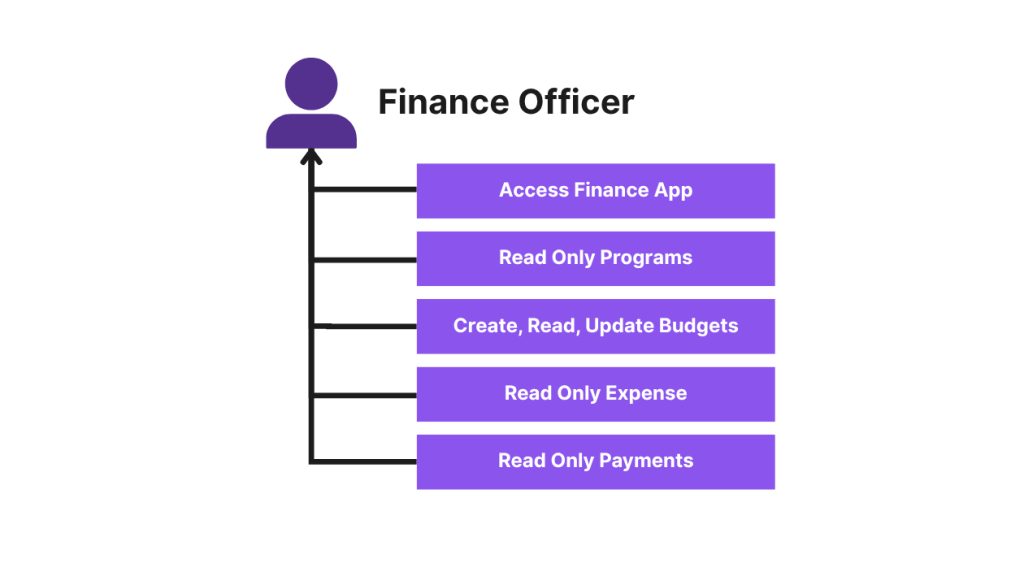
Finance Officer
• Read Program__c
• Create/Read/Update Budget__c
• Read Expense__c
• Read Payment__c
From this, create minimal Permission Sets such as:
- Read Only Program
- Create/Update Program
- Read Only Budget
- Create/Update Budget
- Read Only Expense
- Create/Update Expense
- Read Only Payment
- Create/Update Payment
Reminder: mirror required field-level security (FLS) within each Permission Set.
Step 3: Group permissions by personas (permission sets salesforce)
After building Permission Sets, bundle them into Permission Set Groups that map to your personas:
Permission Set Group → persona mapping (example)
Program Officer (PSG): Read Only Program, Create/Update Program, Read Only Expense, Create/Update Expense, Read Only Payment, Create/Update Payment, Read Only Budget
Finance Officer (PSG): Read Only Program, Read Only Expense, Read Only Payment, Read Only Budget, Create/Update Budget
(Table preserved as original.)
Now, instead of assigning many Permission Sets to a user, assign the single Permission Set Group aligned to their persona. If permissions change for that role, update the group once and let changes cascade.
Step 4: Manage Profiles
In brownfield orgs, Profiles will exist and may contain permissions. Use this migration approach to streamline Profiles:
• Reduce Profiles to a minimal, flat set
• Recreate necessary permissions into Permission Sets
• Test Permission Sets layered on flat Profiles
• Identify elements that must remain in Profiles
• Deprecate legacy Profiles carefully
Internal Link Suggestion (DoFollow):
/salesforce-profile-to-permission-sets-guide
[Optional] Step 5: Automate Permission Assignment with User Access Policies
To remove manual assignment, create a persona field (Persona__c) on the User object. Configure User Access Policies to assign the correct Permission Set Group automatically.
Design tips:
• Start with audit-only mode
• Use picklist values
• Create logs/reports for support teams
Documenting and testing your design
A Permission Set-driven model works only when it’s well-documented and tested. Produce a design artifact that includes:
• Profile structure
• Permission Set definitions
• Permission Set Group membership
• User Access Policy rules
• Test cases
Final thoughts
Moving from a Profile-driven model to permission sets salesforce–aligned Permission Set Groups — augmented by automation — will:
• Simplify permissions management
• Provide modular access control
• Reduce Profile count
• Save admin time
Before you migrate, ensure you:
• Analyze Profiles
• Identify settings that must stay in Profiles
• Introduce minimal flat Profiles
• Create Permission Set Groups
• Document everything
• Test in sandbox
FAQs
Q: Will moving permissions to Permission Sets break existing integrations?
A: Not typically — but confirm any references to Profile-based permissions in integrations or Apex code, and update them if they rely on Profiles for logic.
Q: What if a permission can’t be moved out of a Profile?
A: Some settings remain Profile-only. Document these cases, keep minimal Profiles for those settings, and minimize their number.
Q: How do I revert if something goes wrong?
A: Test thoroughly in sandbox. Use change sets or metadata backups and document the rollback steps before making production changes.Q: Is automatic assignment secure?
A: Automation is secure if the persona attribute is controlled (picklist), and access policies are tested. Maintain an approval/audit process for persona changes.