

Managing Salesforce data deployments, such as reference data like Price Book entries, alongside metadata has always been challenging. Traditionally, configuration data updates are done manually or through separate scripts outside standard release processes. This approach often leads to errors and deployment delays, as teams handle spreadsheets and Data Loader while keeping environments synchronized.
As a Salesforce Solution Architect, I experienced these challenges firsthand. Releases often included all required metadata, but essential data, like pricing records or configuration settings, might be missed or inconsistently loaded later.
More Info : Linkedin
The Challenge: Metadata vs. Data Deployments
Salesforce DevOps has matured around metadata version control and CI/CD pipelines. However, data deployments, including master data or CPQ records, frequently remain an afterthought. Admins often export data to CSV and migrate records manually using Data Loader or other tools.
This manual approach is slow and error-prone. Missing a required Price Book entry in a test environment can disrupt quoting processes. Configuration data does not fit neatly into source control, and it can easily be overlooked during deployments.
Traditional deployment workflows involve migrating data manually, which causes delays and errors. Event-driven pipelines, in contrast, trigger CI/CD deployments automatically when a Jira ticket reaches a deploy-ready status. This replaces tedious manual steps and ensures faster, more reliable releases.
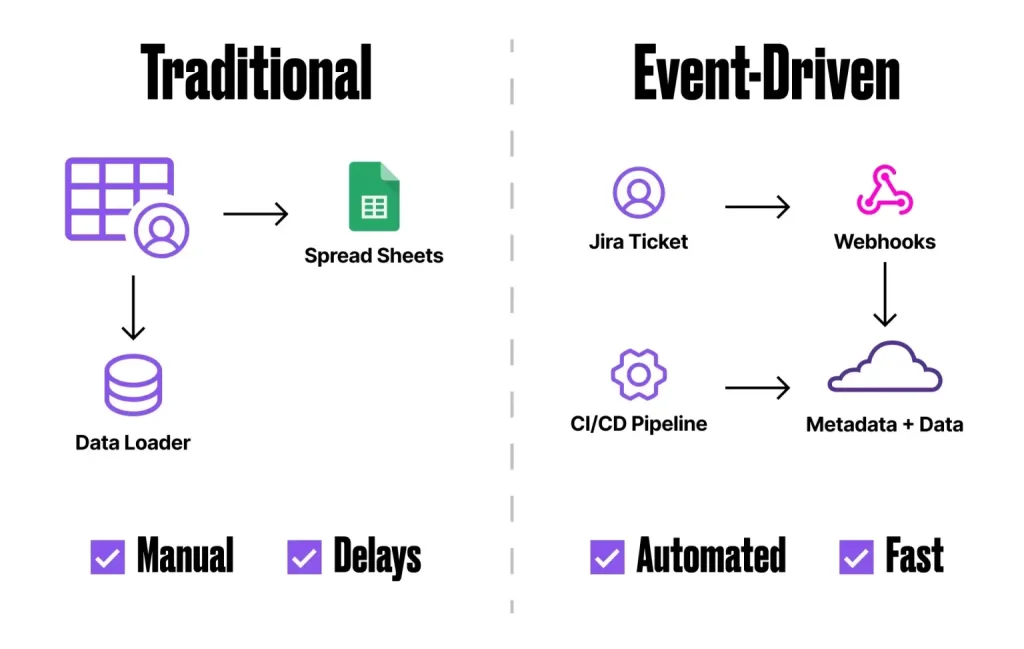
The disconnect between metadata and data releases was a major source of deployment issues. Teams would deploy new custom objects or fields via version-controlled pipelines, but business data like Product records or Price Book entries might be manually updated later. This increased workload and risked environmental drift, making testing less accurate.
Modern Salesforce DevOps tools, such as Copado’s Data Deploy feature, address this gap. The goal is to manage data changes with the same rigor as code changes.
The Solution: An Event-Driven DevOps Pipeline
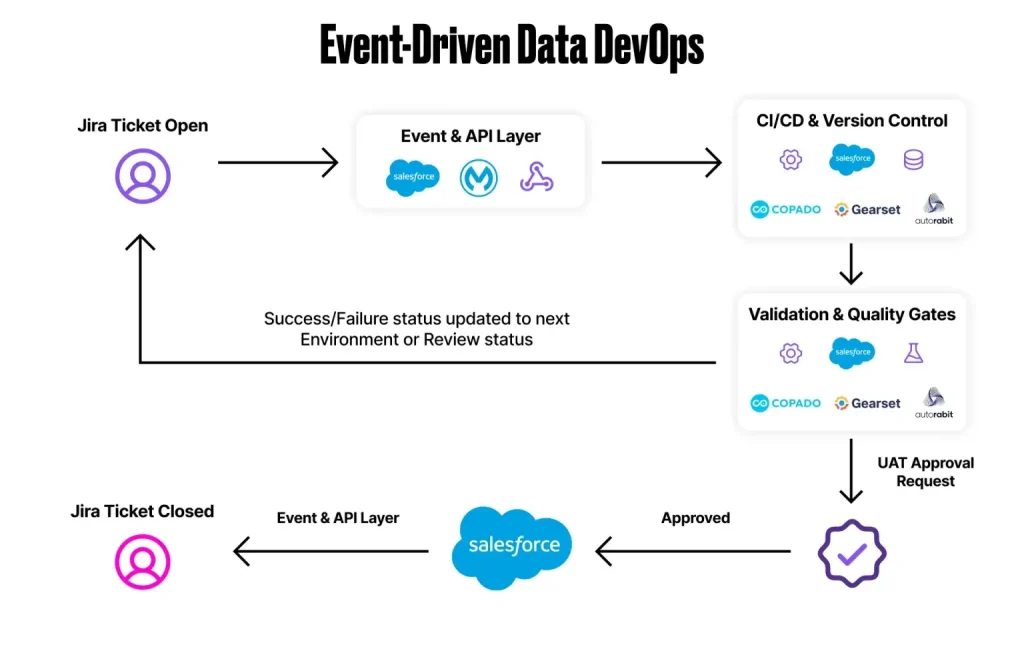
An event-driven pipeline connects Jira tickets to Salesforce deployments with automation at each step. When a Jira User Story is marked ready, it triggers a sequence of automated actions:
Integration Between Jira and Salesforce DevOps
We integrated Jira with Copado, mapping each Jira ticket to a Copado User Story in Salesforce. This ensures status, links to commits, and requirements remain synchronized. Developers can work in familiar tools while their changes stay tied to project tracking.
API Event Listener
A webhook or API listener captures Jira status changes and triggers the CI/CD pipeline. The event provides the ticket ID and new status, ensuring deployments are accurately controlled.
Automated Pipeline Kick-Off
Once the event is received, the integration calls Copado via REST API or Apex to initiate the deployment. This simulates a release manager clicking “Deploy” but happens programmatically. The pipeline commits pending metadata changes and promotes the User Story through the deployment stages.
Metadata and Data Deployment
The Copado pipeline deploys metadata and related data records. Data templates for objects like PricebookEntry upsert required records in target environments. Copado allows data sets to be part of a User Story, ensuring metadata and data move together.
Validation and Testing
After deployment, automated validations run, including Apex tests and custom SOQL checks. External tests, like Selenium scripts for CPQ scenarios, ensure data correctness. Failures flag the deployment for review before production promotion.
Promotion to Production
Validated changes are promoted to Production automatically. Approval gates can enforce governance, but deployments are triggered with minimal manual intervention. This ensures code and configuration move together from sandbox to production seamlessly.
Use Case: Automating Price Book Updates
The sales operations team frequently updates pricing, requiring changes to reflect in CPQ. Previously, metadata and data were deployed separately, involving manual updates and scheduling across environments.
With an event-driven pipeline, metadata and Price Book records are bundled together in each User Story. The pipeline automatically deploys the full package through UAT and Production, ensuring testers and business users always have correct data.
This approach also applies to CPQ product configurations, assignment rules, and permission set assignments. Event-driven pipelines eliminate repetitive manual tasks and ensure reliable deployments.
Key Takeaways and Benefits
- Unified Deployment of Metadata and Data: Deploying reference data alongside metadata eliminates drift and errors caused by manual updates.
- Event-Driven Automation: Jira status triggers start deployments immediately, accelerating the feedback loop and enforcing process compliance.
- Improved Release Quality: Automated validations catch issues early, reducing deployment failures and manual corrections.
- Faster Time to Production: Continuous, automated deployments reduce coordination and scheduling overhead.
- Reusable, Tool-Agnostic Framework: Concepts can be applied with tools like Copado, Gearset, Flosum, or Jenkins+SFDX, ensuring traceability and auditability.
Final Thoughts
Implementing an event-driven DevOps pipeline transformed Salesforce deployments. Moving from manual data handling to automated, coordinated releases improved speed, accuracy, and confidence.
For organizations facing gaps between metadata and data in deployments, an event-driven approach ensures predictable, reliable, and faster releases.
FAQs about event driven data DevOps in salesforce
Q1. What is event-driven Data DevOps in Salesforce?
It is a deployment method where Jira events automatically trigger pipelines, deploying both metadata and data together in a coordinated flow.
Q2. Why is including data in DevOps pipelines important?
Including data ensures all environments stay consistent, reduces manual errors, and aligns configuration changes with metadata deployments.
Q3. Which tools support event-driven data deployments?
Platforms like Copado, Gearset, Flosum, or Jenkins with SFDX can automate both metadata and data deployments in Salesforce pipelines.
Q4. How does automation improve deployment quality?
Automation runs validations and tests automatically, catching issues early and ensuring consistent, repeatable releases across environments.
Q5. Can Price Book updates be automated?
Yes, Price Book records can be deployed alongside metadata, reducing manual effort, errors, and ensuring accurate data in all orgs.