

Analyze, Monitor, and Improve Your Salesforce Org Performance
Managing a Salesforce org becomes difficult as systems grow, business requirements change, and metadata increases. Understanding how every object, workflow, automation, dependency, and security setting works together is not always simple. What if Salesforce teams could reduce manual analysis and quickly identify optimization opportunities without spending weeks reviewing configurations?
Highlights
- Get better visibility into Salesforce metadata, dependencies, and system performance.
- Improve collaboration between business and technical teams through clearer process documentation.
- Strengthen data governance, security, and automation for a healthier Salesforce environment.
- Support AI-powered Salesforce initiatives with better org visibility and structured metadata.
- Speed up requirement gathering and change planning with improved documentation workflows.
- Access Salesforce insights more efficiently to reduce technical debt and improve decision-making.
For Salesforce professionals, understanding how an org functions is no longer optional. Admins, Developers, Architects, and Consultants must understand how changes affect metadata, automation, dependencies, and user experience before introducing updates.
Missing documentation, unmanaged dependencies, and incomplete impact analysis often create long-term technical debt. These problems make Salesforce environments harder to maintain, increase deployment risks, and slow down business operations.
Many organizations rely on spreadsheets, disconnected tools, and manual processes to track Salesforce changes. While this approach may work for smaller environments, growing Salesforce implementations often require a more organized and scalable process for managing metadata, documentation, and release planning.
A structured approach to Salesforce Org Analysis helps businesses improve visibility, reduce risks, and maintain cleaner Salesforce environments. Teams that regularly review metadata, dependencies, and system performance are often better prepared for future updates and automation improvements.
Organizations looking to simplify Salesforce management often benefit from professional Salesforce Consulting Services, where experienced teams review org structure, identify hidden inefficiencies, and recommend practical improvements for long-term scalability.
This guide explains how Salesforce teams can better analyze, track, and understand their Salesforce org, including metadata visibility, dependency tracking, process documentation, automation planning, and practical ways to improve overall Salesforce performance.
Features
Salesforce environments become harder to manage as metadata, automation, and customizations grow. Having clear visibility into dependencies, workflows, permissions, and system behavior helps teams reduce confusion and make better decisions.
A strong Salesforce analysis process should help teams understand metadata faster, identify risks earlier, and improve release planning with better visibility.
Below are some important capabilities that help Salesforce professionals improve Salesforce Org Analysis and maintain a healthier environment.
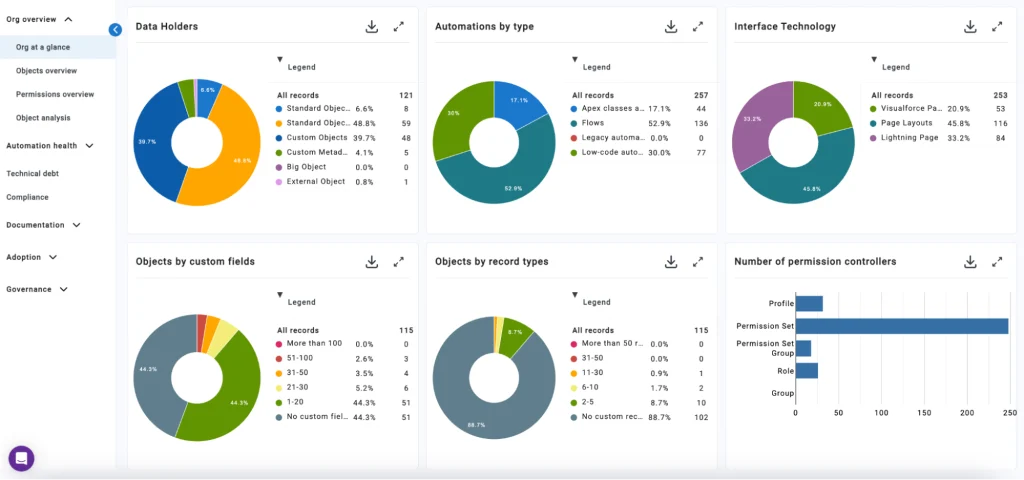
Analytics 360 Dashboard for Better Salesforce Visibility
A centralized analytics dashboard helps Salesforce teams view different parts of their org in one place. Instead of manually reviewing objects, automation, and configurations one by one, admins and consultants can quickly understand overall org health through visual reports and organized system insights.
This type of visibility becomes useful when organizations want to identify which objects hold the largest amount of data, where metadata cleanup may be needed, or which areas create unnecessary complexity.
A better analytics view also helps stakeholders understand how Salesforce is being used across departments and where improvements may be required.
Organizations using Salesforce Sales Cloud Services often review metadata health regularly to identify risks before they impact business performance.
Better Org Visibility Through Metadata Mapping
Understanding how a Salesforce org is structured takes time, especially in environments with years of customization. Metadata mapping helps Salesforce teams review objects, flows, Apex classes, automation, and permissions more efficiently.
When Salesforce metadata is organized and easier to navigate, admins can quickly understand how different components interact across the system.
A structured metadata view helps teams:
- Review object relationships more clearly
- Understand dependencies between automation and data
- Analyze system usage and permissions
- Reduce confusion during deployments and updates
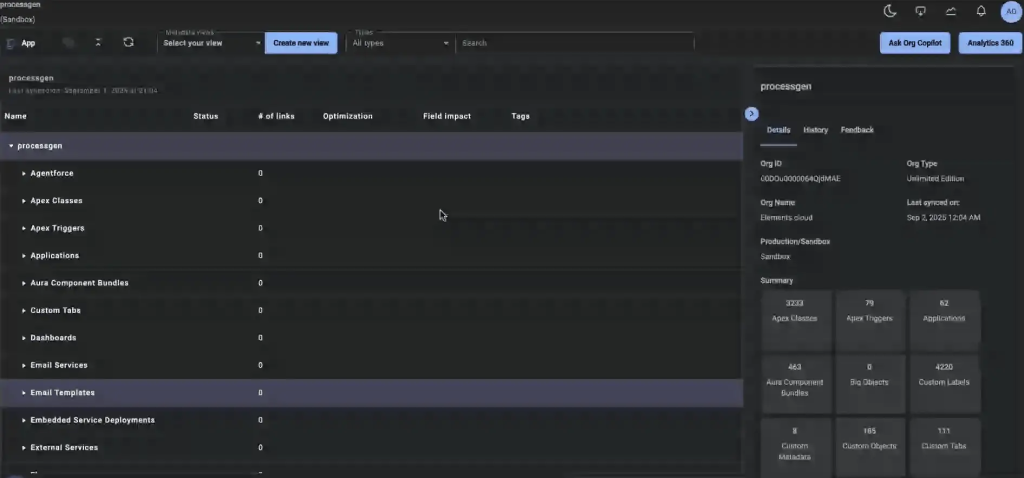
This process improves overall visibility and helps businesses reduce unnecessary complexity inside Salesforce environments.
Organizations working on large implementations often rely on Salesforce Development Services to review architecture, improve metadata quality, and simplify system structure for better scalability.
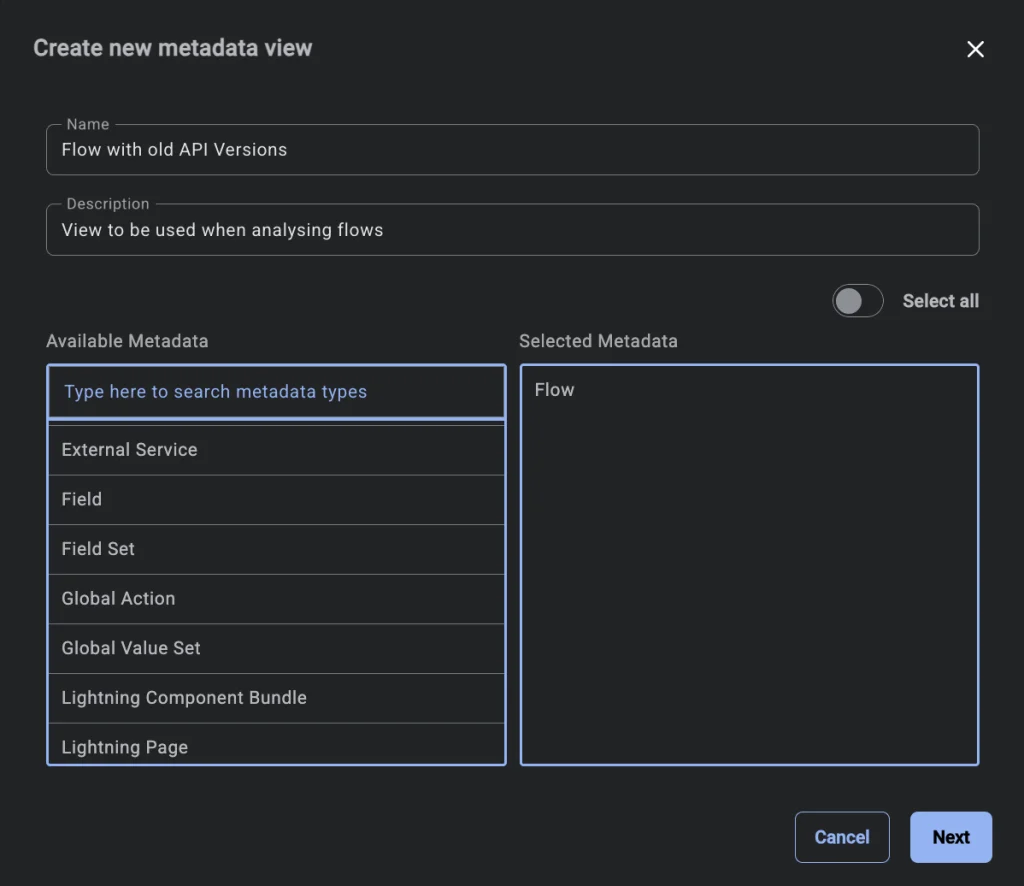

Dependency Tracking for Smarter Change Management
One of the biggest challenges in Salesforce is understanding how one small change affects the rest of the system. A field update, workflow change, or Flow modification may impact reports, automation, integrations, or permissions without immediate visibility.
Dependency tracking helps Salesforce teams understand these relationships before changes are introduced.
For example, admins can review:
- Which fields are connected to Flows
- What automation depends on specific objects
- How metadata components interact
- Which areas may be affected by future updates
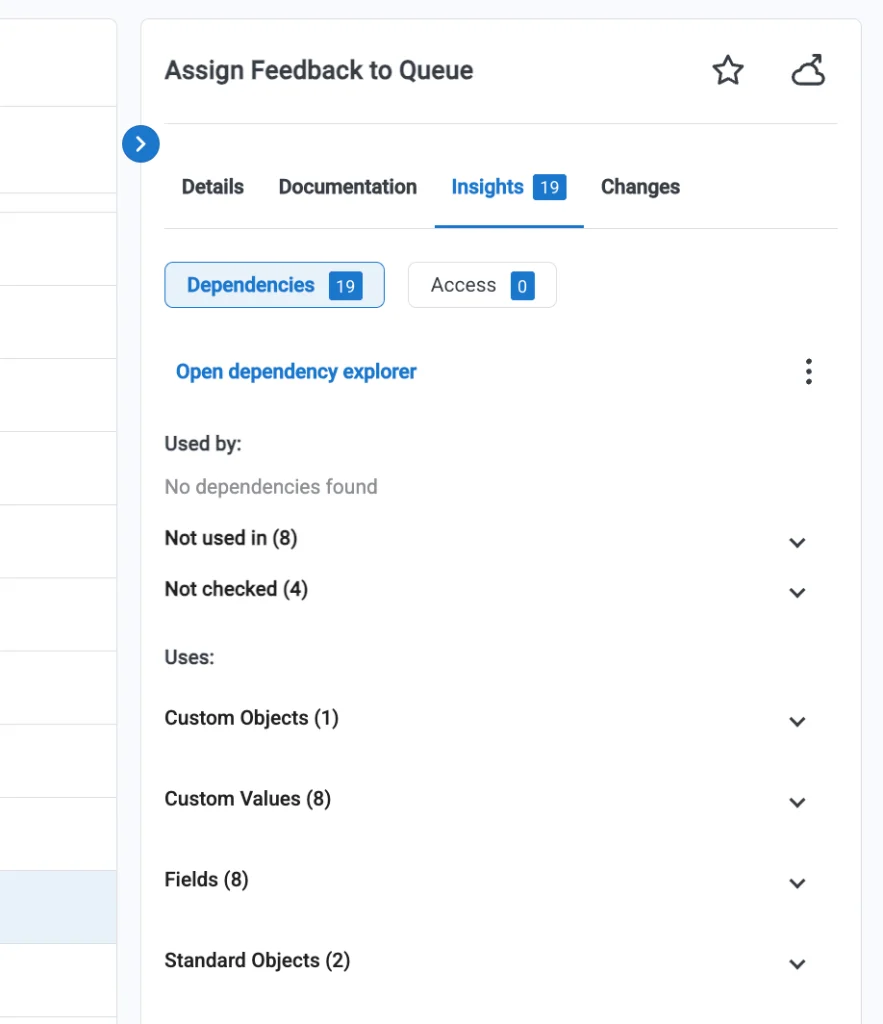
Visual dependency mapping helps reduce unexpected issues and improves release confidence.
Some organizations prefer visual dependency structures, while others review metadata in structured tables for filtering, reporting, and impact analysis. Both approaches help Salesforce professionals improve decision-making before deployments.
Businesses planning frequent Salesforce updates often benefit from Salesforce Consulting Services to improve release planning, dependency analysis, and long-term system stability.
Requirement Planning and User Story Management

Managing Salesforce requirements becomes difficult when teams work across multiple departments and release cycles. Business analysts, admins, developers, and stakeholders often need a structured process to document requirements, review changes, and keep projects aligned with business goals.
A well-organized requirement management process helps Salesforce teams keep track of updates, planned releases, and metadata-related changes more effectively.
Requirements and user stories should remain connected to releases so teams can clearly understand what changes are being delivered and when they are expected to go live. This also improves release visibility and reduces confusion during deployments.
As Salesforce environments grow, teams benefit from linking requirements directly with metadata changes, automation updates, and dependencies to reduce unexpected issues during implementation.
Organizations working on large-scale Salesforce implementations often rely on Salesforce Consulting Services to improve release planning, requirement tracking, and change management processes.
A Better Way to Document Salesforce Processes
Good Salesforce implementation begins with proper planning. Whether businesses are building a new Salesforce environment or improving an existing one, planning before development helps reduce long-term risks.
Creating process documentation before implementation gives teams a clearer understanding of how automation, workflows, and business requirements should function inside Salesforce.

Visual process mapping also improves communication between business teams and technical teams. When processes are easier to understand, stakeholders can review workflows, approve requirements faster, and reduce misunderstandings during implementation.

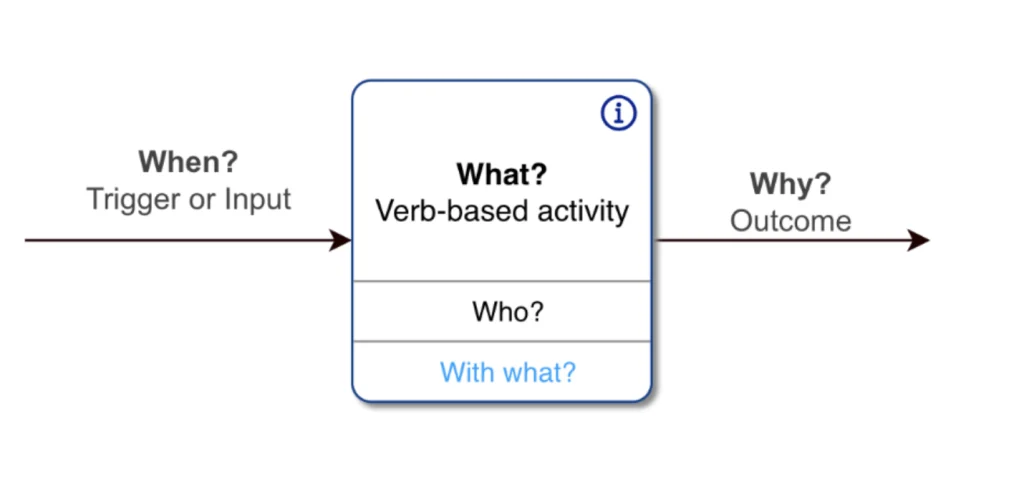
Structured process documentation should answer important questions such as:
- What process is being completed?
- Who is responsible for each activity?
- How does the workflow function?
- Why is this process important?

Breaking large Salesforce processes into smaller sections also helps teams manage complexity more effectively. Instead of overwhelming teams with large system diagrams, smaller process views improve clarity and decision-making.
Businesses handling complex Salesforce environments often benefit from Salesforce Service Cloud Services to improve architecture planning, process design, and metadata organization.
Better Collaboration Across Salesforce Teams
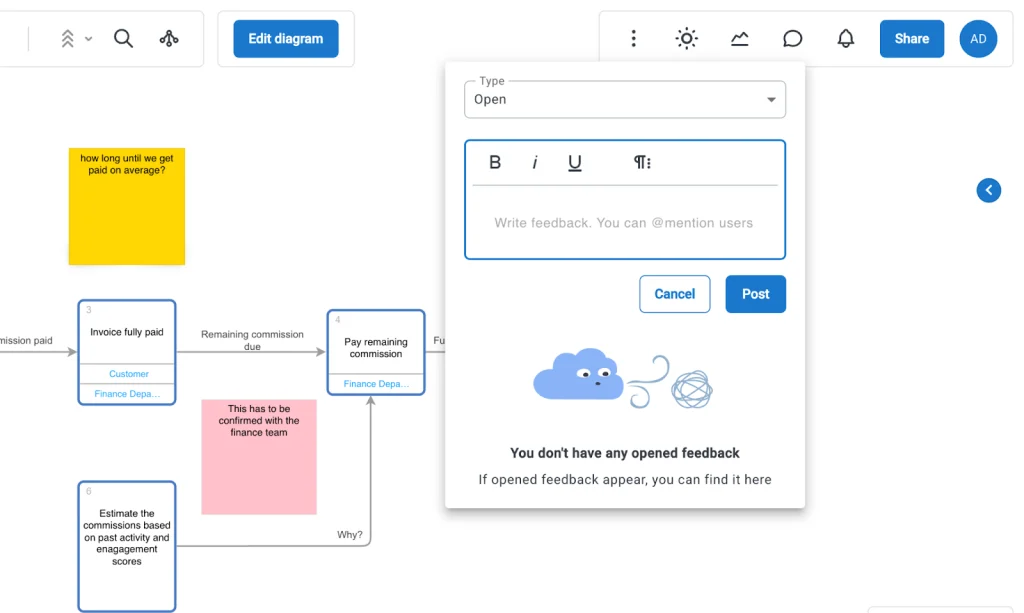
Salesforce projects usually involve multiple stakeholders, including admins, developers, consultants, and business users. Clear collaboration methods help teams review changes, discuss updates, and improve workflows without unnecessary delays.
Feedback systems, comments, and shared documentation help reduce communication gaps during implementations. When feedback stays documented, teams can review discussions later and improve accountability across projects.
This process becomes especially helpful during large Salesforce updates, where multiple teams work together to complete requirements and release planning.
Better Change Tracking Through Version Control
Tracking Salesforce changes is important for maintaining system stability. Version history helps teams review updates, understand previous configurations, and reduce confusion during future releases.
When changes are documented properly, teams can:
- Review previous versions of implementations
- Track who made updates and when
- Improve governance and compliance processes
- Reduce deployment-related risks
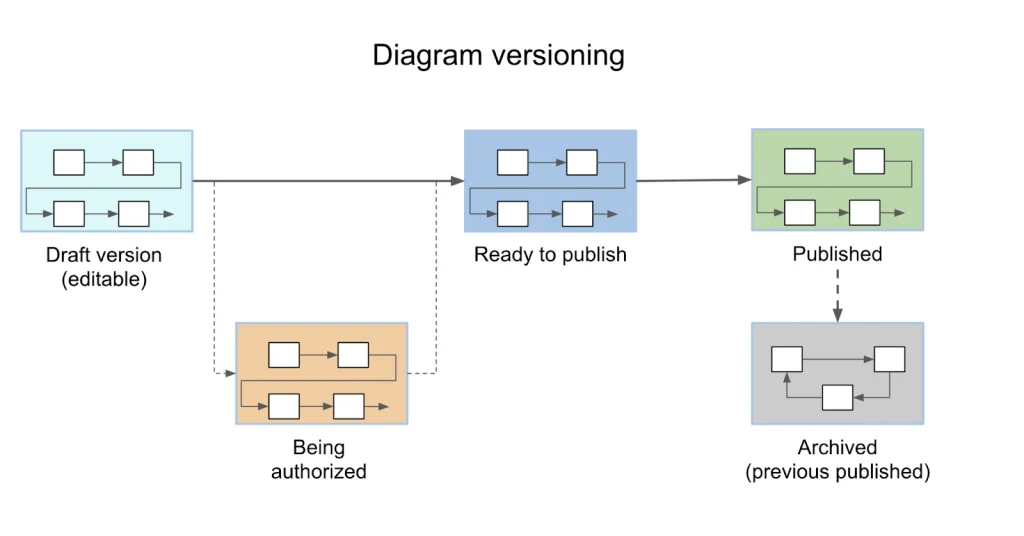
Organizations using Salesforce Managed Services often maintain structured version tracking to improve system reliability and long-term Salesforce governance.
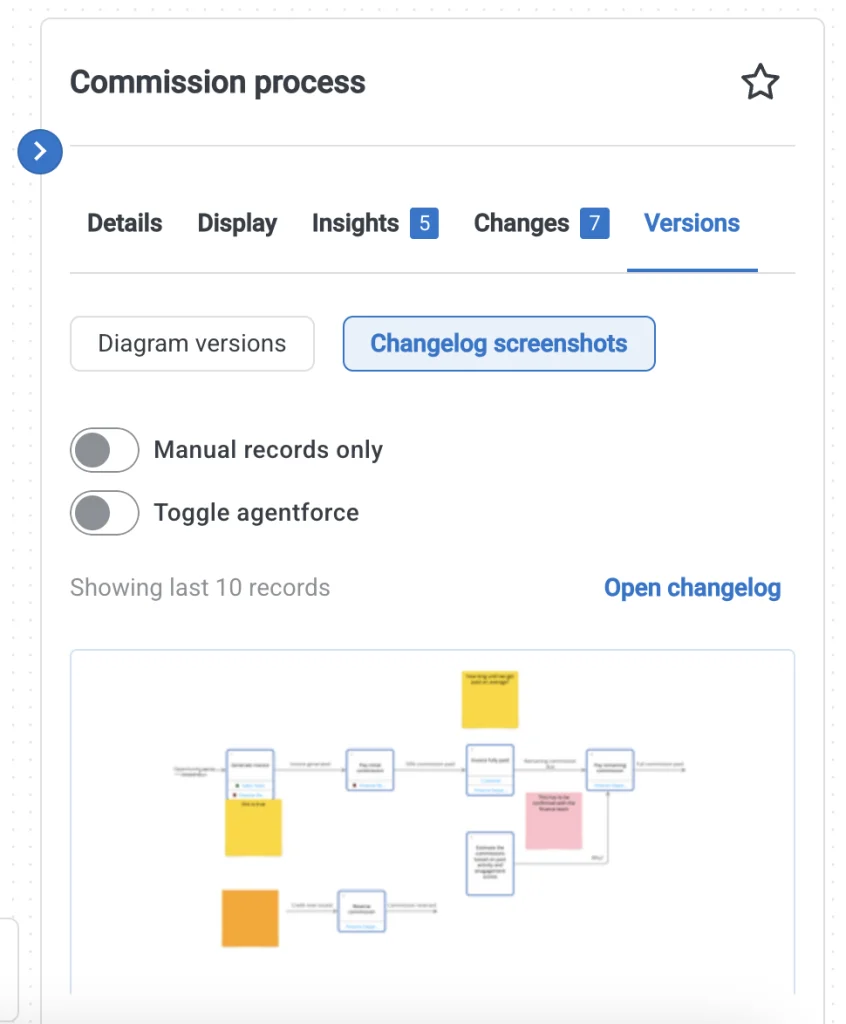
Smarter Salesforce Documentation Management
Maintaining Salesforce documentation takes time, especially when teams handle large implementations, integrations, and automation updates.
Keeping notes, links, process details, and metadata documentation in one place helps teams make better decisions and reduce confusion during future changes.
Well-maintained documentation also improves onboarding for new Salesforce team members and reduces time spent understanding historical implementation decisions.
A strong documentation process helps businesses maintain cleaner Salesforce environments while improving long-term scalability and operational visibility.
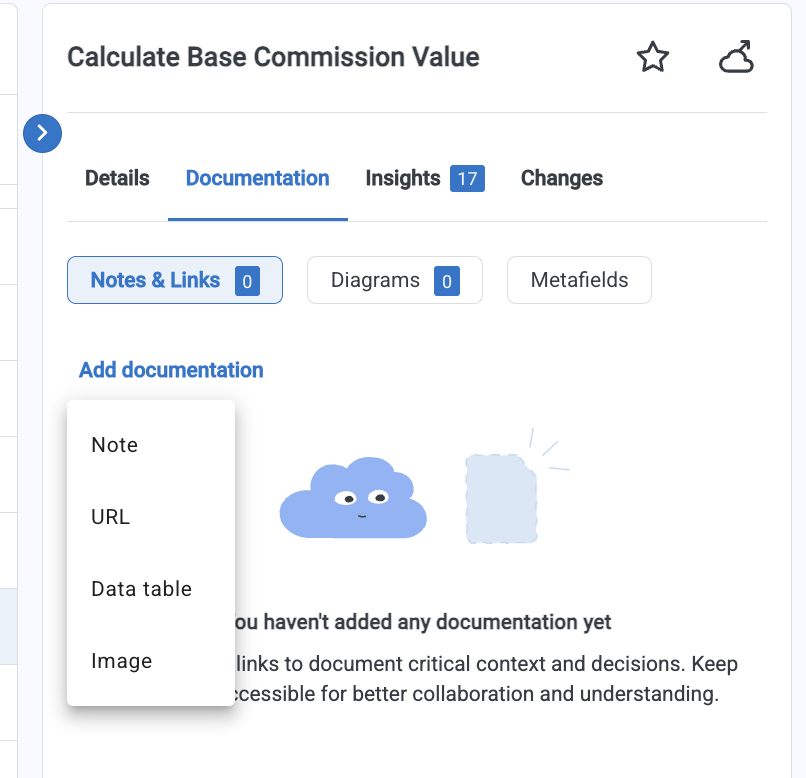
Better Visibility Into Existing Salesforce Processes
Understanding an existing Salesforce implementation often takes significant time, especially when multiple workflows, automations, and dependencies have been added over the years.
A deeper process analysis helps Salesforce teams understand how the org actually works without relying only on manual reviews or multiple stakeholder discussions.
Modern Salesforce process analysis methods help teams create structured process views faster by reviewing metadata, workflows, and connected dependencies. This makes it easier to understand how business operations are configured inside Salesforce and where improvements may be required.
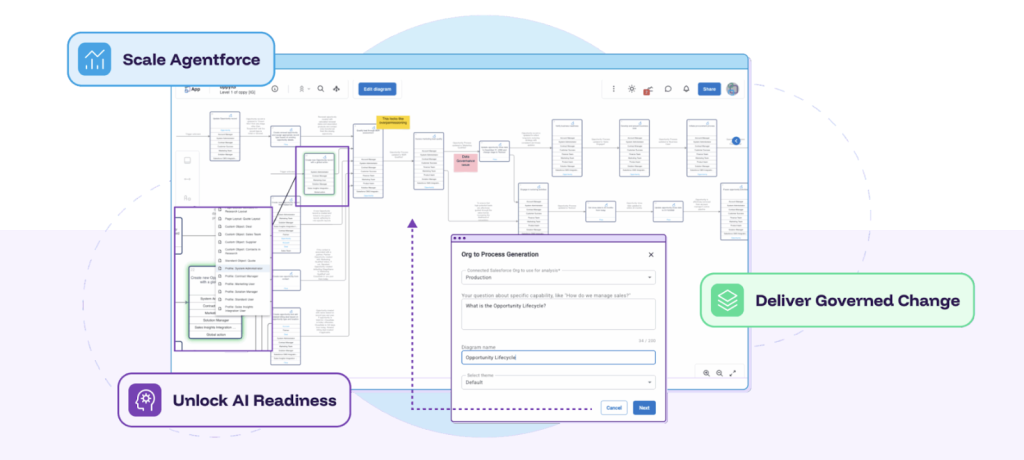
For organizations planning long-term Salesforce Org Optimization, reviewing existing processes is an important step toward reducing technical debt and improving system performance.
A clearer process view helps teams:
- Understand workflow dependencies faster
- Identify automation gaps and inefficiencies
- Review metadata relationships more effectively
- Improve readiness for AI-supported Salesforce operations
Instead of spending weeks manually reviewing system behavior, teams can understand Salesforce environments much faster through structured metadata analysis and process visibility.
Organizations handling large Salesforce ecosystems often benefit from Salesforce Community Services to improve org visibility, reduce hidden risks, and strengthen long-term architecture planning.
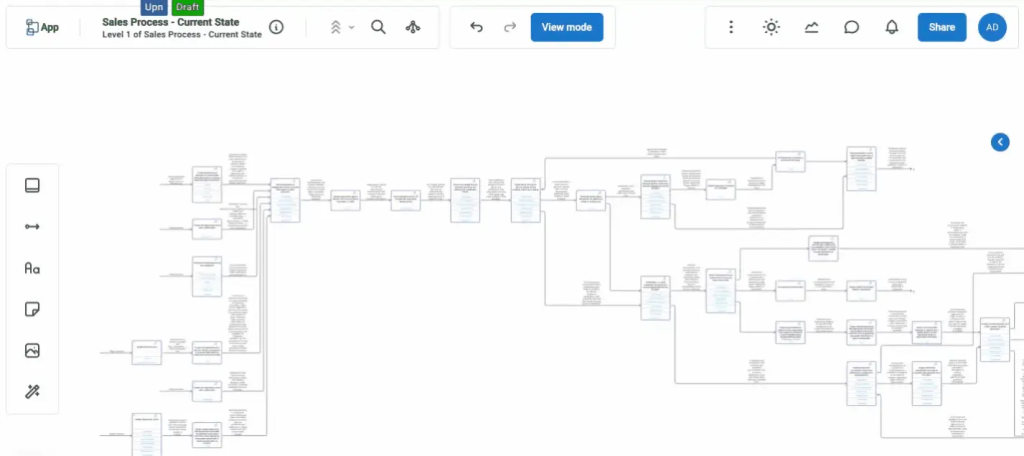
Easier Change Management With Connected Workflows
Salesforce updates become easier when teams understand how requirements, metadata, and dependencies work together.
Linking process documentation with future requirements helps admins and developers plan updates more efficiently. Teams can review metadata impact, understand dependencies, and prepare better release strategies before implementation begins.
A structured approach to Salesforce change planning reduces deployment risks and improves overall system stability.
Jira and DevOps Integration for Better Team Collaboration
Salesforce teams often work closely with development and project management platforms. Smooth collaboration between admins, architects, developers, and business teams helps reduce delays and improve project visibility.
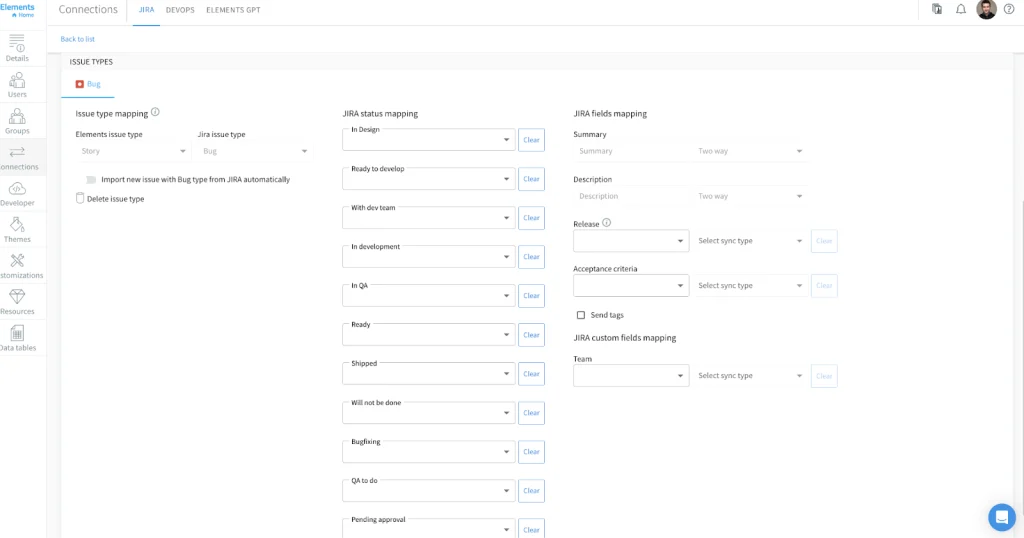
Integrating Salesforce planning with tools like Jira, Azure DevOps, or similar systems improves communication between business requirements and technical execution.
This type of integration helps teams:
- Track Salesforce requirements more efficiently
- Connect user stories with technical changes
- Improve release planning and delivery tracking
- Reduce communication gaps between teams
Organizations managing enterprise-level Salesforce implementations often use Salesforce Marketing Cloud Services to improve DevOps processes, release planning, and metadata management.
Chrome Extension
Especially useful when exploring a new org, but just as valuable when analyzing an existing Salesforce implementation, the Elements.cloud Chrome Extension enables users to access key insights, documentation, and analytics without leaving Salesforce.

Within Salesforce, the extension’s side panel surfaces everything you need to know about a specific object directly inside the Object Manager. While all details can be opened in your Elements workspace for deeper analysis, essential information such as high-level summaries, stakeholders, dependencies, field impact, access details, and more are available with a single click.
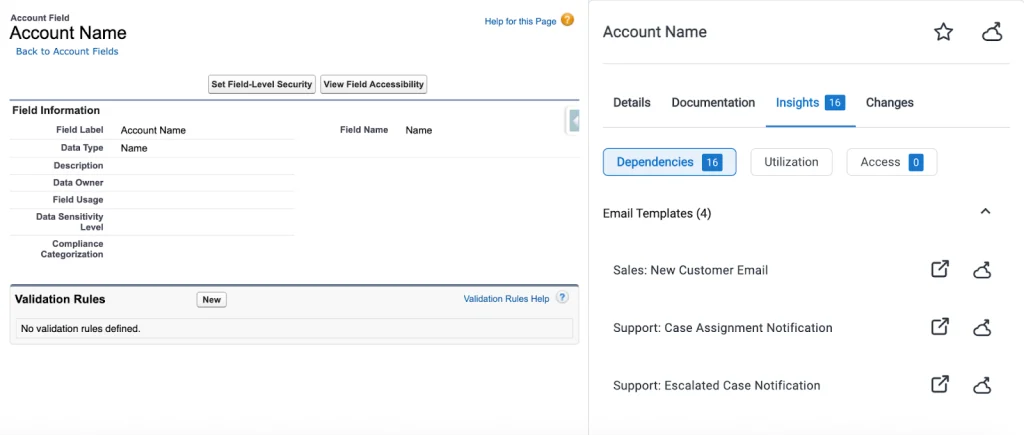
In addition to object-level insights, the extension also provides detailed information for individual fields. This eliminates the need to manually search through the org to identify where standard or custom fields are being used, saving valuable time and effort.
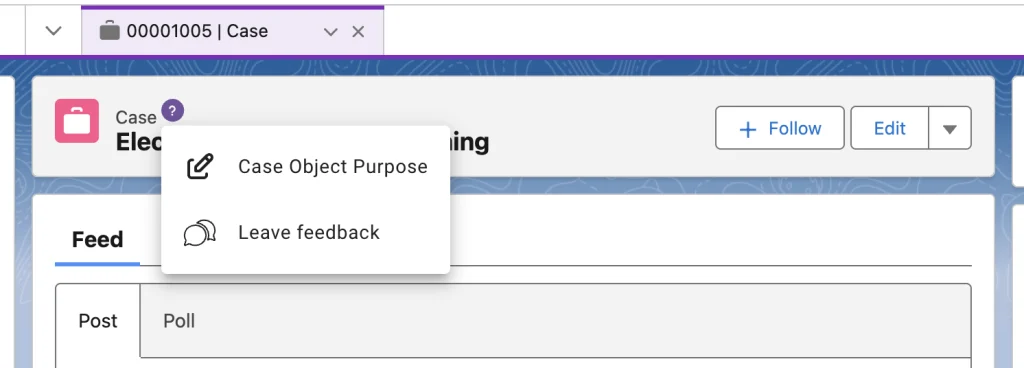
Since not all users who need access to change intelligence have the View Setup and Configuration permission, the platform also allows relevant information to be surfaced directly on user-facing record pages. Administrators have complete control over which content appears for each object and can even enable end-users to submit feedback directly from the interface.
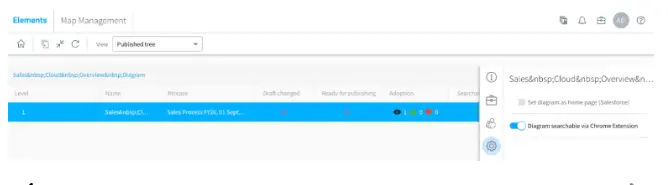
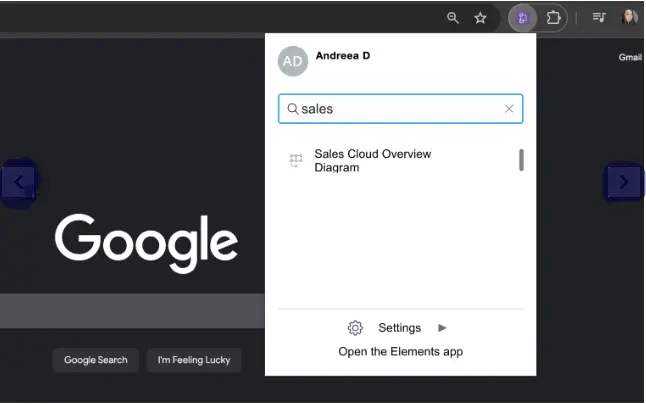
Published diagrams can also be made searchable within the extension from any webpage. This allows end-users and collaborators to quickly find the diagrams and documentation they need, while administrators retain control over which diagrams are available through search.
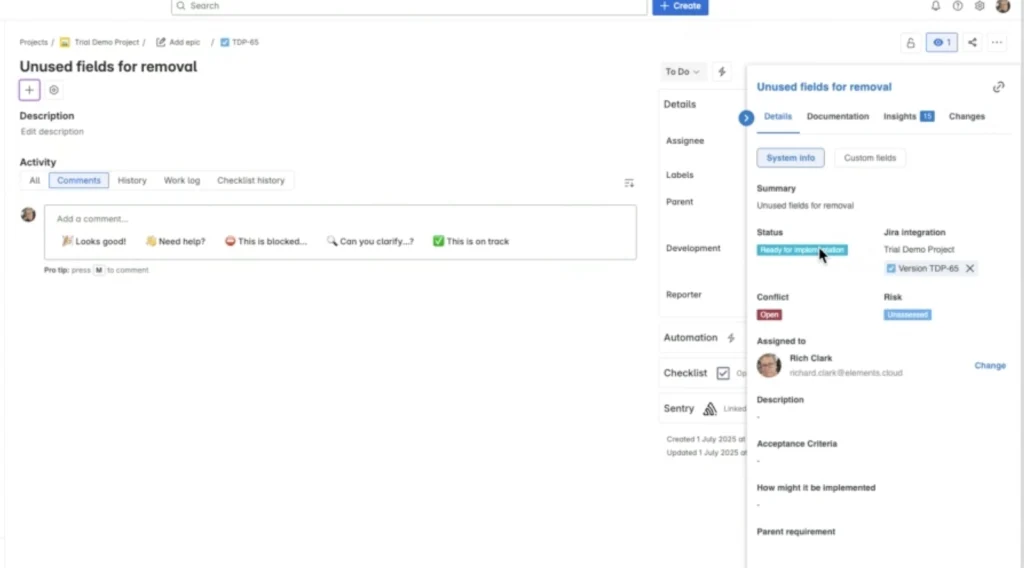
The Chrome Extension side panel is available not only in Salesforce but also in Jira, Copado, DevOps Center, and Azure DevOps. Depending on how these platforms and integrations are utilized, organizations can unlock additional capabilities to streamline processes and optimize overall workflow efficiency.es the time spent manually searching through Salesforce configurations and improves decision-making during system updates.
Future Improvements in Salesforce Process Intelligence
Salesforce environments continue becoming more complex, and organizations increasingly need better visibility into automation, metadata relationships, and system performance.
Future improvements in Salesforce process analysis are expected to improve:
- Multi-object dependency analysis
- Better automation visibility
- Smarter impact assessment for changes
- Improved AI-supported process documentation
- Better system architecture planning
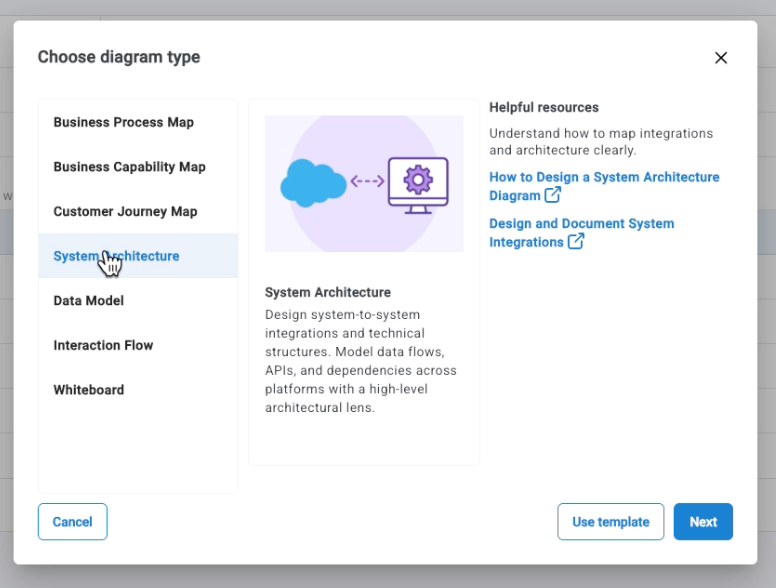
Businesses preparing for long-term Salesforce growth often rely on Salesforce Pardot Services to maintain system health, monitor changes, and improve overall Salesforce performance.
Practical Use Cases for Better Salesforce Optimization
Salesforce teams need more than visibility into metadata and dependencies. The real value comes when insights are converted into practical improvements that reduce manual work, improve efficiency, and strengthen business operations.
Once organizations gain a better understanding of their Salesforce environment, they can identify opportunities to improve automation, strengthen processes, and support long-term scalability.
Below are some practical ways Salesforce teams can improve operations through better process visibility and automation planning.
Salesforce teams increasingly use AI-powered agents to improve repetitive business operations and reduce manual workload.
Agentify Your Processes
Designing an agent with a process-focused approach makes it reliable, scalable, and well-governed, resulting in a digital teammate that understands its responsibilities and knows exactly how to perform them. While organizations could manually review documented processes to identify where an agent might provide value, Elements.cloud simplifies this effort significantly.
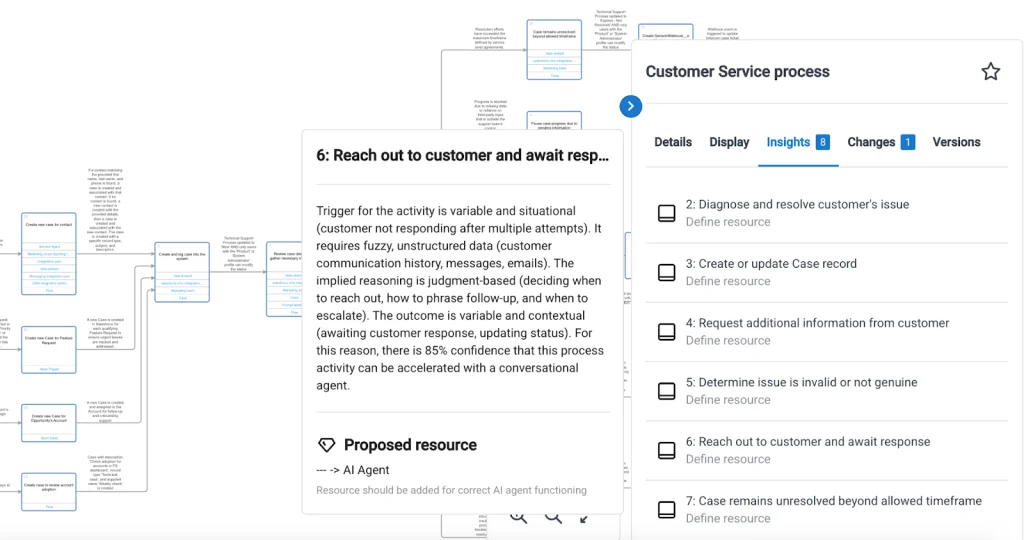
As a leader in helping Salesforce customers scale Agentforce adoption, Elements.cloud provides powerful capabilities to identify the areas where AI agents can have the greatest impact. Agent Finder, the platform’s built-in assistant, automatically analyzes documented processes and highlights potential agent opportunities. It also explains why an AI agent may be more effective in a particular process step compared to a traditional deterministic automation approach.
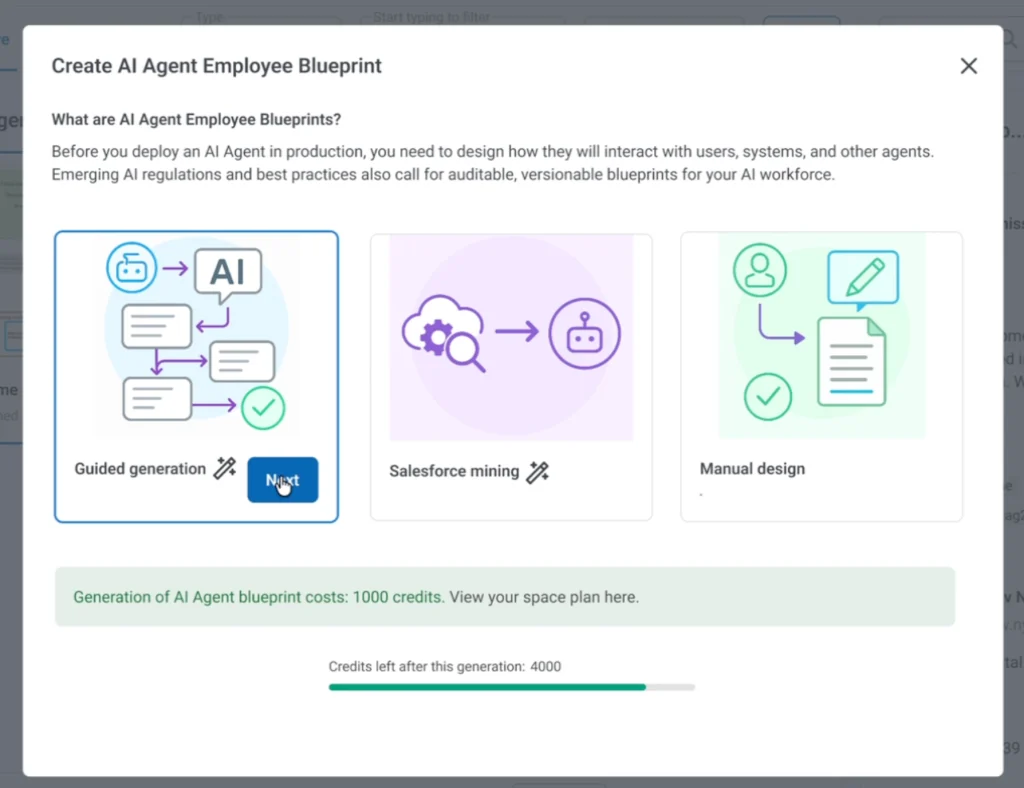
Even when suitable agent opportunities have been identified, planning and building a fully functional agent can appear complex. To address this challenge, Elements.cloud introduced Agent Designer, a dedicated tool for creating Agent Instruction Diagrams (AID). These diagrams act as a visual blueprint that defines the agent’s role, behavior, decision-making process, and actions across different scenarios. The diagram components are specifically designed for agent development and include guidance to help users model effective agent interactions.
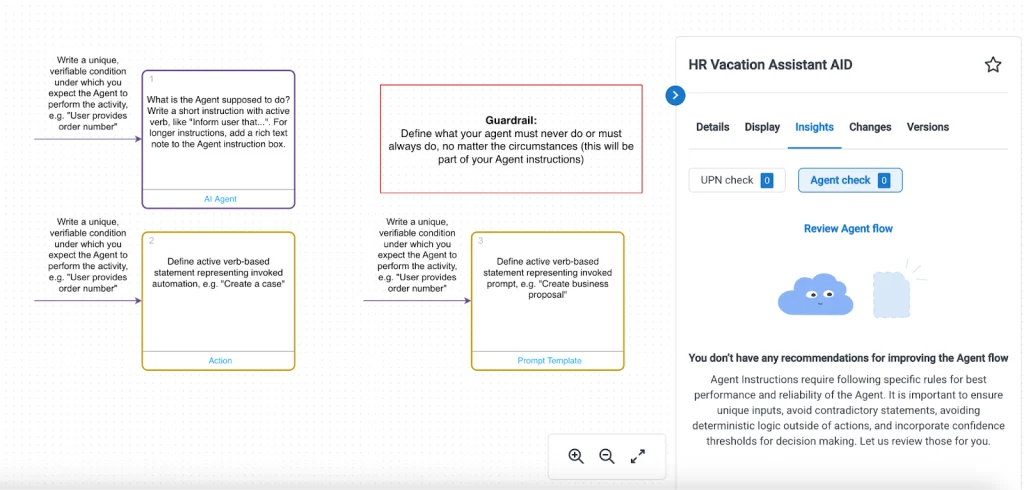
Once an Agent Instruction Diagram has been completed, it can be transformed into a working Agent Topic in a matter of minutes. This process becomes even faster when agents leverage standard Salesforce actions or pre-built custom actions.
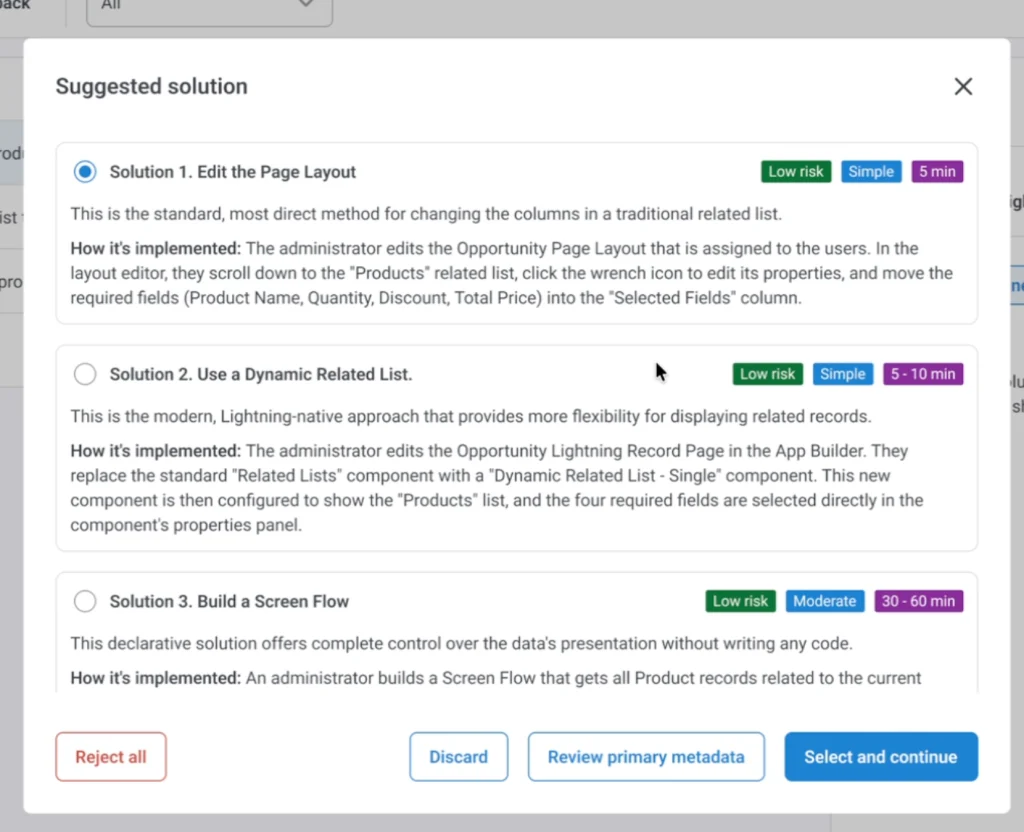
A key advantage of Agent Designer is its AI-powered instruction and utterance generation capability. When creating a new Topic within Agent Builder, users can generate instructions and conversation prompts automatically. While these outputs should always be reviewed and refined, they significantly reduce the time required to create and configure complex agent interactions, especially when all possible scenarios have been mapped within the diagram.

The process of creating an AID often reveals scenarios that may have otherwise been overlooked. By visualizing the complete conversation flow on a single canvas, teams gain a comprehensive view of the end-to-end user experience. For example, an agent designed to assist employees with holiday requests may initially handle only basic submissions. However, the diagram may reveal opportunities to account for weekends, public holidays, approval exceptions, or additional user guidance, resulting in a more effective and user-friendly experience.
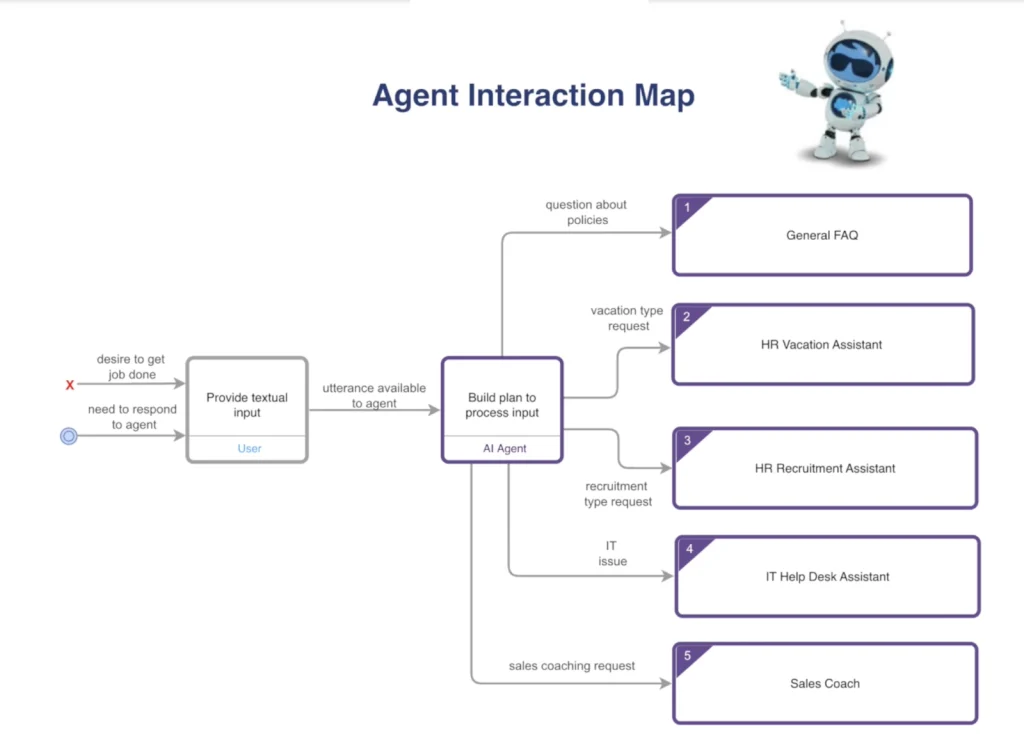
Agentforce agents are capable of managing multiple topics, and because each Agent Instruction Diagram focuses on a specific topic, organizations can use diagram hierarchies to structure and organize agent functionality more effectively. Through an Agent Interaction Map, businesses can visually represent their entire digital workforce, starting with individual agents, followed by their topics and supporting Agent Instruction Diagrams. This structured approach improves visibility, governance, and scalability while enabling teams to get started with Agent Designer at no additional cost.
Uncover Automation Possibilities
Although many business processes can benefit from AI agents, traditional Salesforce automation tools may still be the most appropriate solution in certain scenarios. These may include Flow automations, business rules, or Validation Rules that enforce data quality and process compliance.
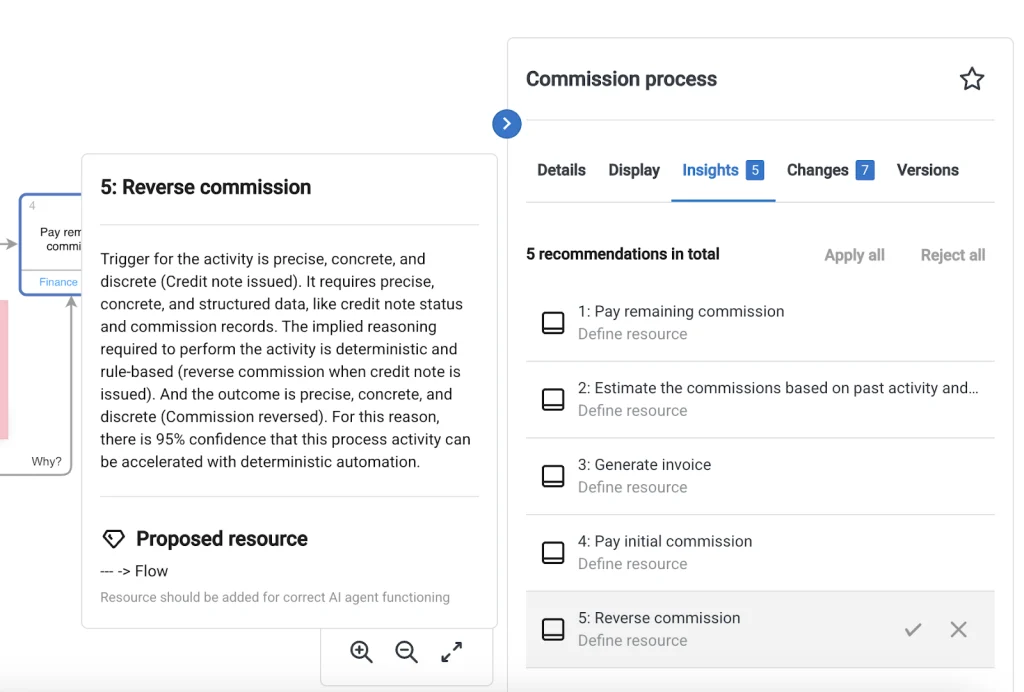
To support informed decision-making, Agent Finder evaluates each process and recommends the most suitable implementation approach. If a requirement can be achieved more effectively through deterministic automation rather than an AI agent, the platform clearly explains the reasoning behind the recommendation. This helps organizations choose the right technology for each process while maximizing efficiency, governance, and long-term maintainability.
Salesforce Setup and Implementation Process
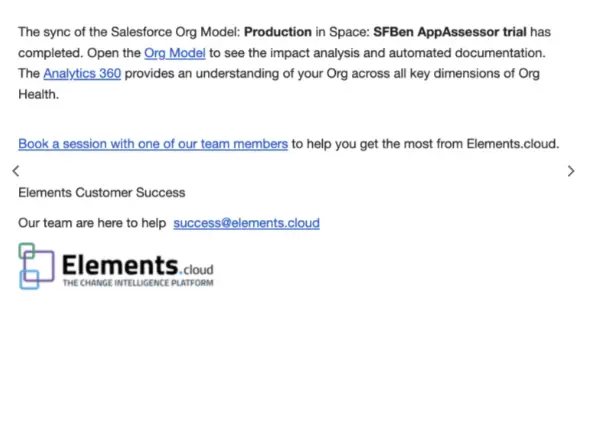
After understanding the importance of Salesforce org visibility, metadata tracking, and process analysis, the next step is implementation. Many businesses assume that improving Salesforce visibility and documentation requires a long and complex setup process, but in most cases, the implementation can be managed in a structured way.
The setup process becomes easier when teams follow a clear roadmap for Salesforce configuration, metadata access, and system monitoring.
Connect Salesforce Environments Properly
The first step in improving Salesforce visibility is connecting the environments that teams actively use.
Organizations often work across:
- Production environments
- Sandbox instances
- Testing environments
- Development orgs
Connecting these environments helps teams review metadata, dependencies, automation, and process behavior from a centralized perspective.
A connected Salesforce environment gives admins and developers better visibility into how business processes operate and where improvements may be needed.
Organizations managing multiple Salesforce environments often use Salesforce Hospitality Services to maintain consistency between production and sandbox environments while reducing deployment risks.
Configure Tools and Permissions for Better Access
Proper setup also depends on assigning the right permissions and access levels to Salesforce teams.
Admins, developers, consultants, and business stakeholders may need different levels of visibility depending on their responsibilities. Setting up structured permissions improves governance while helping teams access the information required for better decision-making.
A properly configured Salesforce environment also improves:
- Metadata visibility
- Dependency analysis
- Documentation management
- Automation monitoring
- Security and governance
Businesses planning long-term Salesforce scalability often rely on Salesforce Services to improve org setup, security configuration, and metadata governance.
Keep Salesforce Data and Metadata Synced
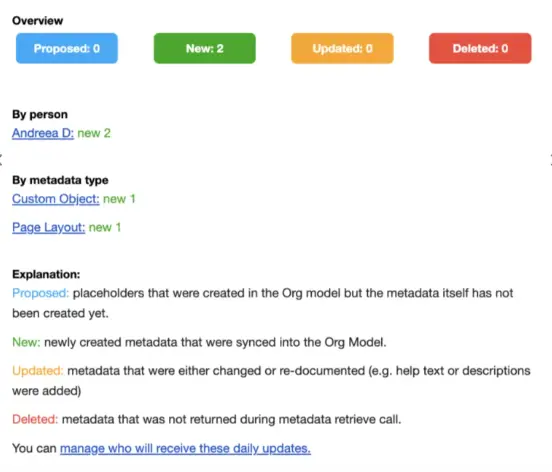
Regular synchronization plays an important role in maintaining accurate Salesforce visibility.
When metadata changes, workflows are updated, or automation is modified, teams should maintain updated system visibility to avoid confusion during deployments or future releases.
A well-maintained sync process helps teams:
- Track metadata changes faster
- Review system updates more efficiently
- Improve release confidence
- Maintain cleaner Salesforce documentation
This also improves long-term Salesforce Org Optimization, especially for organizations handling large implementations with frequent updates.
Improve the Salesforce Experience Through Better Visibility
Once Salesforce environments are properly connected and configured, teams gain better access to metadata insights, process documentation, and dependency tracking.
Better visibility helps admins understand system behavior faster while improving release planning and reducing manual analysis effort.
Organizations planning long-term Salesforce improvements often benefit from Salesforce Development Services to strengthen architecture, improve metadata organization, and maintain scalable Salesforce environments.
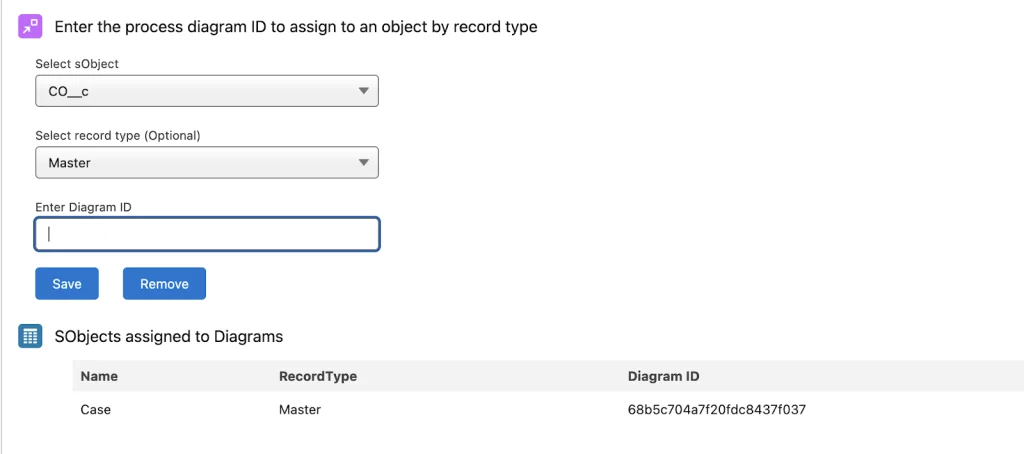
Salesforce Support and Learning Resources
Managing a Salesforce environment requires ongoing learning, system monitoring, and quick access to reliable support. As Salesforce ecosystems become more complex, teams often need guidance to understand metadata changes, automation behavior, integrations, and release planning.
Having access to strong support resources helps Salesforce Admins, Developers, Architects, and Consultants solve issues faster and improve long-term system performance.
A strong Salesforce support process usually includes:
- Technical documentation for better issue resolution
- Training resources for Salesforce teams
- Faster access to troubleshooting support
- Clear guidance for metadata and automation management
- Help with system optimization and governance
Organizations handling large Salesforce implementations often rely on Salesforce Support Services to reduce operational risks, improve issue resolution time, and maintain healthier Salesforce environments.
When teams can quickly access answers and documentation, they spend less time troubleshooting and more time improving business processes.
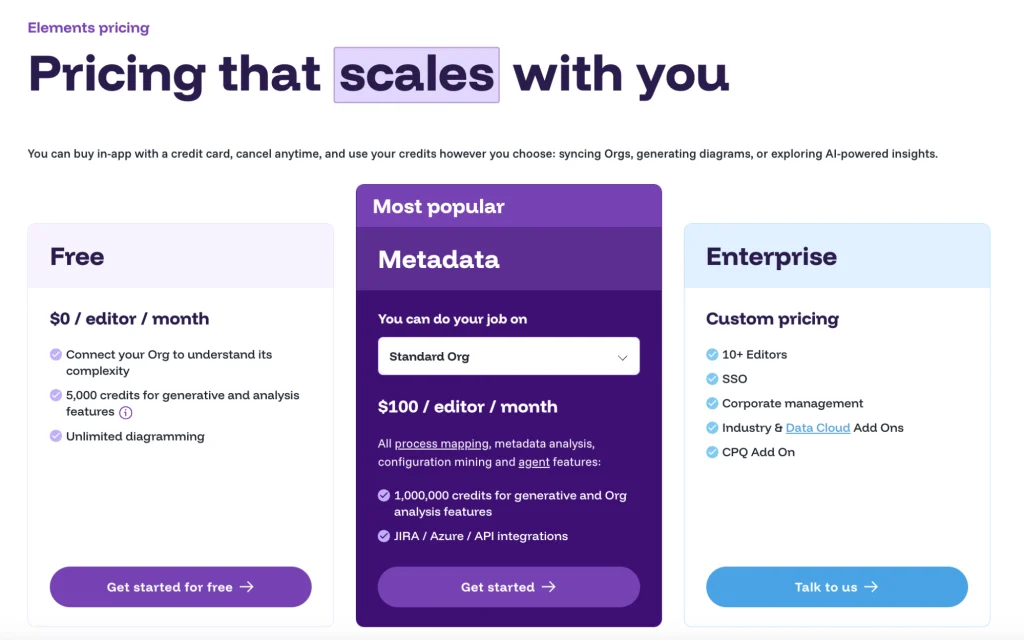
Salesforce Pricing and Scalability Considerations
Salesforce improvement strategies should align with business size, system complexity, and operational requirements.
Some businesses only need basic Salesforce optimization, while others require advanced support for:
- AI-powered automation
- Metadata governance
- DevOps and release planning
- Multi-org management
- Integration monitoring
- Enterprise-level scalability
The right Salesforce strategy depends on business goals, technical requirements, and long-term growth plans.
Organizations planning scalable Salesforce environments often work with Salesforce Consulting Services to evaluate requirements, improve system efficiency, and create a roadmap that supports future growth without increasing unnecessary complexity.
Final Summary
Managing Salesforce technical debt, improving release processes, and maintaining clean metadata structures takes consistent effort. Without proper visibility into automation, dependencies, and system behavior, Salesforce environments can quickly become difficult to maintain.
A structured approach to Salesforce Org Analysis helps businesses improve documentation, reduce risks, strengthen governance, and improve release confidence.
Whether organizations are currently using AI-powered Salesforce solutions or planning future automation, maintaining better visibility into workflows, metadata, and dependencies helps teams make smarter decisions.
Businesses that invest in stronger Salesforce visibility, cleaner documentation, and better process planning are often better prepared for long-term scalability and operational efficiency.For organizations planning to improve system performance and reduce Salesforce complexity, Salesforce Managed Services can help maintain cleaner environments, stronger governance, and long-term Salesforce stability.
Frequently Asked Questions
1. What is Salesforce Org Analysis?
Salesforce Org Analysis is the process of reviewing metadata, automations, dependencies, security settings, and workflows to understand how a Salesforce environment operates and identify opportunities for improvement.
2. Why is Salesforce Org Analysis important for businesses?
It helps organizations improve system performance, reduce technical debt, strengthen governance, and minimize risks associated with Salesforce updates and deployments.
3. How does dependency tracking improve Salesforce change management?
Dependency tracking helps teams understand how changes to fields, flows, objects, or automations may affect other components, reducing unexpected issues during releases.
4. Can Salesforce Org Analysis help improve automation efficiency?
Yes. By analyzing workflows, Flows, validation rules, and existing processes, businesses can identify automation gaps, remove unnecessary complexity, and improve operational efficiency.
5. How does process documentation support Salesforce optimization?
Well-documented processes improve collaboration between business and technical teams, simplify requirement gathering, and make future enhancements easier to manage.
6. What role does AI play in Salesforce Org Optimization?
AI-powered tools and agents can help identify automation opportunities, improve process intelligence, support decision-making, and enhance productivity across Salesforce operations.
7. How often should a Salesforce org be analyzed and reviewed?
Organizations should review their Salesforce org regularly, especially before major releases, integrations, system upgrades, or business process changes to maintain optimal performance and scalability.