

A Google API key is a credential used with supported Google APIs to associate requests with a Google Cloud project. It helps Google apply project-level quota and billing information to API requests, while restrictions can control which applications and APIs are allowed to use the key.
Developers commonly encounter Google API keys when working with services such as Google Maps, Places, Cloud APIs, and Google’s AI ecosystem. However, creating a key is only the beginning. A production-ready setup should also include appropriate API restrictions, application restrictions, monitoring, and key management.
In this guide, you’ll learn what a Google API key is, how to create one, how to use it safely, and what to check before putting it into production.
What Is a Google API Key?
A Google API key is a string generated through Google Cloud that identifies the Google Cloud project associated with supported API requests.
A standard Google API key is mainly used to associate requests with a project for quota and billing purposes. It does not authenticate a specific user or principal by itself.
For example, a web application using a Google API can include an API key with its request so Google can determine which project the request belongs to.
Google API Key at a Glance
| Item | Explanation |
|---|---|
| Purpose | Associates supported API requests with a project |
| Created in | Google Cloud |
| Used for | Supported Google APIs |
| Billing | Helps associate usage with a project |
| Restrictions | Can limit applications and APIs |
| Authentication | A standard API key does not authenticate a principal |
This distinction is important because an API key is not a replacement for OAuth 2.0, IAM, or other authentication methods when an API requires user or service authorization.
What Is a Google API Key Used For?
Google API keys can be used with Google APIs that support API-key authentication.
Common examples include:
- Google Maps Platform
- Places-related services
- Geocoding
- Certain Google Cloud APIs
- YouTube APIs
- Google AI services where API-key authentication is supported
The exact credential requirements depend on the API you’re integrating.
For example, a public-facing Maps application may use a restricted API key, while an application accessing private user data may require OAuth 2.0 instead.
If you’re working on broader API or platform integrations, you can also explore our Salesforce Integration Services to understand how API-based integrations can be planned and managed in an enterprise environment.
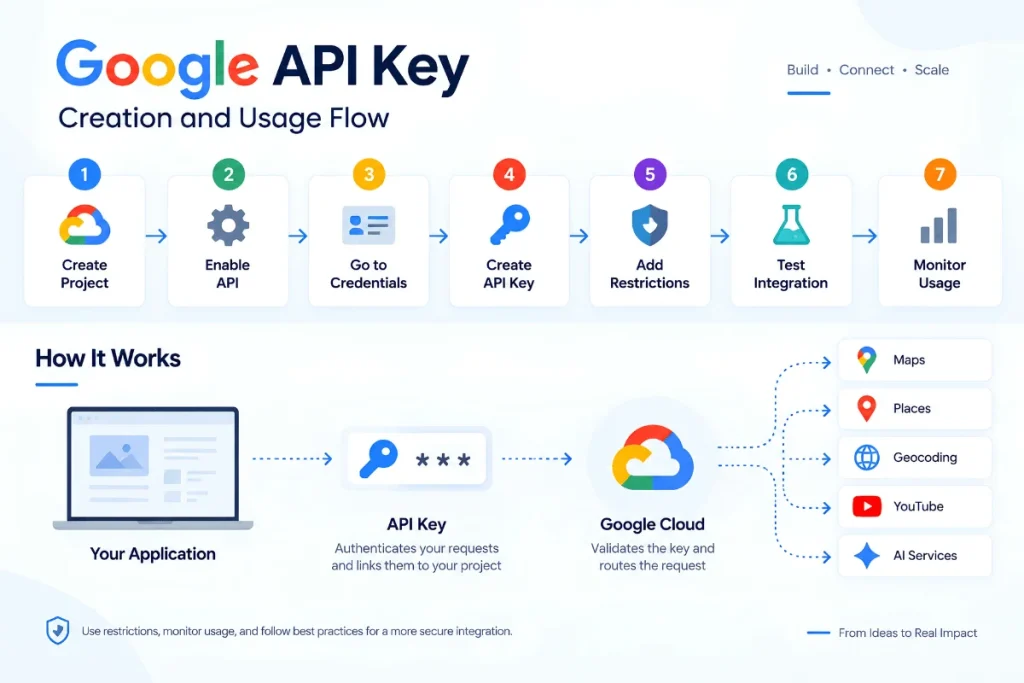
How to Create a Google API Key
Creating a Google API key is straightforward, but you should configure its restrictions before using it in production.
Step 1: Create or Select a Google Cloud Project
Open Google Cloud Console and select an existing project or create a new one.
The project is important because API usage, quotas, and billing are associated with it.
Step 2: Enable the Required API
Before using a particular service, make sure the required API is enabled for your project.
For example, a Maps integration may require a specific Maps API to be enabled.
Step 3: Open Credentials
In Google Cloud Console, go to:
APIs & Services → Credentials
Then select:
Create Credentials → API Key
Google will generate the API key for your project.
Step 4: Restrict the Key
Don’t stop after generating the key.
Configure appropriate application restrictions and API restrictions before using the key in production. Google recommends both types of restrictions.
Google API Key Creation Process
Create Google Cloud Project
↓
Enable Required API
↓
Open Credentials
↓
Create API Key
↓
Add Application Restriction
↓
Add API Restriction
↓
Test the Integration
↓
Monitor Usage
This simple process can help prevent many common configuration and security problems.
How to Restrict a Google API Key
This is one of the most important parts of Google API key management.
Google provides two main types of restrictions:
1. Application Restrictions
Application restrictions define where the API key can be used.
Depending on the application, you can restrict a key to:
- Specific websites
- Specific IP addresses
- Android applications
- iOS applications
For example, a website API key can be limited to requests originating from your approved domain. A server-side application can instead use IP-based restrictions.
2. API Restrictions
API restrictions define which Google APIs the key can access.
Suppose your application only needs one Google API. Instead of allowing the key to work with every API that accepts keys, restrict it to the required service.
This follows the principle of least privilege and reduces the potential impact if the key is exposed.
Recommended Setup
Application Restriction: Where can the key be used?
API Restriction: Which APIs can the key access?
Using both gives you a stronger security boundary than leaving a key unrestricted.
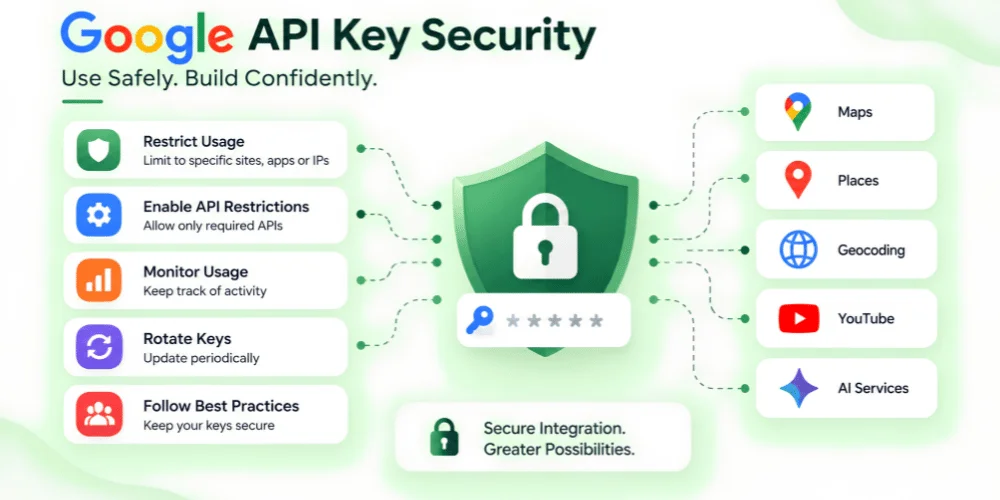
How to Use a Google API Key Safely
Creating an API key is easy. Managing it securely requires more attention.
Google recommends protecting API keys during both storage and transmission because publicly exposed credentials can result in unauthorized usage and unexpected charges.
Follow these practices:
Don’t hardcode keys unnecessarily
Avoid placing API keys directly inside source code that may later be published or shared.
Use environment variables where appropriate
For server-side applications, environment variables or a suitable secrets-management solution can keep credentials separate from application code.
Restrict every production key
Limit both the applications that can use the key and the APIs it can access.
Delete unused keys
Old credentials increase your attack surface. Remove keys that are no longer required.
Rotate keys periodically
When replacing a key, update the application, verify the new credential works, and then remove the old one.
Monitor API usage
Unexpected traffic or usage can indicate a leaked credential or an incorrect restriction.
Can a Google API Key Be Exposed in Frontend Code?
This depends on the API and how the key is restricted.
Some browser-based Google services require a key to be present in client-side requests. In those cases, the important protection is to apply appropriate website/application restrictions and API restrictions rather than assuming the string itself can always be kept completely secret.
For server-side applications, Google recommends avoiding API keys in client code and repositories and using a server-side approach where appropriate.
The key takeaway is:
Don’t rely on secrecy alone. Use restrictions.
A restricted key has a much smaller potential impact if it is accidentally exposed.
Google API Key vs OAuth 2.0
API keys and OAuth 2.0 solve different problems.
| Google API Key | OAuth 2.0 |
|---|---|
| Associates requests with a project | Authorizes access to protected resources |
| Useful for APIs supporting API keys | Common when user authorization is required |
| Can have application/API restrictions | Uses access tokens and scopes |
| Standard API key doesn’t authenticate a principal | Designed for authorized access |
If an API requires access to private user information, an API key alone generally isn’t sufficient. Google documentation recommends selecting the authentication method based on the API and access requirements.
Is a Google API Key Free?
There are two different things to consider.
Creating and managing API keys is free. Google’s API Keys service itself has no charge.
However, the Google service you access through the key may have its own pricing, quotas, credits, or billing requirements.
So, don’t interpret “API key is free” as “all Google API usage is free.”
Before launching an application, check the pricing model of the specific Google service you’re using and monitor your project usage.
Common Google API Key Mistakes
Many API-related problems come from configuration rather than coding.
Avoid these mistakes:
- Creating unrestricted API keys
- Allowing access to APIs the application doesn’t need
- Committing keys to public repositories
- Sharing production keys between unrelated applications
- Keeping unused keys active
- Ignoring API usage and billing
- Using an API key where OAuth or another authentication method is required
Google specifically recommends restricting keys, deleting unused credentials, rotating keys, and reviewing code before making it public.
Google API Key Security Checklist
Before using a key in production, review this checklist:
| Security Check | Done |
|---|---|
| Correct Google Cloud project selected | ☐ |
| Required API enabled | ☐ |
| API restrictions configured | ☐ |
| Application restrictions configured | ☐ |
| Key removed from unnecessary source code | ☐ |
| Unused keys deleted | ☐ |
| Usage monitored | ☐ |
| Pricing and quota reviewed | ☐ |
This checklist is especially useful when multiple developers or applications share the same Google Cloud environment.
Final Thoughts
A Google API key is a simple way to associate supported API requests with a Google Cloud project, but secure API integration requires more than generating a key.
The safest approach is to create the key for a specific purpose, restrict it to the required application and APIs, keep it out of unnecessary source code, monitor usage, and remove credentials that are no longer needed.
If you’re integrating Google APIs into a website, application, CRM, or business workflow, taking care of these basics early can prevent unnecessary security and billing problems later.
Frequently Asked Questions
What is a Google API key?
A Google API key is a credential used with supported Google APIs to associate requests with a Google Cloud project for purposes such as quota and billing. A standard API key does not authenticate a specific principal by itself.
How do I create a Google API key?
Create or select a Google Cloud project, enable the required API, open APIs & Services → Credentials, choose Create Credentials → API Key, and then configure appropriate restrictions.
Is a Google API key free?
The Google Cloud API Keys service itself is free, but the APIs and services you access may have their own pricing and usage limits.
How do I secure a Google API key?
Use application restrictions and API restrictions, avoid unnecessary exposure in source code, delete unused keys, rotate credentials periodically, and monitor API usage.
Is a Google API key the same as OAuth?
No. A standard API key identifies the project associated with supported requests, while OAuth 2.0 is designed for authorization and access to protected resources.