

The Salesforce Spring 2027 Release is the next major Salesforce seasonal release, following Winter ’27. Salesforce delivers three major platform releases each year—Spring, Summer, and Winter—with new features, enhancements, security changes, and release updates.
For Salesforce admins, developers, and businesses, Spring ’27 is especially important because several existing features and integration methods are scheduled for retirement or enforcement changes.
This guide covers the Salesforce Spring 2027 release date, sandbox preview, important retirements, key release updates, and what Salesforce teams should do before the upgrade.
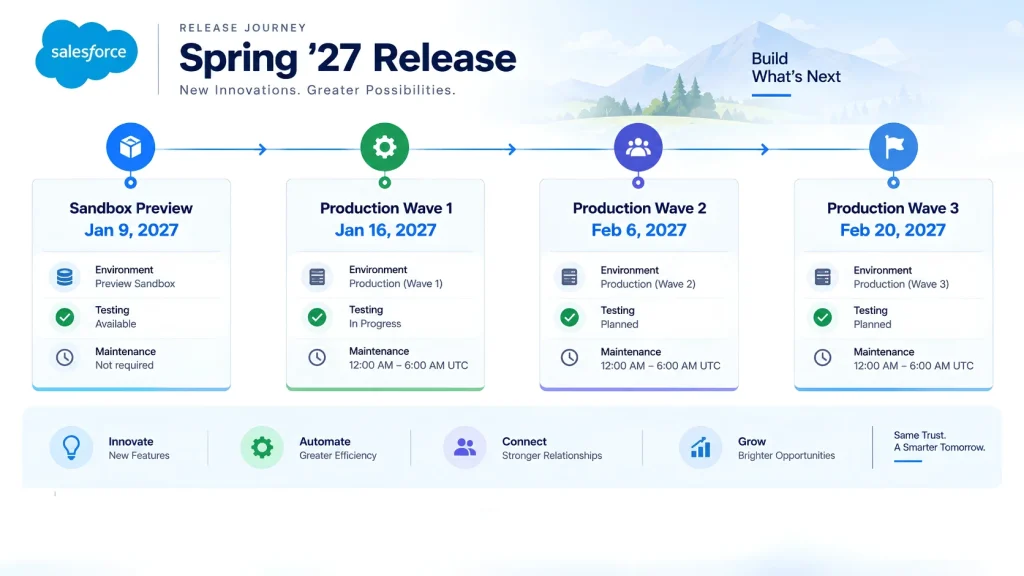
Salesforce Spring 2027 Release Date
Salesforce releases are rolled out across different production weekends rather than on one date for every organization.
The current Salesforce Trust maintenance calendar shows Spring ’27 major-release windows on:
| Milestone | Date |
|---|---|
| Sandbox Preview | Around January 9, 2027 |
| Production Wave 1 | January 16, 2027 |
| Production Wave 2 | February 6, 2027 |
| Production Wave 3 | February 20, 2027 |
Your organization’s exact upgrade date depends on its Salesforce instance. Salesforce recommends using the Trust maintenance calendar to verify the specific date for your org.
Salesforce Spring 2027 Release Flow
Sandbox Preview → Review Release Updates → Test Customizations → Check Integrations → Fix Retirements → Production Upgrade → Post-Release Testing
This process gives admins and developers time to identify problems before the changes reach production.
What Is Important in the Salesforce Spring 2027 Release?
Spring ’27 is not only about new features. Several changes already scheduled for Spring ’27 can affect existing Salesforce environments.
| Area | Spring ’27 Change |
|---|---|
| Salesforce-to-Salesforce | Fully retired |
| Einstein Activity Capture | Several legacy features retired |
| OAuth | User-Agent and Hybrid User-Agent flows retired |
| API Traffic | Instanced URL update enforced |
| Setup Audit Trail | Dedicated permission enforced |
| Sharing | Some recalculations become asynchronous |
| Accessibility | Additional accessibility update enforcement |
| SOAP API | Older login() versions have future retirement implications |
Salesforce’s Release Updates page lists several changes scheduled for enforcement in Spring ’27.
Salesforce publishes release updates and retirement information ahead of enforcement so admins and developers have time to review their orgs and make required changes. You can also check the official Salesforce Active Product & Feature Retirements page for the latest retirement schedule and affected products.
1. Salesforce-to-Salesforce Is Being Retired
One of the biggest changes to prepare for is the retirement of Salesforce-to-Salesforce (S2S).
Salesforce has already stopped allowing new S2S configurations, and support has been discontinued. In Spring ’27, Salesforce-to-Salesforce will be fully retired and will no longer function.
Salesforce recommends moving affected integrations to alternatives such as:
- Partner Cloud
- Data Cloud One
- MuleSoft Anypoint
- MuleSoft for Flow
What Should Admins Do?
If your organization still depends on S2S:
- Identify all active S2S connections.
- Document the objects and records being synchronized.
- Identify automation depending on synchronized data.
- Select a replacement integration approach.
- Test the replacement in a sandbox.
- Move the integration before Spring ’27.
This is one of the changes that should be handled before the production upgrade, rather than after it.
If your organization manages multiple Salesforce integrations, our Salesforce Integration Services can provide useful background on integration planning.
2. Einstein Activity Capture Features Are Retiring
Salesforce is also retiring several legacy Einstein Activity Capture (EAC) features in Spring ’27.
The affected features are:
- Activity 360 Reports
- Activities Dashboard
- Activity Metrics
- Recommended Connections
Salesforce says these features are being replaced by more platform-native approaches using standard Salesforce Activity records, reports, dashboards, automation, and APIs.
What Does This Mean?
Organizations using these features should review:
- Existing reports
- Dashboards
- Custom fields
- Apex code
- Flows
- User processes
- External reporting integrations
For example, reports using retired Activity 360 objects may stop returning data after the retirement.
Salesforce recommends rebuilding affected reporting using standard Activity report types and other platform capabilities before February 2027.
3. OAuth User-Agent and Hybrid User-Agent Flows
Spring ’27 also includes the retirement of the OAuth user-agent flow and OAuth hybrid user-agent flow.
This matters most to teams managing older authentication architectures.
Admins and developers should check:
- Connected apps
- External client apps
- OAuth configurations
- Authentication flows
- Custom integrations
- Third-party applications
If an integration depends on a retiring authentication method, it should be migrated and tested before enforcement.
4. Update Instanced URLs in API Traffic
Another important release update affects Salesforce API traffic.
Salesforce is moving organizations toward using the organization’s My Domain URL rather than incorrect or outdated instance-based URLs in API traffic. This update was previously scheduled and postponed to Spring ’27.
This can affect integrations, middleware, custom applications, and API-based processes.
Quick Check
Search your integration code and configuration for older Salesforce instance URLs.
Pay particular attention to:
- Apex callouts
- Middleware
- External applications
- API integrations
- Hardcoded endpoints
- Integration documentation
Testing these connections in a sandbox should be part of your Spring ’27 preparation.
5. Setup Audit Trail Gets More Granular Access Control
Spring ’27 also introduces enforcement around the dedicated View Setup Audit Trail permission.
The change allows organizations to provide Setup Audit Trail access without automatically granting the broader View Setup permission. Salesforce describes this as supporting the principle of least privilege.
For admins, this means reviewing which users actually need access to Setup Audit Trail and assigning the appropriate permission through a profile or permission set.
This is a relatively small configuration change, but it is worth checking before the release.
6. Sharing Recalculation Behavior Is Changing
Spring ’27 also includes an important platform behavior change related to large-scale updates to groups or roles.
Some sharing recalculations will happen asynchronously rather than immediately. Salesforce warns that Apex code and Flows that depend on sharing records being updated synchronously may need changes.
Developers Should Review
- Apex classes
- Apex triggers
- Apex tests
- Record-sharing logic
- Flows
- Group membership automation
- Role-related automation
If custom logic assumes that sharing calculations are immediately complete, test that behavior carefully in a Spring ’27 sandbox.
Spring 2027 Admin & Developer Checklist
Before your production upgrade, use this checklist:
| Check | What to Review |
|---|---|
| Release date | Confirm your instance’s upgrade window |
| Sandbox | Test Spring ’27 changes |
| S2S | Identify and migrate Salesforce-to-Salesforce |
| EAC | Review retiring Activity features |
| OAuth | Check retiring authentication flows |
| APIs | Review Salesforce endpoints |
| Apex | Test custom code |
| Flow | Test automation and sharing dependencies |
| Permissions | Review Setup Audit Trail access |
| Reports | Rebuild affected EAC reports |
| Integrations | Perform end-to-end testing |
| Production | Run smoke tests after upgrade |
For organizations that regularly manage Salesforce upgrades, a structured Salesforce Release Management process can help organize testing, deployment and post-release validation.
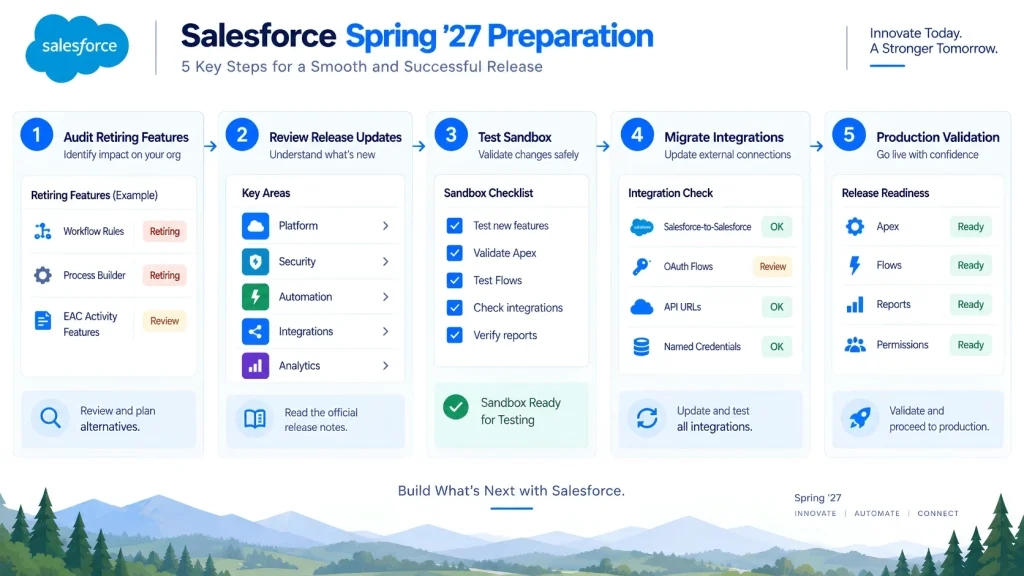
How to Prepare for Salesforce Spring 2027
You don’t need to test every Salesforce feature in the release.
Start with the areas that could affect your existing environment.
Step 1: Find Your Upgrade Date
Check Salesforce Trust and identify the maintenance window for your instance.
Step 2: Review Release Updates
Open Setup → Release Updates and check updates scheduled for Spring ’27.
Step 3: Audit Retiring Features
Search your org for:
- Salesforce-to-Salesforce
- Activity 360 Reports
- Activities Dashboard
- Activity Metrics
- Recommended Connections
- Retiring OAuth flows
Step 4: Test in Sandbox
Test your important:
- Flows
- Apex
- Integrations
- Reports
- Authentication
- Sharing rules
- API connections
Step 5: Prepare Production
Fix identified issues, deploy required changes and create a post-release smoke-test plan.
What Should Salesforce Teams Prioritize?
A simple way to organize Spring ’27 preparation is:
Identify → Test → Migrate → Validate → Deploy
Identify
Find features, integrations and code that could be affected.
Test
Use the sandbox preview to reproduce important business processes.
Migrate
Replace retiring features and outdated integration methods.
Validate
Confirm reports, automation, APIs and permissions still behave correctly.
Deploy
Move required changes to production before or alongside the upgrade, depending on the specific release requirement.
Frequently Asked Questions
1. When is the Salesforce Spring 2027 Release?
The current Salesforce Trust calendar shows Spring ’27 production release windows on January 16, February 6, and February 20, 2027. Your exact upgrade date depends on your Salesforce instance.
2. When does the Salesforce Spring ’27 Sandbox Preview start?
The current schedule indicates a Sandbox Preview around January 9, 2027. The exact timing should be confirmed for your sandbox instance through Salesforce Trust.
3. Is Salesforce-to-Salesforce being retired in Spring ’27?
Yes. Salesforce-to-Salesforce is fully retired in Spring ’27 and will no longer function. Salesforce recommends migrating to supported alternatives such as Partner Cloud, Data Cloud One, or MuleSoft solutions.
4. What Einstein Activity Capture features are retiring?
Salesforce is retiring Activity 360 Reports, Activities Dashboard, Activity Metrics, and Recommended Connections in Spring ’27.
5. What should Salesforce admins do before Spring ’27?
Admins should confirm the upgrade date, review Release Updates, audit retiring features, test integrations and automation in a sandbox, and resolve any issues before production.
6. Does Spring ’27 affect Salesforce integrations?
Yes. Changes involving Salesforce-to-Salesforce, OAuth flows, API URLs and sharing behavior can affect integrations and custom applications. Developers should test affected integrations before production.
Final Thoughts
The Salesforce Spring 2027 Release is important not only because of new platform capabilities, but also because several existing features and technical approaches are changing.
The biggest preparation areas are Salesforce-to-Salesforce retirement, Einstein Activity Capture feature retirement, OAuth changes, API URL updates, Setup Audit Trail permissions, and sharing recalculation behavior.
The safest approach is to start with your existing Salesforce architecture rather than trying to test everything. Identify what your org depends on, test those areas in the Spring ’27 sandbox preview, migrate anything being retired, and validate integrations before production.
That preparation can make the Spring ’27 upgrade much easier to manage.