

Salesforce Admins handle much more than adding fields or creating users. Their daily work can include troubleshooting errors, reviewing automation, checking data quality, preparing reports, documenting changes, supporting users, and planning new requirements.
As Salesforce continues to add AI capabilities, admins now have another way to handle some of this work. AI can help explain problems, organize information, generate ideas, create drafts, and speed up repetitive tasks. Salesforce is also expanding AI experiences such as Agentforce and Setup with Agentforce to help admins work with Salesforce using natural language. Trailhead
However, AI should not replace an admin’s knowledge or decision-making. The best results come when admins use AI as an assistant and then review the output before making changes in a production org.
So, what can Salesforce AI for Admins actually do?
Here are 10 practical ways it can make everyday Salesforce administration easier.
1. Troubleshoot Salesforce Errors Faster
Salesforce errors can sometimes be difficult to understand, especially when an admin is working with Flow, validation rules, permissions, or automation.
Instead of spending a long time trying to understand an error message, an admin can provide the error, relevant configuration details, and the expected result to an AI tool.
AI can help:
- Explain what the error means
- Identify possible causes
- Suggest areas to check
- Break a complex problem into smaller steps
- Suggest questions to investigate
For example, if a Flow fails because a record update cannot be completed, AI can help an admin create a troubleshooting checklist.
The admin should still verify the recommendation inside Salesforce before changing anything.
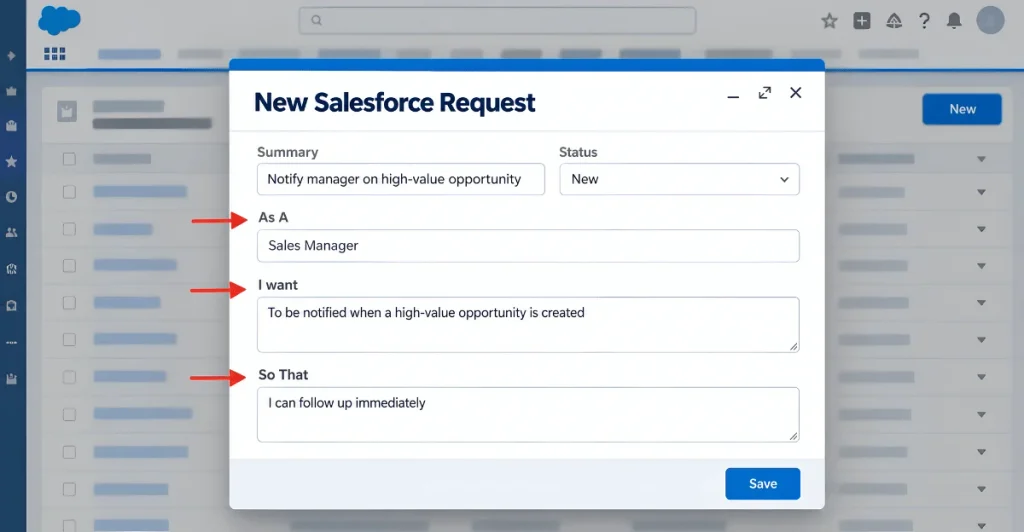
2. Turn User Requests Into Clear Admin Tasks
Users do not always explain requirements in Salesforce terms.
A user may say:
“When a high-value opportunity is created, I want the manager to know immediately.”
An admin can use AI to convert this into a more structured requirement:
| User Requirement | Possible Salesforce Solution |
|---|---|
| High-value opportunity created | Record-triggered Flow |
| Opportunity meets value condition | Decision element |
| Manager should be notified | Email notification or custom notification |
| Requirement should happen automatically | Automated Flow |
This does not mean AI decides the final architecture. Instead, it gives the admin a clearer starting point for discussion and implementation.
For more complex requirements, an admin can also work with a Salesforce consulting team to validate the solution before implementation.
3. Improve Data Quality Checks
Data quality is an important part of Salesforce administration. Duplicate records, missing fields, incorrect formats, and inconsistent values can reduce the usefulness of reports and automation.
AI can help admins think through possible data-quality problems.
For example, an admin could ask AI to create a checklist for reviewing:
- Duplicate Accounts
- Missing contact information
- Invalid email formats
- Empty required business fields
- Inconsistent picklist values
- Old or inactive records
- Unusual data patterns
AI can also help create a data-quality review plan that an admin can adapt to the organization’s actual Salesforce data.
The important point is that AI should help plan and analyze the process. Actual data changes should still follow proper Salesforce controls.
4. Create Better Test Scenarios
Testing is often one of the most important parts of Salesforce administration, but it can be easy to miss an unusual scenario.
AI can help admins create a more complete test checklist before releasing a change.
For example, if an admin creates a new opportunity Flow, AI can suggest test situations such as:
- Opportunity meets the condition.
- Opportunity does not meet the condition.
- Required information is missing.
- Multiple records are updated together.
- A user with limited permissions performs the action.
- The Flow encounters an unexpected value.
This gives the admin a starting point for testing instead of creating every scenario manually.
5. Explain Salesforce Features in Simple Language
Salesforce has many features, settings, and technical terms. Sometimes an admin understands a feature technically but needs to explain it to a non-technical user.
AI can help convert technical explanations into simple business language.
For example, instead of explaining every technical detail of a Flow, an admin can create a short explanation such as:
“This automation checks the opportunity when it is created and sends a notification when the opportunity meets the required conditions.”
This can be useful for:
- User documentation
- Training material
- Internal emails
- Change announcements
- Knowledge articles
- Project discussions
For learning purposes, Salesforce Trailhead also provides AI-focused learning paths covering AI fundamentals, generative AI, data, and responsible AI use. Trailhead
6. Make Reports and Dashboard Planning Easier
Building a useful report starts with understanding what the business actually wants to measure.
AI can help admins turn a business question into a reporting plan.
For example:
Business question:
“Which opportunities are getting stuck in the sales process?”
A useful reporting plan could include:
| Requirement | Reporting Idea |
|---|---|
| Opportunities by stage | Summary report |
| Time spent in each stage | Historical or stage-duration analysis |
| Opportunities with no recent activity | Filtered report |
| Pipeline by owner | Grouped report |
| High-value stalled opportunities | Filtered dashboard component |
The admin still needs to check whether the required fields and data actually exist in the org.
7. Review Automation Before Making Changes
Automation can become difficult to manage when an org has many Flows, validation rules, approval processes, and other dependencies.
AI can help an admin review an automation concept before making a change.
For example, an admin can describe:
- What starts the automation
- What conditions are checked
- What actions happen
- Which users are affected
- What should happen if the conditions are not met
AI can then help identify possible gaps or questions.
If the change involves Flow, it is also useful to understand the existing Salesforce Flow architecture before modifying it. A relevant resource is the complete guide to Salesforce Flow for business automation.
For larger or more sensitive automation projects, Salesforce Consulting Services can provide additional technical and implementation support.
8. Prepare Change Management Plans
A technically correct Salesforce change can still create problems if users do not understand what changed.
AI can help admins prepare a simple change-management checklist.
For example:
Before release
- Test the change
- Confirm affected users
- Review permissions
- Prepare documentation
- Confirm rollback options
During release
- Deploy the change
- Check key functionality
- Monitor errors
After release
- Collect user feedback
- Review unexpected issues
- Update documentation
This makes it easier to move from “the change works” to “the change works and users know how to use it.”
9. Create Better Salesforce Documentation
Documentation is often one of the tasks admins postpone because it takes time.
AI can make the first draft much faster.
An admin can provide information about:
- A Flow
- Custom objects
- Fields
- Business rules
- User processes
- Reports
- Automation
- Configuration changes
AI can then organize that information into a readable document.
For example, a Flow document could include:
| Section | Information |
|---|---|
| Purpose | Why the Flow exists |
| Trigger | When the Flow starts |
| Conditions | Rules checked by the Flow |
| Actions | What the Flow performs |
| Users Affected | Who is impacted |
| Testing | Scenarios that should be tested |
The admin should review the final documentation because AI can misunderstand configuration details if the input is incomplete.
10. Build a Personal Salesforce Admin Assistant
One of the most useful ways to use AI is to create a repeatable workflow for everyday admin tasks.
Instead of asking random questions, an admin can use a consistent prompt structure.
For example:
Task: Review a new Salesforce requirement.
Provide:
- Business requirement
- Objects involved
- Current process
- Expected result
- User type
- Known limitations
Ask AI to return:
- Requirement summary
- Missing information
- Possible Salesforce solution
- Risks or dependencies
- Testing scenarios
- Questions for the business team
This creates a repeatable process and can save time across different projects.
Salesforce is also introducing AI experiences directly into admin workflows. Its current Setup with Agentforce experience is designed to help admins perform tasks, find information, and troubleshoot through natural-language interaction. Trailhead
Where Salesforce Admins Can Use AI
The following table gives a simple overview:
| Admin Task | How AI Can Help |
|---|---|
| Troubleshooting | Explain errors and suggest checks |
| Requirements | Convert business requests into structured tasks |
| Data Quality | Create review checklists |
| Testing | Suggest positive and negative scenarios |
| Documentation | Create first drafts |
| Reporting | Organize reporting requirements |
| Automation | Review logic and identify questions |
| Change Management | Create release checklists |
| User Support | Simplify technical explanations |
| Daily Admin Work | Create repeatable workflows |
How Should Salesforce Admins Use AI Safely?
AI can save time, but admins should not treat every AI response as correct.
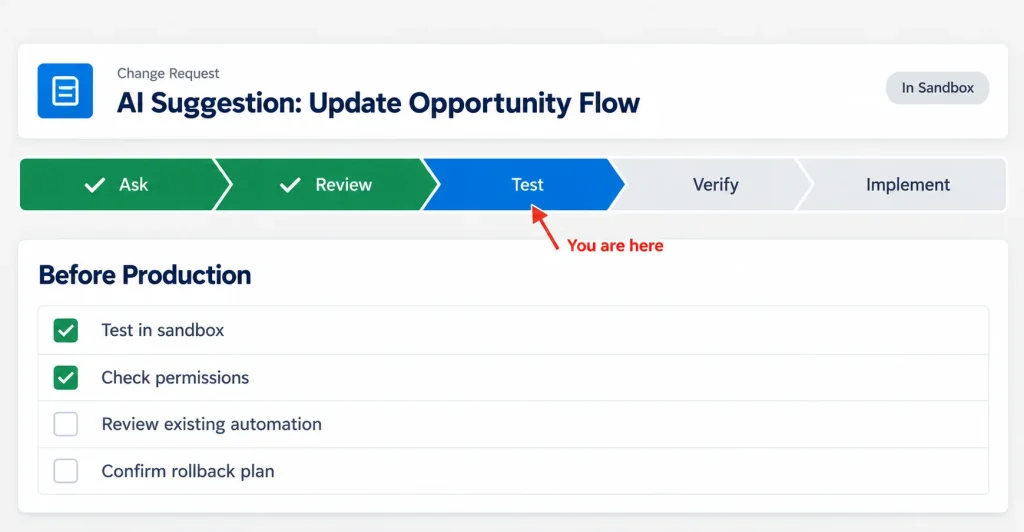
A good approach is:
Ask → Review → Test → Verify → Implement
For example, if AI suggests changing a Flow, do not immediately make the change in production.
First understand the recommendation. Then test it in a sandbox or appropriate development environment. Check permissions, dependencies, existing automation, and possible side effects.
Salesforce’s own AI guidance emphasizes trusted data, security, testing, and governance when implementing AI solutions. Salesforce
Good practices include:
- Never blindly copy AI-generated configuration.
- Do not expose sensitive business or customer data unnecessarily.
- Verify technical recommendations.
- Test changes before production deployment.
- Keep human review in important decisions.
- Follow your organization’s security policies.
- Use official Salesforce documentation when checking product behavior.
Salesforce Trailhead: Get Started with Artificial Intelligence
AI Tools Salesforce Admins Can Consider
Admins can use different types of AI tools depending on the task.
| Tool Type | Useful For |
|---|---|
| Generative AI assistants | Writing, explaining, brainstorming, documentation |
| Salesforce AI features | Salesforce-specific assistance and workflows |
| Agentforce | AI-powered tasks and agent experiences |
| AI coding assistants | Technical investigation and development support |
| Trailhead | Learning AI and Salesforce capabilities |
Salesforce’s current AI ecosystem includes Agentforce, generative AI capabilities, and tools for building and testing AI experiences. Developer
The right choice depends on the admin’s task, Salesforce edition, available features, permissions, security requirements, and organizational policies.
Benefits of Using AI as a Salesforce Admin
When used correctly, AI can provide several practical benefits.
Faster problem solving
Admins can get a structured starting point when investigating an error or unfamiliar configuration.
Better documentation
AI can turn notes and technical information into organized documentation faster.
More consistent testing
AI can suggest scenarios that an admin may otherwise forget.
Easier communication
Technical Salesforce concepts can be rewritten in language that business users understand.
Less repetitive work
Admins can reduce the time spent creating checklists, drafts, summaries, and basic explanations.
The goal is not to let AI manage the entire Salesforce org. The goal is to reduce repetitive effort so admins can spend more time on architecture, security, business requirements, and user experience.
What AI Cannot Replace in Salesforce Administration
AI can be useful, but Salesforce administration still requires human judgment.
An AI tool may not understand:
- Your company’s internal processes
- Hidden dependencies
- Business priorities
- User permissions
- Data sensitivity
- Existing customization
- Organizational politics
- The impact of a production change
That is why experienced Salesforce Admins remain important even as AI becomes more capable.
AI can suggest a solution, but the admin is responsible for deciding whether that solution is appropriate.
Final Thoughts
Salesforce AI for Admins is not about replacing the admin. It is about helping admins work faster and more systematically.
From troubleshooting errors and preparing test scenarios to improving documentation and organizing requirements, AI can support many everyday tasks.
The most effective approach is simple: use AI for assistance, but keep human judgment in the process.
Admins who learn how to combine Salesforce knowledge with AI skills can spend less time on repetitive work and more time improving the Salesforce environment for their users.
As Salesforce continues to expand Agentforce and AI-powered admin experiences, learning how to work with these tools will become an increasingly useful skill for Salesforce professionals. Trailhead
FAQs
1. How can Salesforce Admins use AI in their daily work?
Salesforce Admins can use AI for many supporting tasks, including troubleshooting errors, creating documentation, preparing testing checklists, organizing business requirements, planning reports, reviewing automation logic, and explaining Salesforce features in simple language. AI can also help admins create repeatable workflows for common tasks. However, the admin should always review and test AI-generated suggestions before applying changes to a Salesforce org.
2. Can AI replace a Salesforce Administrator?
No. AI can automate or assist with some repetitive tasks, but it does not replace the business knowledge, security understanding, configuration experience, and decision-making required from a Salesforce Administrator. An admin still needs to understand the organization’s processes, data model, permissions, automation, and business requirements. AI works best as an assistant that helps the admin complete work faster rather than as a replacement for the admin.
3. Is it safe for Salesforce Admins to use AI tools?
AI can be used safely when admins follow proper security and data-handling practices. Sensitive customer, employee, financial, or business information should not be shared with an external AI tool unless the organization has approved that use. Admins should also verify AI-generated recommendations, test configuration changes, and follow internal security policies. For Salesforce-native AI capabilities, admins should also understand the available permissions, data access, and governance controls.
4. Can AI help with Salesforce Flow?
Yes. AI can help admins understand Flow concepts, plan automation logic, identify possible conditions, create testing scenarios, and explain Flow behavior. It can also help organize a Flow requirement before implementation. However, an AI-generated Flow design should not be implemented blindly. Admins should review the logic, check for existing automation and dependencies, test the Flow properly, and confirm that the final solution follows Salesforce best practices.
5. Which Salesforce AI tools should Admins learn?
The best tools depend on the admin’s role and Salesforce environment. Admins should understand the basics of generative AI, Salesforce’s AI capabilities, Agentforce, Prompt Builder, and AI-assisted administration. Salesforce Trailhead currently offers learning resources covering AI fundamentals, generative AI, prompts, Agentforce, and admin-focused AI topics. Trailhead
6. How should a Salesforce Admin start using AI?
A good starting point is to choose one low-risk, repetitive task. For example, an admin can use AI to create documentation, prepare a testing checklist, summarize a requirement, or explain an error message. Once the admin becomes comfortable reviewing AI output, AI can gradually be introduced into more advanced workflows. Starting small makes it easier to understand both the benefits and limitations before using AI for important Salesforce changes.