
As cyber threats continue to grow, Salesforce data security has become one of the biggest priorities for admins and organizations. Businesses manage large amounts of customer information every day, making it important to secure sensitive records and maintain responsible data practices. Salesforce data security focuses on protecting customer information, reducing security risks, and ensuring that data is managed properly across the organization.
The Salesforce platform includes multiple features that help organizations protect business and customer information. However, creating a strong data protection strategy is not only about using Salesforce tools. It also requires organizations to build a culture where employees follow responsible data management practices, security policies, and proper access control.
Businesses that depend on digital customer experiences often focus heavily on secure system architecture. Companies using Website Development Services alongside Salesforce commonly prioritize secure integrations and protected customer interactions to reduce security risks.
For Salesforce Admins, staying updated with the latest security policies, best practices, and protection methods is an important responsibility. Admins are expected to understand how data security works and how to reduce risks before they affect business operations.
In this article, we’ll take a high-level look at Salesforce data security by focusing on the three important parts of a strong data protection strategy:
- Understanding your data and identifying its sensitivity level to reduce compliance, security, and regulatory risks through proper planning.
- Protecting your data through a structured security and sharing model while maintaining strong security practices across teams.
- Monitoring your data to identify vulnerabilities early and resolve risks before they turn into larger business problems.
Understanding Your Data
Understanding your data — including how sensitive it is, which regulations may apply to it, and who should or should not have access to it — is one of the first and most important steps when building a strong Salesforce data protection strategy. Organizations cannot create secure systems without first understanding what type of information they manage and the level of protection that information requires.
Before creating security rules, admins should understand what customer or business information exists inside Salesforce, which records require stronger protection, and how access should be managed across departments.
Classifying Constituent Data
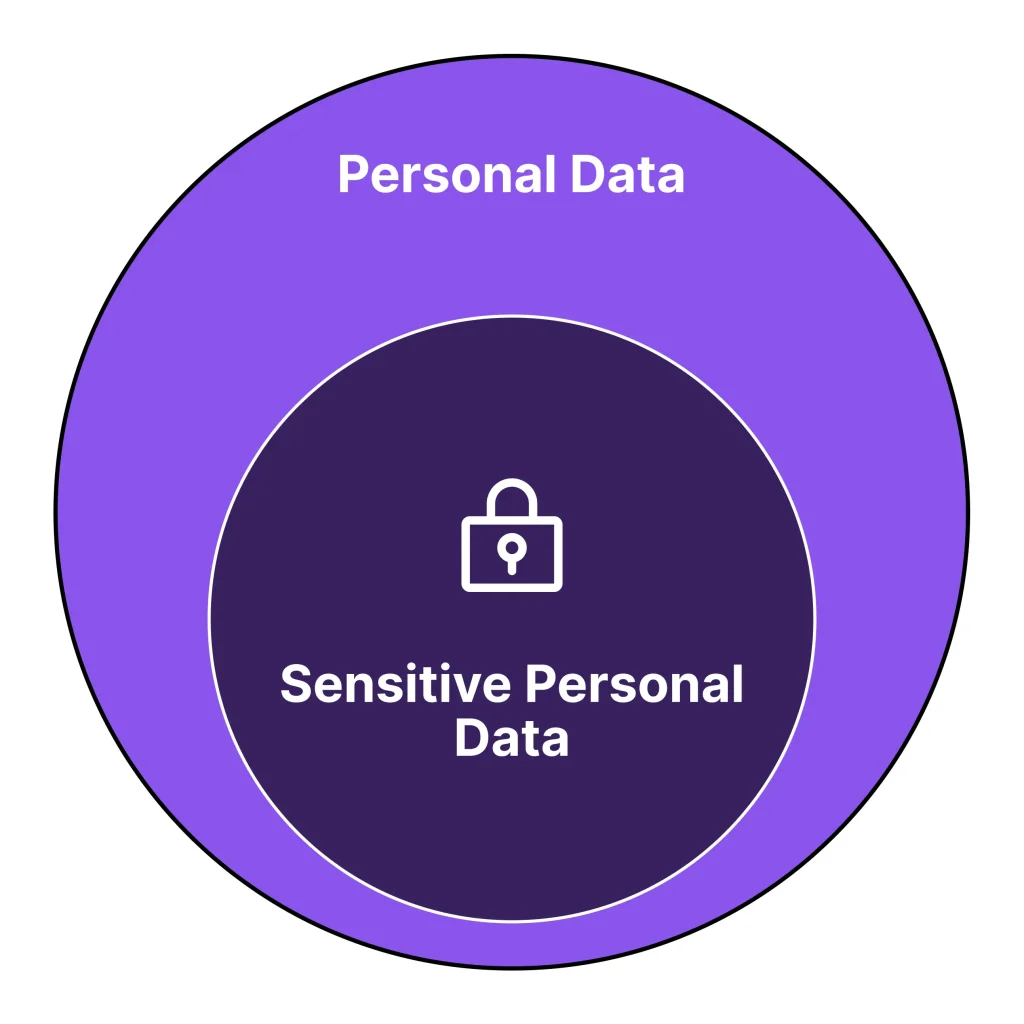
Personally Identifiable Information (PII) refers to any type of information that can identify a specific individual. In many regions, PII is protected under regulatory frameworks such as GDPR and other privacy regulations. Organizations storing this information often need a structured data protection process that follows relevant legal requirements.
Some common examples of PII include:
- First name and last name
- Email address
- Phone number
- Government-issued identification numbers (such as Social Security Number, Tax ID, National Insurance Number, etc.)
However, not all personal information carries the same level of sensitivity. While all personal data should be managed responsibly, some types of information require stronger protection due to the risk they create if exposed.
PII generally identifies a person, while sensitive personal data includes information that may cause harm, discrimination, or privacy concerns if mishandled.
Sensitive data may include information related to:
- Race or ethnicity
- Religious or spiritual beliefs
- Political beliefs
- Genetic or biometric information
- Sexual orientation or gender identity
- Health status
In some cases, sensitive data may also include financial details such as credit card information, banking credentials, or account passwords.
Organizations using Salesforce Consulting Services often begin security planning by classifying customer and operational data before defining permissions, visibility, and compliance policies.
Properly understanding and classifying business data helps teams build stronger protection protocols. For example, personally identifiable information may require stricter visibility controls, while sensitive information may need additional security measures such as encryption, restricted access, or time-based retention policies.
Businesses should always focus on handling customer information responsibly and transparently. The right protection strategy depends on the type of information being stored, the permissions customers provide for data usage, and any legal frameworks that apply to that information.
Compliance and Regulation
Data security is important for every organization managing customer information. However, compliance becomes even more critical in industries where regulations are stricter, such as healthcare, finance, and government sectors.
Organizations working in highly regulated industries should consult experienced security professionals who understand compliance requirements specific to their field. Without proper planning, businesses may face operational risks, legal concerns, or penalties related to improper data handling.
Even organizations operating in less regulated industries should understand the key principles behind data privacy regulations such as GDPR and other data protection standards.
These principles commonly include:
- Consent for clear usage: Organizations should clearly explain how customer data will be used and avoid using information beyond approved consent.
- Data minimization: Businesses should only collect and store the minimum amount of data required for operations, especially personally identifiable or sensitive information.
- Data accuracy: Customer information should remain accurate and regularly updated.
- Limited retention: Data should not remain stored longer than necessary, and businesses should maintain clear deletion or archival policies.
- Data integrity and confidentiality: Access should only be granted to authorized users, and secure handling should be maintained during integrations or transfers between systems.
- Data subject rights: Customers should understand their rights regarding access, correction, or deletion of their personal information.
- Breach notifications: Organizations should respond quickly to security incidents and notify affected individuals according to regulatory requirements.
- Accountability and governance: Businesses should maintain documented processes that demonstrate compliance with applicable regulations.
Although these principles may vary depending on specific regulations, they reflect the overall purpose of most data protection laws: protecting customer information and encouraging responsible data management.
Organizations working with Salesforce Consulting Services in Dubai, UAE often pay close attention to regional compliance standards and customer privacy expectations while designing secure Salesforce environments.
Protecting Your Data
Salesforce provides a wide range of configurable tools and features that help organizations protect customer and business data. At first, this collection of tools may feel overwhelming, especially for teams managing large amounts of information. However, when admins organize security features based on business functions and follow established best practices, managing Salesforce data protection becomes much easier.
Building a secure Salesforce environment requires more than simply enabling settings. Organizations must combine security policies, sharing models, access controls, and ongoing maintenance to create a system that supports both protection and usability.
Businesses working with Salesforce Integration Services often place additional focus on data protection because connected platforms, APIs, and external systems require secure handling during data transfers.
Security and Sharing
To better understand Salesforce data protection, it is important to separate two major areas: security and sharing. Although both work together, they serve different purposes inside a Salesforce environment.
Security focuses on protecting a Salesforce org from unauthorized access, malicious activity, or cyber threats.
Sharing, on the other hand, focuses on controlling data visibility for users who already have permission to access Salesforce. Sharing determines which records users can see and what actions they are allowed to take.
In simple terms, security mechanisms help prevent unwanted access from unauthorized users, while sharing settings help ensure authorized users only access the information they actually need.
Salesforce provides detailed control over visibility and permissions, allowing admins to decide who can access data and what they can do with it. To better understand how Salesforce manages data security, it helps to look at four important levels of access:
- Organization-level security: Controls who can log in and interact with the Salesforce environment. Access should only be granted to verified users with proper credentials.
- Object-level access: Determines which types of records users can interact with inside Salesforce.
- Record-level access: Controls access to individual records so only approved users can view or update them.
- Field-level access: Restricts visibility of specific fields that may contain sensitive information such as personally identifiable information (PII).
Documenting your security and sharing structure is also an important part of transparency and long-term system management. Clear documentation helps teams maintain consistency when updates or security reviews become necessary.
Salesforce Tools and Products
At each level of security, Salesforce offers tools that help organizations configure permissions, visibility, and access management.
Some of the most important tools admins should understand include:
| Level | Tool |
| Organization | User licensing, Multi-Factor Authentication (MFA), IP Range Restrictions, Limited Login Hours |
| Object | Permission Sets, Permission Set Groups |
| Record | Org-Wide Defaults (OWD), Role Hierarchy, Sharing Rules, Manual Sharing, Apex Managed Sharing |
| Field | Field-Level Security, Enhanced Personal Information Management |
It is important to note that Salesforce now recommends using Permission Sets instead of Profiles when managing object-level permissions. This provides greater flexibility and helps organizations scale access more efficiently.
Salesforce also offers additional tools designed to support stronger security and data protection practices.
Some important products include:
- Salesforce Shield: Helps organizations monitor, encrypt, and classify customer data.
- Security Center: Provides a centralized place to monitor and manage Salesforce org security.
- Privacy Center: Helps organizations manage customer consent and compliance requirements.
- Data Mask & Seed: Protects sensitive information inside sandboxes during development and testing.
- Backup & Recover: Helps organizations protect against data loss with automated backups and recovery options.
Organizations using Salesforce Support Services often depend on these tools to maintain stronger security controls and improve long-term platform stability.
Data Security Methodologies
Creating a complete Salesforce security and sharing model can be challenging. Every organization has different compliance requirements, customer expectations, and operational needs.
To simplify this process, Salesforce admins and architects often follow established security methodologies that help guide decision-making and reduce unnecessary risk.
Shared Responsibility Model
Trust remains one of Salesforce’s core values, and the platform works to provide secure infrastructure for customer data. However, protecting business information is not Salesforce’s responsibility alone.
Salesforce follows what is known as the Shared Responsibility Model, where both Salesforce and the organization work together to maintain security.
A simple way to think about this model is by comparing it to protecting a house.
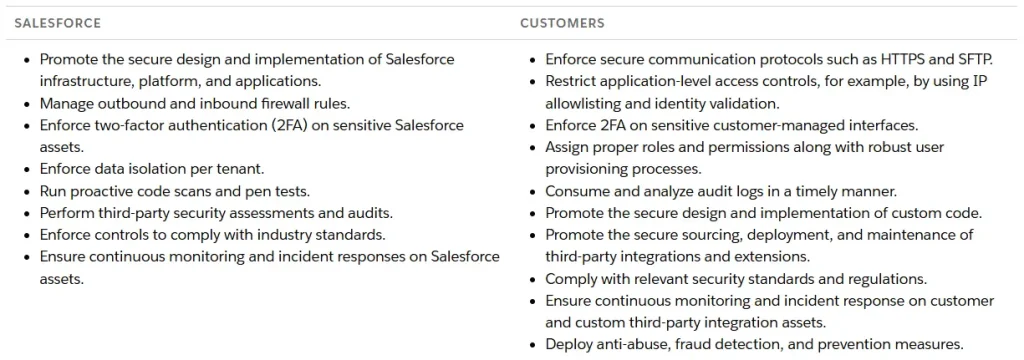
Salesforce provides the secure structure — strong walls, locking doors, and alarm systems. The organization, however, is responsible for locking those doors, managing keys safely, and using the available security systems properly.
This shared approach helps businesses understand that technology alone cannot fully protect customer information without responsible internal processes.
Principle of Least Privilege
The Principle of Least Privilege (PoLP) is a security approach that helps organizations determine how much access users truly need.
The main idea is simple: users should only receive the minimum level of access necessary to complete their responsibilities.
Instead of giving broad permissions, organizations should limit access as much as possible while still allowing employees to do their jobs effectively.
When designing a Salesforce security model, admins should ask questions such as:
- Does this user truly need this level of access?
- Can permissions be reduced further?
- Can access be restricted by session or timeframe?
- Will the user still complete their work with fewer permissions?
Businesses using Salesforce QuickStart Services often follow least-privilege strategies during initial setup to help reduce unnecessary security risks from the beginning.
Zero Trust
Salesforce also follows a Zero Trust approach to security. This model supports the same philosophy as PoLP by assuming users should only receive minimum required access.
Under Zero Trust, users can only access approved systems, applications, and services through clearly defined pathways. This reduces the impact of potential cyberattacks because unauthorized movement inside systems becomes much harder.
One of the best examples of Zero Trust in Salesforce is Multi-Factor Authentication (MFA).
Additional Zero Trust best practices include:
- Using strong and approved encryption for all connections.
- Monitoring active sessions and closing unauthorized connections.
- Avoiding location-based trust as the only access factor.
Organizations using Salesforce Lightning Migration Services often strengthen security frameworks during modernization projects to help align with Zero Trust best practices.
Monitoring Your Data
Continuously monitoring your Salesforce org and customer data is an important part of maintaining a strong data protection strategy. Security threats, configuration issues, and access vulnerabilities can develop over time, which is why organizations should regularly review their Salesforce environment instead of treating security as a one-time setup process.
Consistent monitoring helps admins identify risks early and resolve vulnerabilities before they become larger operational or compliance problems.
There are several important ways Salesforce admins can monitor org security and maintain better visibility into system activity:
- Running Health Check: Helps identify security risks inside the Salesforce org while prioritizing areas that may require improvement.
- Event Monitoring: Tracks high-risk activity and helps organizations identify unusual behavior early.
- Setup Audit Trail: Maintains a history of metadata and configuration changes across the Salesforce environment.
- Field History Tracking: Logs field-level changes to records, helping organizations maintain an auditable history of important updates.
Data archival, scheduled deletion, and backup management also play a major role in secure data handling. Organizations should create clear policies explaining how data is stored, archived, backed up, and eventually removed when no longer needed.
The tools used to support data protection can vary widely depending on business requirements. Some organizations may rely on custom automation, while others may implement third-party backup and monitoring solutions. Regardless of the tools being used, businesses should maintain clear processes for managing the full lifecycle of customer data.
Organizations working with Salesforce CRM Cloud Hotel Services often prioritize long-term monitoring and secure customer data management because hospitality systems regularly handle large volumes of sensitive guest information.
When building a Salesforce data protection strategy, organizations should make sure monitoring processes are clearly defined and that responsible team members understand how frequent reviews, audits, and security checks should occur.
Final Thoughts
Protecting customer and business data inside Salesforce remains a top priority for organizations across every industry. Salesforce offers a strong combination of native features and additional tools that help businesses manage security, access control, compliance, and data protection requirements.
However, creating an effective data protection framework is not solely dependent on Salesforce technology. Security remains a shared responsibility between Salesforce and the organizations managing customer data. Businesses must combine secure system architecture, responsible access management, compliance awareness, and continuous monitoring to maintain a secure environment.
By properly understanding and classifying customer data, organizations can build security policies that align with both operational requirements and regulatory expectations. Once security requirements are clearly defined, admins can create sharing and visibility models that help protect data from unauthorized access while still supporting productivity and collaboration for approved users.
Ongoing monitoring, regular audits, and proactive security management help organizations identify vulnerabilities early and reduce long-term risks before they affect business operations.
Organizations using Salesforce Support Services often strengthen long-term platform security by maintaining regular monitoring practices, reviewing access structures, and improving data governance processes over time.
FAQs About Salesforce Data Security
1. What is Salesforce data security?
Salesforce data security is the process of protecting customer and business information stored inside Salesforce. It includes access management, sharing settings, compliance controls, monitoring, and security tools that help keep data protected from unauthorized access.
2. Why is data security important in Salesforce?
Data security is important because organizations store sensitive customer information inside Salesforce. Proper security helps protect data from cyber threats, unauthorized access, accidental exposure, and compliance risks.
3. What is Personally Identifiable Information (PII) in Salesforce?
Personally Identifiable Information (PII) refers to data that can identify a specific person. Examples include names, email addresses, phone numbers, tax IDs, government-issued IDs, and other personal details.
4. What is the difference between security and sharing in Salesforce?
Security focuses on protecting a Salesforce org from unauthorized users or malicious activity, while sharing controls what authorized users can view, edit, or access inside the system.
5. What are the four levels of Salesforce data security?
Salesforce data security generally works across four key levels:
- Organization-level security
- Object-level access
- Record-level access
- Field-level access
These levels help organizations control visibility and permissions more effectively.
6. What is the Principle of Least Privilege (PoLP) in Salesforce?
The Principle of Least Privilege (PoLP) means users should only receive the minimum level of access required to complete their work. This helps reduce unnecessary permissions and lowers security risks.
7. How does Multi-Factor Authentication (MFA) improve Salesforce security?
Multi-Factor Authentication (MFA) adds an extra layer of security by requiring users to verify their identity through additional methods, helping reduce unauthorized access risks.
8. What is the Shared Responsibility Model in Salesforce?
The Shared Responsibility Model means Salesforce provides secure infrastructure, while organizations remain responsible for configuring permissions, managing users, protecting customer data, and maintaining internal security practices.
9. How can admins monitor Salesforce data security?
Admins can monitor security by using:
- Health Check
- Event Monitoring
- Setup Audit Trail
- Field History Tracking
- Backup and Recovery tools
These tools help identify risks early and maintain stronger system security.
10. What are the best practices for Salesforce data protection?
Some important Salesforce data protection best practices include limiting user access, enabling MFA, using permission sets, classifying sensitive data, monitoring system activity, maintaining backups, and following compliance requirements.