

Implementing Salesforce is an important investment, but buying the platform does not guarantee that employees will use it effectively. If sales representatives continue tracking deals in spreadsheets, managers rely on separate reports, and employees avoid updating records, the business may not get the full value of its CRM.
This is why Salesforce user adoption matters. It measures how effectively employees use Salesforce in their daily work, not simply how often they log in.
Low adoption can lead to incomplete customer records, unreliable reports, missed follow-ups, and wasted time. It can also make employees lose confidence in the system when the information they need is missing or outdated.
The solution is not to force everyone to use Salesforce without understanding their difficulties. Businesses need to make the CRM useful, easy to navigate, and relevant to each user’s responsibilities.
In this guide, we will explore nine practical ways to improve Salesforce user adoption, measure progress, and build better habits across your organization.
Why Is Salesforce User Adoption Important?
Salesforce works best when employees regularly update records and use the information available to them. When adoption is low, even a well-configured CRM can become unreliable.
For example, imagine a sales team that updates opportunities in Salesforce only before monthly meetings. Managers may see outdated pipeline figures, sales representatives may miss follow-up tasks, and leadership may make decisions using incomplete information.
Better adoption can help businesses achieve:
- More reliable data: Teams maintain current customer and opportunity records.
- Better productivity: Users spend less time searching for information or repeating tasks.
- Improved reporting: Managers can make decisions using more complete data.
- Stronger teamwork: Employees work from shared customer information.
- Better return on investment: The business gets more value from its Salesforce implementation.
The goal is not to maximize logins alone. The goal is to make Salesforce a natural part of the work employees already need to do.
9 Ways to Improve Salesforce User Adoption
1. Understand Why Employees Avoid Salesforce
Before changing the system, find out why people are not using it properly.
Employees may find data entry too time-consuming, struggle to locate important fields, receive insufficient training, or feel that Salesforce does not support their actual workflow. Some may also be dealing with duplicate records or outdated information.
Speak with users and observe how they complete common tasks. Ask questions such as:
- Which Salesforce task takes the most time?
- What information is difficult to find?
- Which steps feel unnecessary?
- What do you currently manage outside Salesforce?
- What would make your daily work easier?
Use these answers to identify the biggest obstacles instead of assuming that employees simply resist change.
2. Simplify the Salesforce User Experience
A complicated interface can discourage employees from using Salesforce. Too many fields, unnecessary tabs, confusing labels, and poorly organized pages make routine tasks harder than they need to be.
Salesforce Admins can improve the experience by reviewing page layouts, removing unnecessary fields from user workflows, improving field labels, and organizing navigation around common tasks.
For example, sales representatives may need quick access to leads, opportunities, activities, and follow-up tasks. Showing these items clearly can make their daily work easier.
Do not remove fields or change permissions without checking business requirements and dependencies. The objective is to reduce unnecessary effort while keeping important information available.
3. Involve Users Before Making Changes
Salesforce adoption improves when employees feel that their needs are considered during planning and implementation.
Instead of designing every workflow from the management team’s perspective, involve the people who will use the system every day. Ask a small group of users to test proposed changes and share feedback before rolling them out to the entire organization.
For example, before changing the opportunity page, ask sales representatives which information they need most often and which fields slow them down.
A simple process is:
- Collect user requirements.
- Prepare a proposed solution.
- Let representative users test it.
- Gather feedback and make improvements.
- Release the change more broadly.
This approach helps identify usability problems early and reduces the chance of delivering a system that technically works but does not suit employees’ needs.
4. Provide Role-Specific Salesforce Training
General training may introduce Salesforce features, but employees also need to understand how those features apply to their jobs.
A sales representative, customer service agent, marketing user, and manager may use the same CRM differently. Training should reflect those differences.
| User role | Training priority |
|---|---|
| Sales representatives | Leads, opportunities, activities, and follow-ups |
| Sales managers | Pipeline reports, dashboards, and team performance |
| Customer service agents | Cases, queues, customer history, and escalation |
| Marketing users | Campaigns, campaign members, and lead information |
| Salesforce Admins | Configuration, permissions, automation, and troubleshooting |
Use short demonstrations, practical exercises, and examples from your actual Salesforce environment. Provide simple reference guides so employees can revisit the instructions when needed.
Salesforce’s official CRM adoption resource is also useful for understanding adoption as an ongoing business process rather than a one-time training activity.
5. Reduce Repetitive Manual Work
Employees are more likely to use a CRM when it saves time instead of adding extra work.
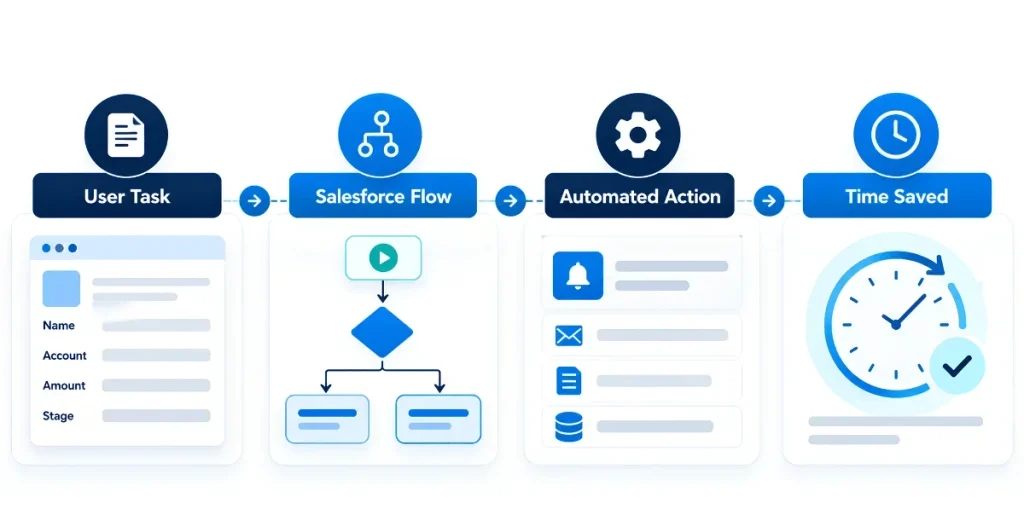
Review processes that require repeated typing, unnecessary record updates, or manual follow-up reminders. Where appropriate, use Salesforce automation to reduce these tasks.
For example, a business could use a Flow to notify an opportunity owner when a follow-up date is approaching. Another workflow might update a field when a record meets defined conditions.
Before introducing automation, understand the existing process, required conditions, and possible dependencies. Test changes carefully to avoid creating duplicate notifications or unexpected updates.
If your team needs guidance on designing these workflows, the complete guide to Salesforce Flow for business automation explains how Flow can support business processes.
6. Encourage Managers to Lead by Example
Employees pay attention to how their managers use Salesforce. If managers ask teams to update opportunities but maintain separate spreadsheets for pipeline reviews, employees may see Salesforce updates as an extra task rather than a normal part of their work.
Managers should use Salesforce reports and dashboards during meetings, review opportunities in the CRM, and encourage follow-ups based on shared records.
Leadership should also explain why accurate information matters. The aim is not to monitor every action or punish employees for small mistakes. It is to build consistent working habits and show that Salesforce supports real business decisions.
When managers use the system consistently, employees have a clearer reason to do the same.
7. Improve Data Quality and Build Trust
Poor data quality can quickly reduce adoption. If employees regularly find outdated contacts, duplicate accounts, missing information, or incorrect opportunity details, they may stop trusting Salesforce.
Improving data quality should therefore be part of your adoption plan.
Start by identifying common data problems and deciding who is responsible for resolving them. Review duplicate records, standardize important fields, and provide clear guidance on when and how records should be updated.
Also, avoid collecting information that has no clear business purpose. Required fields should reflect genuine process needs rather than making every field mandatory by default.
For more technical guidance, see the iBirds article on Salesforce metadata cleanup for fields and picklists. Reviewing existing fields and picklist values can help teams maintain a more consistent Salesforce environment.
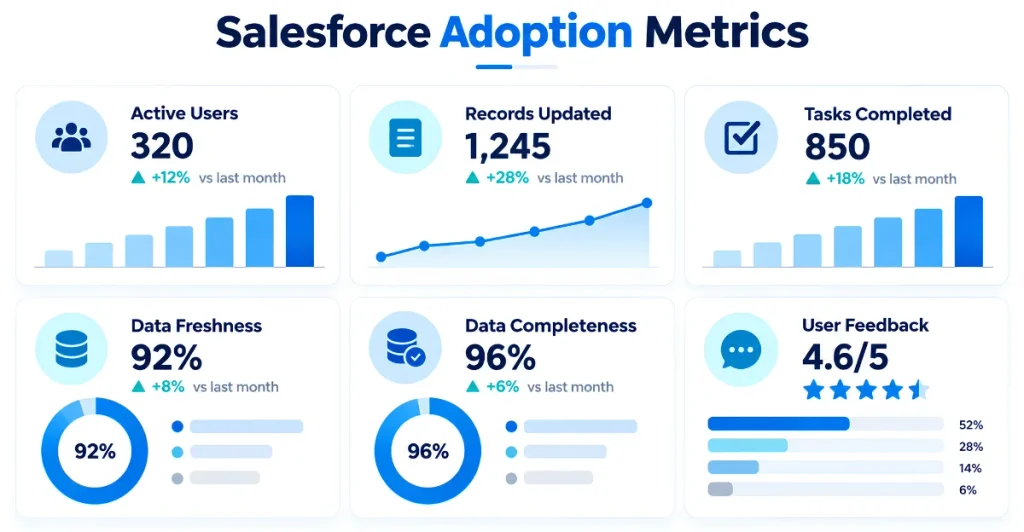
8. Measure Adoption With Meaningful Metrics
You cannot improve Salesforce adoption effectively if you do not know where the problems are.
Login activity can provide useful information, but it should not be the only measurement. An employee may log in every day without completing important tasks, while another may use Salesforce less frequently because of their role.
Choose metrics that reflect the work employees are expected to complete.
| Adoption metric | What it helps you understand |
|---|---|
| Active users over time | Whether employees regularly use Salesforce |
| Records updated | Whether important information is being maintained |
| Activities completed | Whether follow-ups and assigned tasks are progressing |
| Opportunity data freshness | Whether the sales pipeline reflects current information |
| Required-field completeness | Whether important business data is available |
| User feedback | What is making Salesforce difficult to use |
Compare results over time and look for patterns by team or role. For example, low activity completion might indicate a training issue, a confusing workflow, or unrealistic expectations.
Metrics should guide support and improvement, not become a way to shame employees. Before drawing conclusions, consider the user’s responsibilities and the quality of the underlying data.
9. Collect Feedback and Improve Continuously
Salesforce adoption is not finished when the system goes live. Business processes change, new employees join, and users discover problems as they work.
Create a simple feedback process through short surveys, regular check-ins, or an internal channel for reporting Salesforce issues.
Review feedback regularly and prioritize improvements based on their impact. Fix common problems first rather than changing many parts of the system at once.
A practical improvement cycle looks like this:
Collect feedback
Understand user problems and missing features.
Prioritize improvements
Choose changes with clear business value.
Test the changes
Check the workflow before releasing it.
Measure the results
Check whether usage and user experience improve.
If the same problems continue despite training and small improvements, the organization may need a broader review of its Salesforce configuration, processes, or implementation approach.
For businesses that need expert guidance, Salesforce Consulting Services from iBirds Software Services can be a relevant option for reviewing business requirements and improving the Salesforce environment.
A Simple Salesforce User Adoption Improvement Plan
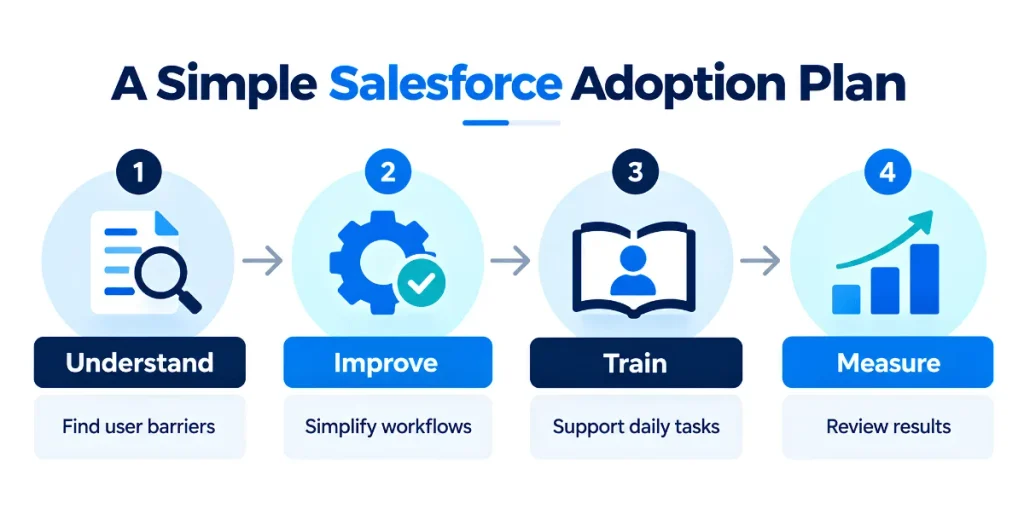
Businesses do not need to change everything at once. A phased approach makes adoption easier to manage and gives teams time to learn from each improvement.
| Phase | Main activity | Expected outcome |
|---|---|---|
| Week 1 | Collect feedback and review current usage | Identify the biggest adoption barriers |
| Week 2 | Simplify one important workflow | Reduce unnecessary user effort |
| Week 3 | Deliver role-specific training and guidance | Help users complete tasks correctly |
| Week 4 | Review metrics and gather feedback again | Identify what improved and what needs attention |
This is a suggested starting plan, not a fixed timeline. A small team may move faster, while a large organization with multiple departments may need a longer rollout.
The key is to start with a specific problem, make a measurable improvement, and check whether it actually helps users.
Final Thoughts
Improving Salesforce user adoption requires more than asking employees to log in regularly. It means creating a CRM environment that helps people complete their work, find reliable information, and understand the value of keeping records updated.
Start by identifying the main barriers. Simplify the user experience, provide relevant training, reduce unnecessary manual work, and ensure managers use Salesforce consistently. Then measure meaningful activity, improve data quality, and act on employee feedback.
Most importantly, treat adoption as an ongoing process. Small, well-planned improvements can make Salesforce more useful for employees and more valuable for the business over time.
Frequently Asked Questions
1. What is Salesforce user adoption?
Salesforce user adoption refers to how effectively employees use Salesforce as part of their regular work. It includes more than logging in; users should be able to complete relevant tasks, maintain accurate records, use reports, and follow the business processes managed through the CRM. Good adoption means Salesforce supports employees’ daily responsibilities and provides useful information for decision-making. Businesses can improve adoption through better training, simpler workflows, reliable data, and regular feedback.
2. Why do employees struggle to adopt Salesforce?
Employees may struggle with Salesforce because the interface is confusing, data entry takes too much time, training is insufficient, or workflows do not match their actual responsibilities. Poor data quality can also discourage users because they cannot trust the information they find. Sometimes, employees continue using spreadsheets or older tools because they are familiar with them. To identify the real reason, businesses should speak with users, observe their daily tasks, review adoption metrics, and address the most common obstacles first.
3. How can a business measure Salesforce user adoption?
Businesses can measure adoption through several indicators, including active users, record updates, completed activities, opportunity data freshness, and required-field completeness. User surveys and feedback are also useful because numerical data alone may not explain why employees are struggling. The best metrics depend on each team’s responsibilities. For example, opportunity updates may be important for sales representatives, while case resolution and case updates may be more useful for service teams. Reviewing these indicators over time helps businesses identify problems and evaluate whether improvements are working.
4. How can Salesforce Admins improve user adoption?
Salesforce Admins can improve adoption by simplifying page layouts, reviewing unnecessary fields, improving navigation, automating repetitive tasks, and providing role-specific training. They can also involve users in testing changes before releasing them and create short guides for common activities. Admins should review feedback and adoption metrics regularly instead of assuming that a successful deployment means users are satisfied. Making small improvements based on real user needs is often more effective than introducing major changes without understanding the problems.
5. Does Salesforce training improve user adoption?
Yes, relevant training can help employees understand how Salesforce supports their work and how to complete tasks correctly. However, training is most effective when it uses the organization’s actual workflows, fields, reports, and processes. Generic training alone may not explain how employees should handle their daily responsibilities. Businesses should combine initial onboarding with short refresher sessions, practical exercises, written guides, and ongoing support. They should also check whether employees can perform the required tasks after training and provide additional help where necessary.
6. How long does it take to improve Salesforce user adoption?
There is no fixed timeline for improving Salesforce adoption. A small team with a few usability problems may notice improvements after targeted training or workflow changes. A large organization with multiple departments, complex processes, and legacy systems may need a longer improvement program. Businesses should begin by establishing a baseline, selecting a few priority problems, and setting realistic goals. They can then review usage metrics and employee feedback at regular intervals. Consistent improvement is more important than expecting every user to change their habits immediately.
7. What should a business do when employees continue using spreadsheets instead of Salesforce?
First, understand why employees prefer spreadsheets. They may find Salesforce slower for certain tasks, struggle with reporting, lack required permissions, or have difficulty entering information. Review whether the CRM provides the necessary fields, views, automation, and reports. If spreadsheets are still needed for legitimate reasons, define how their information should be maintained and transferred into Salesforce. Avoid simply banning spreadsheets without resolving the problems that made employees depend on them. The long-term goal should be to make Salesforce the trusted source for the business information it is intended to manage.