

Salesforce is often connected with other business applications such as ERP systems, websites, payment platforms, marketing tools, customer portals, and data platforms. Salesforce API Integration makes this possible by allowing different systems to exchange data and work together.
For example, when a customer submits a form on a website, an integration can send that information to Salesforce as a Lead. Similarly, Salesforce data can be sent to another application when an order, customer, or service record changes.
The important part is choosing the right API and designing the integration properly. This guide explains the basics, common Salesforce APIs, practical use cases, and important points to consider.
What Is Salesforce API Integration?
Salesforce API Integration is the process of connecting Salesforce with an external application through APIs.
An API acts as a communication layer between two systems. It allows one application to request data, send information, create records, update records, or perform other supported operations.
A simple example looks like this:
Website → API Request → Salesforce → Lead Created
API integration can help businesses reduce manual data entry and keep information synchronized across different systems.
If you want to understand the wider integration process, you can also read our guide on How to Build Salesforce Integrations.
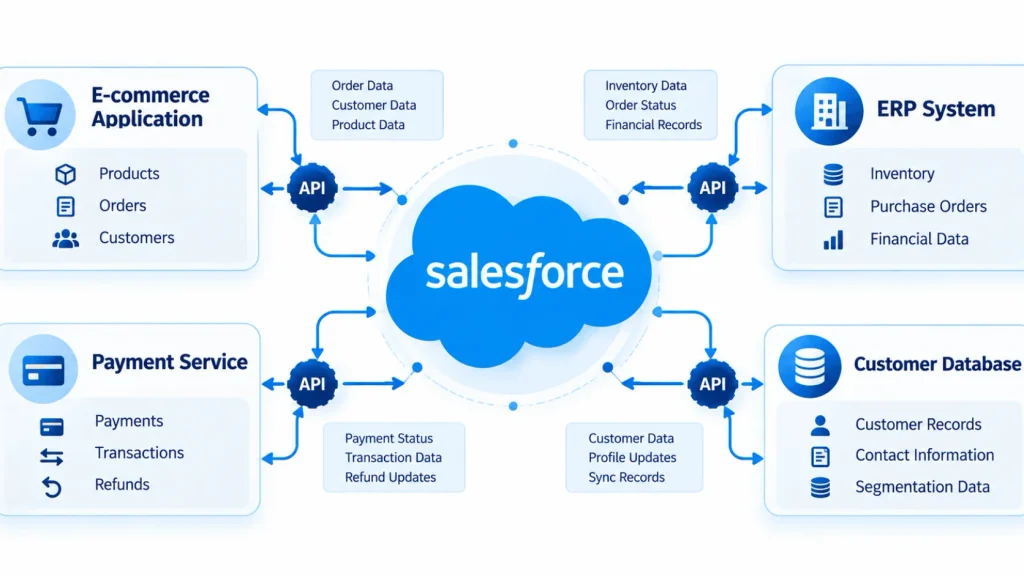
Why Is Salesforce API Integration Important?
Businesses rarely use Salesforce as a completely separate system. Customer and business information may also exist in accounting software, websites, mobile applications, marketing platforms, or internal systems.
API integration helps these systems exchange information.
Some common benefits include:
- Automatic data synchronization
- Reduced manual data entry
- Faster access to customer information
- Better connection between business applications
- Automated business processes
- More consistent data across systems
- Support for real-time or scheduled data exchange
For example, a company can connect its website with Salesforce so that new customer inquiries automatically become Salesforce Leads.
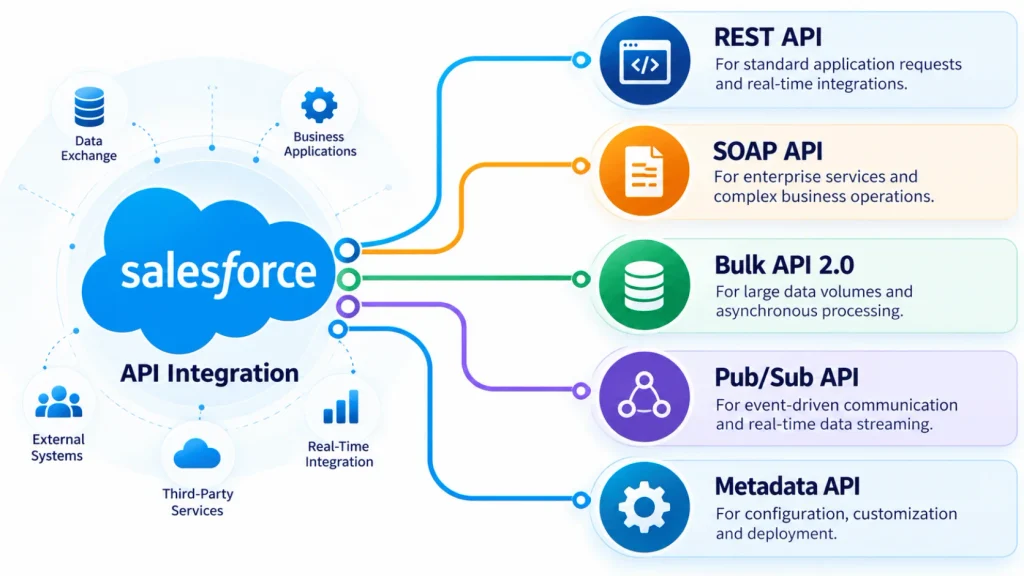
Common Salesforce APIs
Salesforce provides different APIs for different integration requirements. The right choice depends on factors such as data volume, operation type, timing, and application requirements.
REST API
REST API is commonly used when applications need to communicate with Salesforce through standard HTTP requests.
It can be used to create, retrieve, update, and delete Salesforce records. REST is often suitable for web applications, mobile applications, and other systems that need straightforward access to Salesforce data.
SOAP API
SOAP API is a web-service API that uses a structured XML-based approach.
It can be useful for enterprise applications that already work with SOAP-based services or require strongly defined service contracts.
Bulk API 2.0
Bulk API 2.0 is designed for large amounts of data. Salesforce documentation describes it as a REST-based API for asynchronously inserting, updating, upserting, deleting, and querying large datasets.
For example, if a business needs to process a large customer data file, using a bulk process can be more appropriate than sending thousands of individual requests.
Pub/Sub API
Pub/Sub API is designed for event-based communication and can be useful when external systems need to receive Salesforce events or changes.
This approach can support integrations where applications need to react to changes instead of repeatedly checking Salesforce for new information.
Metadata API
Metadata API is different from APIs used mainly for business records. It is used to work with Salesforce configuration and metadata, such as custom objects, fields, layouts, and other setup components.
This can be useful for deployment and Salesforce development workflows.
Salesforce API Integration: Key Things to Consider
A successful integration is not only about connecting two systems. The integration should also be secure, reliable, and easy to maintain.
1. Choose the Right API
Start by understanding the actual requirement.
Ask:
- How much data needs to be transferred?
- Is the integration real-time or scheduled?
- Are you working with Salesforce records or metadata?
- Does the external system need to send data, receive data, or both?
- Does the process need synchronous or asynchronous communication?
For example, REST API may work well for smaller, regular transactions, while Bulk API 2.0 is designed for large asynchronous data operations. Salesforce notes that operations involving more than 2,000 records can be good candidates for Bulk API 2.0.
2. Use Secure Authentication
Authentication is a key part of any Salesforce API integration.
OAuth-based authentication is commonly used for Salesforce API access. For example, Bulk API 2.0 uses an access token to authenticate requests.
Avoid putting usernames, passwords, access tokens, or other sensitive credentials directly into application code.
Also consider:
- Appropriate user permissions
- Connected apps or external client applications
- Token management
- HTTPS communication
- Least-privilege access
3. Consider Data Volume
Data volume should be considered before development begins.
Sending a large number of individual API requests can create unnecessary load and may cause the integration to reach Salesforce API limits.
For large datasets, an asynchronous approach such as Bulk API 2.0 may be more suitable. Bulk API 2.0 supports operations such as insert, update, upsert, delete, and large-data queries.
4. Handle Errors Properly
API calls can fail for many reasons.
For example:
- Invalid data
- Authentication problems
- Missing permissions
- Network failures
- Incorrect field mapping
- Salesforce limits
- External application errors
Your integration should record useful error information and provide a way to retry failed operations when appropriate.
Do not simply ignore failed API responses.
5. Avoid Unnecessary API Calls
Good integration design should minimize unnecessary requests.
Instead of repeatedly asking Salesforce for the same information, consider whether data can be cached, processed in batches, or exchanged only when something changes.
This can improve performance and help manage API usage.
6. Plan Real-Time vs Batch Processing
Not every integration needs real-time data.
For example:
| Requirement | Possible Approach |
|---|---|
| Create a Lead immediately | REST API |
| Update a single customer record | REST API |
| Process a large customer file | Bulk API 2.0 |
| Respond to Salesforce events | Pub/Sub API |
| Deploy Salesforce configuration | Metadata API |
The best option depends on the business process rather than simply choosing the newest API.
7. Test and Monitor the Integration
Testing should cover both successful and failed scenarios.
Test cases can include:
- Valid records
- Missing required fields
- Duplicate records
- Invalid authentication
- Network failures
- Large data volumes
- API errors
- Partial failures
After deployment, monitoring is equally important. Keep track of failed requests, processing times, authentication problems, and unusual API usage.
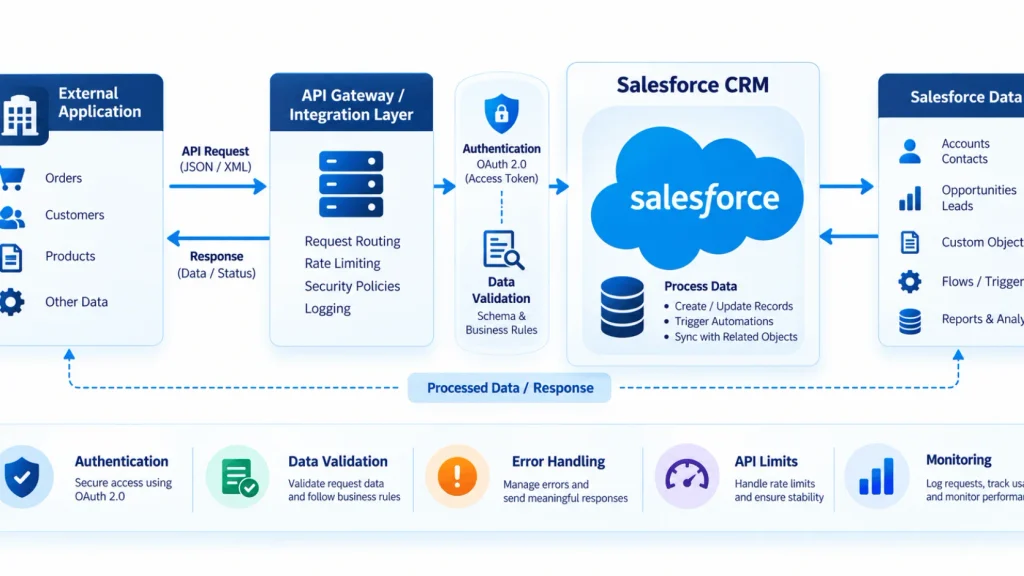
A Simple Salesforce API Integration Process
A typical integration can follow this basic flow:
External Application
↓
Authentication
↓
API Request
↓
Salesforce API
↓
Salesforce Data / Process
↓
Response or Event
↓
External Application
For example, an e-commerce website could send customer information to Salesforce through an API. Salesforce processes the request and creates or updates the relevant record.
For integrations that require Salesforce Flow and external HTTP services, our guide on HTTP Callouts in Salesforce Flow can provide additional context.
REST API vs Bulk API 2.0
| Feature | REST API | Bulk API 2.0 |
|---|---|---|
| Main use | Regular record operations | Large data operations |
| Processing | Generally synchronous | Asynchronous |
| Data volume | Small to moderate operations | Large datasets |
| Typical use | Create/update individual records | Bulk insert/update/query |
| Communication | HTTP requests | REST-based asynchronous jobs |
Salesforce describes Bulk API 2.0 as a REST-based solution for asynchronous processing of large datasets.
Salesforce API Integration Best Practices
Before launching an integration, check these points:
- Choose the API according to the business requirement.
- Use secure authentication.
- Give integrations only the permissions they need.
- Consider Salesforce API limits.
- Use bulk processing for suitable large-data operations.
- Validate data before sending it.
- Build proper error handling and retry logic.
- Keep API credentials secure.
- Monitor integration activity after deployment.
- Test both successful and failed scenarios.
For official API documentation and current Salesforce integration resources, see the Salesforce Developers API documentation.
Final Thoughts
Salesforce API Integration allows Salesforce to communicate with external applications and become part of a larger business technology ecosystem.
The main challenge is not simply connecting two systems. It is selecting the appropriate API, authentication method, data-processing approach, and error-handling strategy for the specific requirement.
A well-planned integration can make data exchange more consistent, reduce manual work, and support connected business processes.
If your organization needs help planning or implementing a Salesforce integration, you can explore Salesforce Integration Services from iBirds Software Services.
FAQs
What is Salesforce API Integration?
Salesforce API Integration connects Salesforce with external applications so they can exchange data and perform supported operations automatically.
Which API is commonly used for Salesforce integration?
REST API is commonly used for many application integrations, while other APIs such as SOAP, Bulk API 2.0, Pub/Sub API, and Metadata API are used for different requirements.
When should I use Bulk API 2.0?
Bulk API 2.0 is designed for large data operations that can be processed asynchronously. Salesforce specifically identifies large operations, including those involving more than 2,000 records, as candidates for the Bulk framework.
Can Salesforce APIs be used with Postman?
Yes. Postman can be used to test Salesforce API requests, authentication, endpoints, headers, and responses.
Is Salesforce API Integration secure?
It can be secure when the integration uses appropriate authentication, permissions, HTTPS, credential protection, and proper access controls.
What should I consider before building a Salesforce API Integration?
Consider data volume, API selection, authentication, integration direction, real-time requirements, error handling, API limits, testing, and ongoing monitoring.