

Salesforce rarely works alone. Businesses often connect Salesforce with ERP systems, payment platforms, marketing tools, customer portals, data warehouses, calendars, and other applications.
The challenge is not simply connecting two systems. The real challenge is deciding how the systems should communicate, when data should move, and whether the process needs an immediate response.
This is where Salesforce Integration Patterns become useful. An integration pattern provides a repeatable architectural approach for a common integration requirement. Salesforce Architects groups integration scenarios around factors such as process, data, virtual access, synchronous execution, and asynchronous execution.
In this guide, we will explain seven important Salesforce integration patterns and approaches, their use cases, advantages, and key considerations.
What Are Salesforce Integration Patterns?
Salesforce integration patterns are standard approaches used to connect Salesforce with external applications and systems.
Instead of designing every integration from scratch, architects can start with a pattern that matches the business requirement.
For example:
- Need an immediate response from another system? Use a Request and Reply approach.
- Need to send information without waiting? Use Fire and Forget.
- Need to move large amounts of data periodically? Use Batch Data Synchronization.
- Need Salesforce to access external data without storing a copy? Use Data Virtualization.
Salesforce’s official architecture guidance uses patterns to address recurring integration scenarios and provides a selection framework based on factors such as data volume, timing, failure handling, transactionality, and system capabilities.
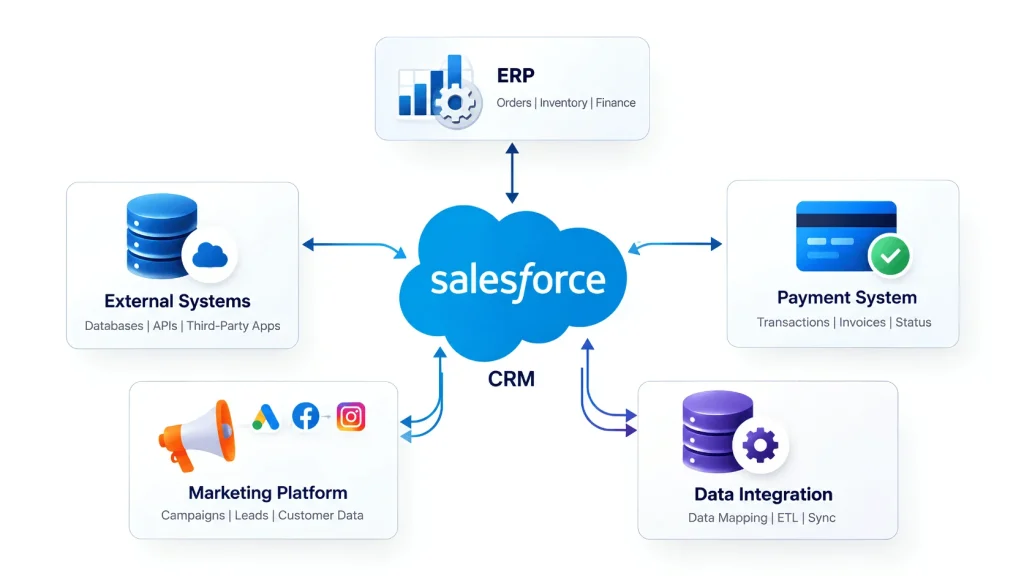
Why Are Salesforce Integration Patterns Important?
A poorly designed integration can create duplicate data, unnecessary API calls, slow processes, difficult troubleshooting, and maintenance problems.
Choosing an appropriate pattern helps teams think about:
- Data direction: Salesforce to another system or another system to Salesforce
- Timing: Synchronous or asynchronous
- Data volume: Small transactions or large datasets
- Business process: Simple data exchange or multi-step processing
- Failure handling: What happens when an external system is unavailable?
- Data ownership: Which system is the source of truth?
- Scalability: Can the integration handle future growth?
Salesforce describes these considerations as important parts of selecting an integration strategy.
7 Salesforce Integration Patterns You Should Know
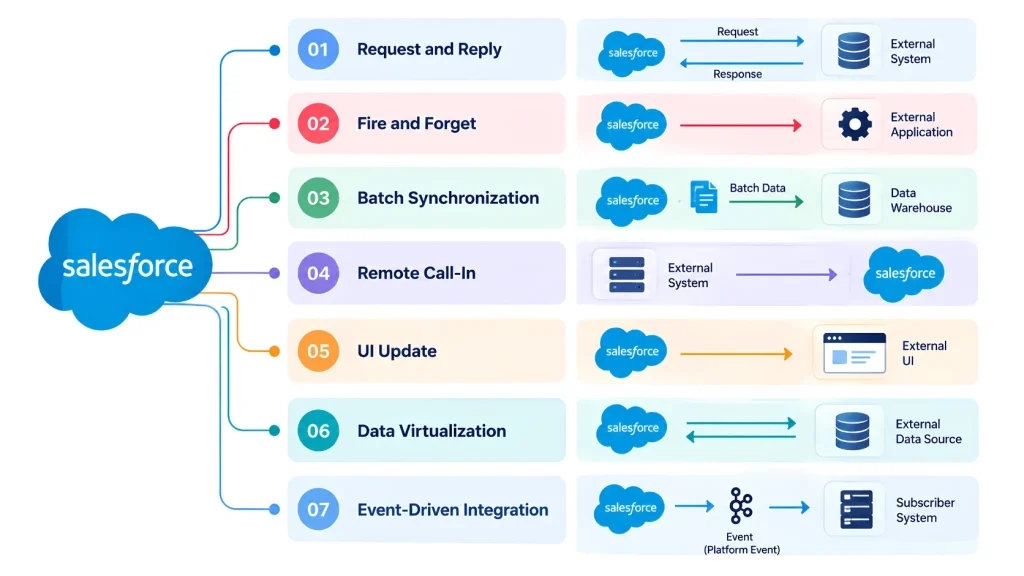
1. Remote Process Invocation — Request and Reply
Request and Reply is used when Salesforce sends a request to an external system and needs a response before continuing.
The communication is generally synchronous.
How it works
Salesforce
    ↓
Send Request
    ↓
External System
    ↓
Process Request
    ↓
Return Response
    ↓
Salesforce Continues
For example, imagine a sales representative creates an order in Salesforce. Salesforce may send the order information to an external inventory system and wait for confirmation.
The response could contain:
- Order confirmation
- Inventory availability
- External order ID
- Validation result
- Error information
When to use it
Request and Reply is useful when the user or business process needs an immediate result.
Common examples include:
- Real-time pricing checks
- Inventory verification
- Credit validation
- Address verification
- External order creation
The main consideration is that Salesforce must wait for the external response, so response time and failure handling should be carefully designed.
Salesforce identifies Remote Process Invocation—Request and Reply as a synchronous integration pattern.
2. Remote Process Invocation — Fire and Forget
With Fire and Forget, Salesforce sends information to another system but does not wait for the external process to finish.
The external system receives the request and processes it separately.
Salesforce
    ↓
Send Request
    ↓
External System
    ↓
Acknowledgement
    ↓
Salesforce Continues
             ↓
       External Processing
For example, when a new customer is created in Salesforce, the customer information could be sent to a marketing platform for further processing.
Salesforce does not need to wait for the marketing platform to complete its work.
When to use it
This approach can be useful for:
- Notifications
- Background processing
- Data publishing
- Event-driven workflows
- Non-critical updates
The main advantage is that Salesforce does not remain blocked while the external process runs.
However, teams should define how failures, retries, and acknowledgements will be handled.
Salesforce classifies Fire and Forget as an asynchronous Remote Process Invocation pattern.
3. Batch Data Synchronization
Batch Data Synchronization is designed for moving or synchronizing larger amounts of data between Salesforce and external systems.
Instead of processing every record immediately, data is transferred in batches based on a schedule or defined process.
For example:
External ERP
     ↓
Large Data Set
     ↓
Batch Process
     ↓
Salesforce
     ↓
Updated Records
A business may synchronize:
- Customer records
- Product information
- Billing data
- Historical transactions
- Order information
- Reporting data
Batch synchronization can work in either direction depending on which system owns the data.
When to use it
Consider batch synchronization when:
- Data volumes are large.
- Real-time updates are not necessary.
- Data can be processed periodically.
- A scheduled synchronization is easier to manage.
- An external system acts as the primary data source.
Salesforce’s architecture guidance specifically discusses batch synchronization for scenarios where data is created or refreshed between Salesforce and an external system in a batch manner.
For practical integration implementation, you can also explore our guide on how to build Salesforce integrations.
4. Remote Call-In
Remote Call-In is used when an external system initiates a request to Salesforce.
In this pattern, the external application can create, retrieve, update, or delete Salesforce data through an appropriate Salesforce API or integration mechanism.
External Application
        ↓
Salesforce API
        ↓
Salesforce
        ↓
Create / Read / Update / Delete
For example, an external ecommerce application could send customer or order information to Salesforce after a purchase.
Common use cases
Remote Call-In can be used for:
- Website-to-Salesforce integrations
- Ecommerce applications
- Customer portals
- External business applications
- Mobile applications
- ERP-to-Salesforce integrations
The external application becomes the system initiating the communication.
Salesforce lists Remote Call-In as a core integration pattern for scenarios where a remote system operates on Salesforce data.
5. UI Update Based on Data Changes
Sometimes users need the Salesforce interface to reflect changes as soon as important data changes.
This is where UI Update Based on Data Changes becomes relevant.
For example, a customer service representative may be viewing a Salesforce record while another process updates information related to that record.
Instead of requiring the user to manually refresh the page, an event or data-change mechanism can help update the interface.
Typical examples
This approach can support:
- Real-time status updates
- Order status changes
- Case updates
- Notification experiences
- Live operational dashboards
It is particularly useful when users need timely information without repeatedly refreshing the Salesforce interface.
Salesforce includes UI Update Based on Data Changes among its integration patterns.
6. Data Virtualization
Data Virtualization allows Salesforce users or processes to work with external data without necessarily copying all of that data into Salesforce.
This is useful when the external system remains the source of the data.
For example, a company may keep large financial or inventory datasets in another platform while allowing Salesforce users to access relevant information when needed.
External Data Source
        ↑
        │ Real-Time Access
        ↓
Salesforce
        ↓
User / Process
Salesforce Connect and external objects can support this type of architecture by allowing Salesforce to access data stored externally. Salesforce’s current architecture guidance describes Data Virtualization as a way to interact with external data without replicating it into Salesforce.
When it can be useful
Data virtualization may be considered when:
- The external system is the source of truth.
- Data volumes are too large to replicate unnecessarily.
- Users need current external information.
- Data should remain in the original system.
- Duplicate copies of data should be minimized.
7. Event-Driven Integration
Event-driven integration is an important modern approach for Salesforce environments where systems need to react to changes without tightly coupling every application together.
Instead of one system directly controlling another system, an event can communicate that something has happened.
For example:
Salesforce Record Changes
          ↓
      Publish Event
          ↓
 ┌────────┼─────────┐
 ↓        ↓         ↓
ERP     Analytics   Marketing
A customer status change could generate an event that different systems consume according to their own requirements.
Event-driven architectures can be useful for:
- Near-real-time data sharing
- Decoupled applications
- Notifications
- Large integration ecosystems
- Asynchronous processing
- Change-based workflows
Salesforce’s architecture guidance distinguishes synchronous integrations, where the caller waits for a response, from asynchronous approaches that allow processing to continue without waiting for the result.
Important: Event-driven integration is best viewed here as a modern integration approach rather than one of the six classic patterns listed in Salesforce’s core Integration Patterns guide.
Salesforce Integration Patterns by Type
Understanding the integration type makes pattern selection easier.
| Integration Type | Main Purpose | Example |
|---|---|---|
| Process Integration | Connect business processes across systems | Salesforce creates an external order |
| Data Integration | Synchronize information between systems | ERP customer data → Salesforce |
| Virtual Integration | Access external data without replicating it | Salesforce Connect |
| Synchronous | Get an immediate response | Real-time inventory check |
| Asynchronous | Process without waiting for completion | Event-based notification |
Salesforce groups integration patterns into Data Integration, Process Integration, and Virtual Integration, while also considering whether communication is synchronous or asynchronous.
Synchronous vs Asynchronous Salesforce Integration
One of the most important decisions is whether an integration should be synchronous or asynchronous.
Synchronous Integration
The calling system waits for a response.
Salesforce
    ↓
Request
    ↓
External System
    ↓
Response
    ↓
Continue
Use this when the response is required immediately.
Examples: real-time validation, pricing, availability checks.
Asynchronous Integration
The calling system sends the request and continues without waiting for the complete process.
Salesforce
    ↓
Send Request/Event
    ↓
Continue Process
        ↓
External System Processes
Use this when the process can happen in the background.
Examples: notifications, event processing, background synchronization.
Salesforce describes synchronous operations as blocking request/response interactions and asynchronous operations as non-blocking approaches that can use one-way messaging.
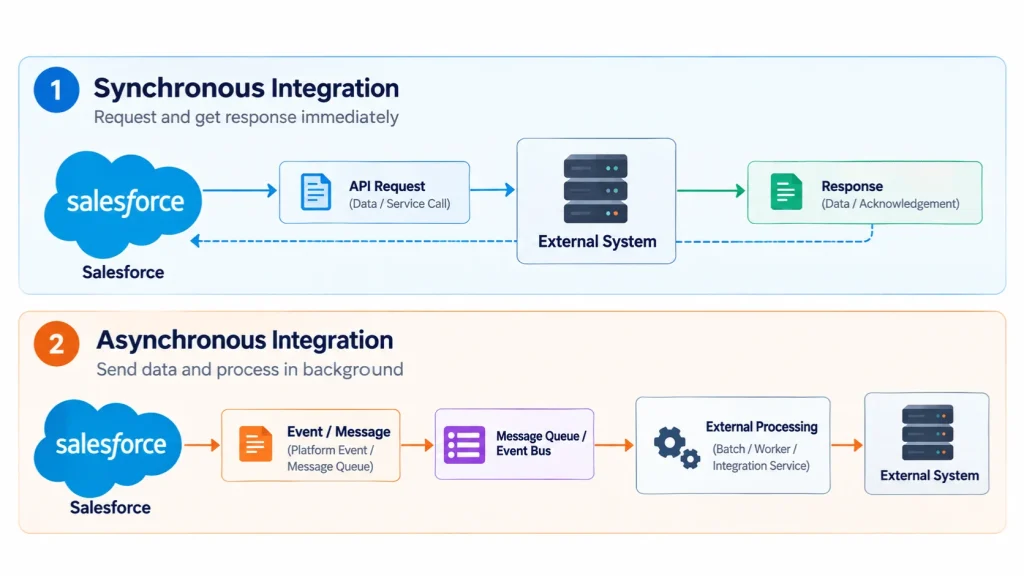
How to Choose the Right Salesforce Integration Pattern
There is no single pattern that fits every Salesforce integration.
Start by answering these questions:
1. What needs to be integrated?
Is the requirement about:
- A business process?
- Data synchronization?
- External data access?
- A user interface update?
2. Which system starts the integration?
Determine whether the communication starts from:
- Salesforce
- An external application
- A user action
- A scheduled process
- A data change or event
3. Does the process need an immediate response?
If yes, a synchronous approach such as Request and Reply may be appropriate.
If no, an asynchronous approach such as Fire and Forget or event-driven processing may be considered.
4. How much data is involved?
A small real-time transaction and a million-record synchronization should not normally use the same integration design.
For large datasets, batch processing may be more suitable.
5. Where should the data live?
Ask whether Salesforce should:
- Store the data
- Synchronize the data
- Access it remotely
- Treat Salesforce as the system of record
6. What happens when something fails?
Every integration should consider:
- Timeouts
- API failures
- Duplicate requests
- Retry handling
- Partial failures
- Logging
- Error notifications
Salesforce recommends considering system capabilities, data volume, failure handling, and transactionality when selecting an integration pattern.
Salesforce Integration Tools and Technologies
The pattern is the architectural approach, while the implementation can use different Salesforce technologies.
Depending on the requirement, teams may work with:
- Salesforce APIs
- Apex
- Flow
- Named Credentials
- External Services
- Platform Events
- Change Data Capture
- Salesforce Connect
- Middleware platforms such as MuleSoft
For example, Salesforce Flow can support declarative automation and integration scenarios, while Apex can be used when more customized logic is required.
You can learn more about using Flow for integrations in our guide to HTTP Callouts in Salesforce Flow.
For broader Salesforce integration architecture, the official Salesforce Integration Patterns documentation provides pattern descriptions and selection guidance.
Salesforce Integration Patterns Best Practices
Choosing a pattern is only the first step. The implementation also needs careful planning.
Keep the integration purpose clear
Define exactly what the integration needs to accomplish before selecting a technology.
Avoid unnecessary data replication
If users only need real-time access to external information, consider whether virtual access is more appropriate than copying everything into Salesforce.
Plan for failures
External systems can become unavailable. Build appropriate error handling, retry logic, and monitoring into the architecture.
Protect credentials and sensitive data
Use secure authentication mechanisms and avoid hardcoding credentials inside Apex, Flow, or configuration files.
Consider API limits and data volume
An integration that works with 100 records may behave very differently with millions of records. Design around expected growth.
Reduce unnecessary coupling
Where appropriate, asynchronous and event-driven approaches can help systems operate more independently.
Document the architecture
Document:
- Source system
- Target system
- Data direction
- Integration method
- Authentication
- Error handling
- Retry strategy
- Data ownership
- Expected volume
Good documentation makes future troubleshooting and maintenance easier.
Salesforce Integration Patterns: Quick Comparison
| Pattern | Communication | Best Suited For |
|---|---|---|
| Request and Reply | Synchronous | Immediate response |
| Fire and Forget | Asynchronous | Background processing |
| Batch Data Synchronization | Batch | Large data transfers |
| Remote Call-In | External → Salesforce | External applications updating Salesforce |
| UI Update Based on Data Changes | Event/Data change | Timely UI updates |
| Data Virtualization | Real-time access | External data without replication |
| Event-Driven Integration | Asynchronous/Event-based | Decoupled, near-real-time systems |
Frequently Asked Questions
What are Salesforce Integration Patterns?
Salesforce Integration Patterns are reusable architectural approaches for connecting Salesforce with external applications and systems. They help teams choose an appropriate design based on requirements such as data movement, timing, system direction, and processing needs.
How many Salesforce Integration Patterns are there?
Salesforce’s core Integration Patterns guide describes six primary patterns, including Request and Reply, Fire and Forget, Batch Data Synchronization, Remote Call-In, UI Update Based on Data Changes, and Data Virtualization. Event-driven integration is also an important modern approach for Salesforce architectures.
What is the difference between synchronous and asynchronous integration?
In synchronous integration, the calling system waits for a response before continuing. In asynchronous integration, the request can be processed separately, allowing the calling system to continue without waiting for completion.
When should I use Batch Data Synchronization?
Batch Data Synchronization is useful when large amounts of data need to be transferred or refreshed periodically and the business does not require every change to be processed immediately.
What is Data Virtualization in Salesforce?
Data Virtualization allows Salesforce to access data stored in an external system without necessarily replicating that data into Salesforce. Salesforce Connect and external objects can support this type of architecture.
How do I choose the right Salesforce Integration Pattern?
Start with the business requirement. Determine what is being integrated, which system initiates the communication, whether an immediate response is required, how much data is involved, where the data should reside, and how failures should be handled. These factors help narrow down the appropriate integration approach.
Final Thoughts
Salesforce integration is not simply about connecting one application to another. The architecture behind that connection determines how data moves, how quickly processes respond, how failures are handled, and how easily the solution can scale.
The key Salesforce Integration Patterns covered in this guide include Request and Reply, Fire and Forget, Batch Data Synchronization, Remote Call-In, UI Update Based on Data Changes, Data Virtualization, and modern event-driven integration approaches.
The right choice depends on your data volume, integration direction, timing requirements, system ownership, business process, and failure-handling needs.
If your organization needs help designing or implementing Salesforce integrations, explore Salesforce Integration Services from iBirds Software Services.