

If you work with Salesforce and need to create guided customer experiences, complex business processes, or applications that connect data from multiple sources, you may have come across Salesforce OmniStudio.
But what exactly is OmniStudio, and why is it useful?
Salesforce OmniStudio is a low-code suite for building guided digital experiences and business processes. It provides visual tools for creating user interfaces, guided workflows, data operations, and server-side integrations without requiring traditional custom code for every part of the solution. Salesforce describes OmniStudio as a suite built around components such as FlexCards, OmniScripts, Data Mappers, and Integration Procedures.
In this guide, we will explain what Salesforce OmniStudio is, how its components work, common use cases, benefits, limitations, and how it fits into a modern Salesforce implementation.
What Is Salesforce OmniStudio?
Salesforce OmniStudio is a declarative, low-code development environment that helps businesses create industry-specific digital experiences and guided business processes.
Instead of building every customer-facing interaction with custom code, teams can use visual designers to configure screens, workflows, data mapping, and integration logic.
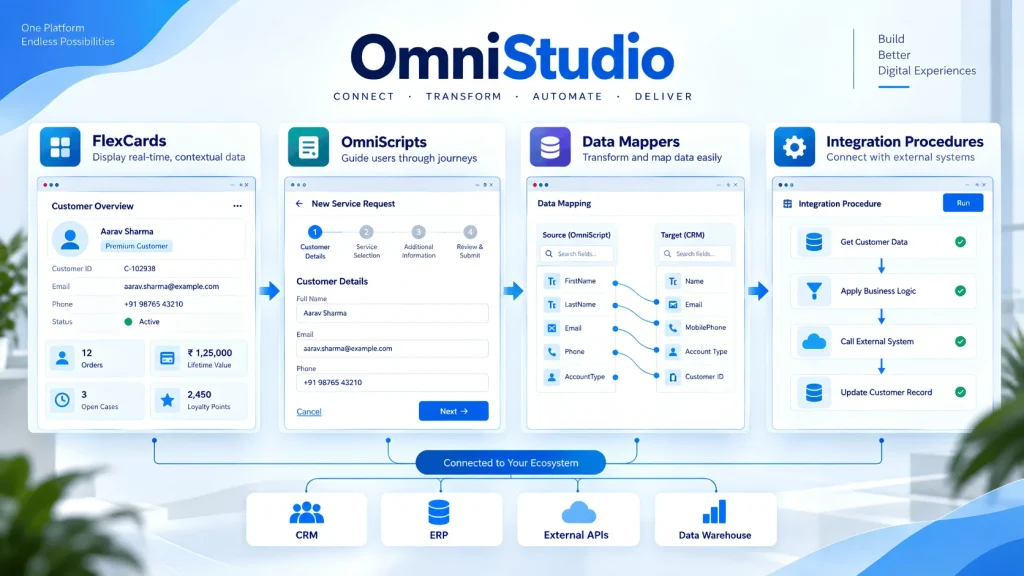
Salesforce’s current OmniStudio documentation groups its capabilities around four major components:
- FlexCards for displaying contextual information and actions
- OmniScripts for guided, step-by-step interactions
- Data Mappers for retrieving, transforming, and writing data
- Integration Procedures for server-side processing and integration operations
These components are designed to work together rather than operate as completely separate tools.
How Salesforce OmniStudio Works
A simple way to understand OmniStudio is to think about it as a combination of interface + process + data + integration.
For example, imagine an insurance company creating an online claim process.
The customer may first see a screen showing their policy information. A guided process then asks questions about the claim. Salesforce data is retrieved and transformed behind the scenes, while an external system may be called to verify additional information.
An OmniStudio solution could handle these different parts through its four core components:
FlexCard → OmniScript → Data Mapper → Integration Procedure → External or Salesforce Data
The components can pass information between each other to create a connected experience. Salesforce documentation explains that OmniScripts can use Data Mappers and Integration Procedures for data handling, while FlexCards can display information returned by those services.
4 Core Salesforce OmniStudio Components
1. FlexCards
FlexCards are visual UI components designed to show important information and available actions in a contextual format.
For example, a customer service representative might need to see:
- Customer name
- Account status
- Open cases
- Recent transactions
- Service details
- Available actions
Instead of opening several records, a FlexCard can bring relevant information together in one interface.
Salesforce describes FlexCards as components that display contextual information and allow users to launch relevant actions. They can also be used with Lightning Web Components and Experience Cloud experiences.
2. OmniScripts
OmniScripts are used to create guided, step-by-step business processes.
They are useful when users need to complete a process involving multiple questions, screens, decisions, or actions.
Examples include:
- Customer onboarding
- Insurance claims
- Loan applications
- Service requests
- Account updates
- Product applications
- Payment processes
An OmniScript can guide the user through the process while other OmniStudio components handle data retrieval and processing.
Salesforce describes OmniScripts as guided interactions that provide a configurable way to create consistent customer experiences.
3. Data Mappers
Data Mappers handle the movement and transformation of data.
They can retrieve Salesforce data, write data back to Salesforce, or transform information into another structure.
Salesforce currently provides four Data Mapper types:
| Data Mapper | Main Purpose |
|---|---|
| Extract | Retrieve data |
| Turbo Extract | Retrieve data from a single Salesforce object efficiently |
| Load | Create or update Salesforce data |
| Transform | Change data structure or format |
For example, an OmniScript could use a Data Mapper Extract to retrieve an Account record, allow the user to update information, and then use a Data Mapper Load to save the changes.
Salesforce documentation confirms that Data Mappers can retrieve, transform, and write data and can work with Salesforce and other OmniStudio components.
4. Integration Procedures
Integration Procedures handle more complex server-side data and integration operations.
They can work with Salesforce data, external APIs, Apex, and other data sources. Multiple actions can also be combined into a single server-side process.
For example:
OmniScript → Integration Procedure → Salesforce + External API → Response
This can be useful when a customer-facing process needs information from several systems.
Salesforce states that Integration Procedures can retrieve, transform, and send data between Salesforce and external systems, make REST API calls, call Apex, and execute multiple actions in a single server call.
For businesses that need to connect Salesforce with external applications, Salesforce Integration Services can be relevant when planning the wider integration architecture.
How the OmniStudio Components Work Together
The real value of OmniStudio comes from combining its components.
Consider a customer applying for a new service.
Step 1: FlexCard displays customer information
The customer or service agent sees account details and available actions.
Step 2: OmniScript starts the guided process
The user follows a series of steps to submit the application.
Step 3: Data Mapper retrieves information
Required Salesforce records are retrieved and placed into the process.
Step 4: Integration Procedure handles complex operations
The process can communicate with external systems, call APIs, perform calculations, or combine multiple data operations.
Step 5: Data Mapper saves information
After the process is completed, the required information can be written back to Salesforce.
This creates a structured architecture where each component has a specific responsibility.
What Are the Main Uses of Salesforce OmniStudio?
OmniStudio can be useful in industries where users need guided, personalized, data-driven experiences.
Customer Onboarding
Businesses can create guided onboarding processes that collect customer information, validate data, and create or update Salesforce records.
Insurance Processes
Insurance organizations can use guided experiences for claims, policy changes, customer information, and other multi-step processes.
Financial Services
OmniStudio can support applications, account services, eligibility workflows, and other customer interactions that require multiple steps and data sources.
Healthcare Experiences
Healthcare organizations can create guided interactions for registration, service requests, eligibility processes, and other structured workflows.
Telecommunications
Telecom companies can use OmniStudio for service activation, plan changes, customer onboarding, and other guided processes.
The exact capabilities available depend on the Salesforce products, industry solutions, runtime, and configuration used by the organization.
Salesforce OmniStudio Architecture
Salesforce’s learning materials describe OmniStudio using three broad layers:
| Layer | Components | Purpose |
|---|---|---|
| Digital Experience | FlexCards, OmniScripts | User interaction and guided experiences |
| Service Management | Data Mappers, Integration Procedures | Data processing and server-side operations |
| Developer Experience | Salesforce CLI and deployment tools | Development and movement of solutions |
The first layer focuses on what users see and interact with. The second handles data and business processing. The third supports development and deployment activities.
This layered approach helps teams separate the user experience from data processing and development operations.
OmniStudio vs Salesforce Flow
OmniStudio and Salesforce Flow are both declarative tools, but they can serve different types of requirements.
Salesforce Flow is widely used for automating business processes inside Salesforce. OmniStudio focuses more heavily on guided digital experiences, industry-specific interfaces, data interaction, and reusable integration processes.
For example:
| Requirement | Common Tool to Evaluate |
|---|---|
| Record-based automation | Salesforce Flow |
| Guided multi-step experience | OmniScript |
| Contextual information display | FlexCard |
| Salesforce data mapping | Data Mapper |
| Complex server-side integration | Integration Procedure |
| General Salesforce automation | Flow |
This does not mean one tool automatically replaces the other. In larger Salesforce environments, different tools can be used together depending on the process.
If you are reviewing Salesforce automation options, the Salesforce Flow Guide can provide additional context on Flow’s role in Salesforce automation.
Benefits of Salesforce OmniStudio
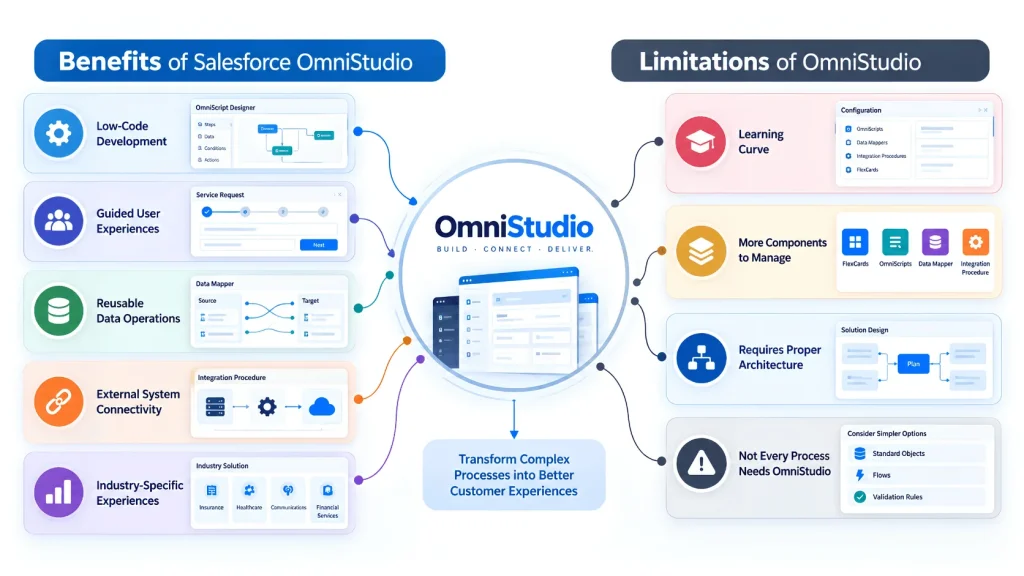
Low-Code Development
OmniStudio provides visual designers that allow teams to build many experiences without writing traditional code for every component. Salesforce describes its designers as declarative, drag-and-drop tools.
Guided User Experiences
OmniScripts can break complex processes into manageable steps, helping users complete tasks in a structured way.
Reusable Data Operations
Data Mappers and Integration Procedures can be reused across different OmniStudio components, which can reduce duplicated configuration.
External System Connectivity
Integration Procedures can communicate with external systems and APIs, making them useful for processes that require information beyond Salesforce.
Industry-Specific Experiences
OmniStudio is particularly relevant to Salesforce Industry Cloud scenarios where organizations need customized digital experiences around complex business processes.
What Are the Limitations of OmniStudio?
OmniStudio is powerful, but it is not necessarily the simplest tool for every Salesforce requirement.
Learning Curve
Although OmniStudio is low-code, teams still need to understand its components, data JSON, mappings, integration logic, designers, and deployment process.
Recent competitor coverage also highlights the learning curve as an important consideration when adopting OmniStudio.
More Components to Manage
A solution may involve an OmniScript, FlexCard, Data Mapper, and Integration Procedure working together. Poor design can make troubleshooting more difficult.
Requires Proper Architecture
Complex OmniStudio solutions should be planned carefully. Data flow, API calls, performance, security, and reusable components should be considered before development.
Not Every Process Needs OmniStudio
For a simple record update or straightforward automation, a standard Salesforce tool may be enough. Using a more complex framework when the requirement is simple can increase unnecessary maintenance.
How to Get Started With Salesforce OmniStudio
Before building an OmniStudio solution, start with the business process rather than the component.
Follow this approach:
Business Requirement → User Journey → Data Sources → OmniStudio Components → Testing → Deployment
First, identify what the user needs to accomplish.
Then determine what information is required and where that information comes from.
Next, select the appropriate components:
- FlexCard for contextual information and actions
- OmniScript for guided interactions
- Data Mapper for data retrieval, transformation, or writing
- Integration Procedure for server-side processing and integrations
Salesforce provides official learning material for OmniStudio through its documentation and Trailhead resources. The OmniStudio Basics Trailhead module covers the components, layers, and practical fundamentals.
Best Practices for OmniStudio Development
Keep Each Component Focused
Give every component a clear responsibility. Avoid putting unrelated logic into one OmniScript or Integration Procedure.
Reuse Data Services
Where possible, create reusable Data Mappers and Integration Procedures instead of rebuilding the same data logic for every experience.
Minimize Unnecessary Data
Only retrieve the information required for the current process. This can help keep responses efficient and easier to manage.
Plan Integrations Carefully
If external APIs are involved, document authentication, error handling, response formats, and performance requirements before development.
Test the Complete User Journey
Do not test only individual components. Test the entire process from the first user interaction through data retrieval, processing, integration, and final record updates.
For teams already managing Salesforce Flow and automation, understanding how different declarative tools fit together is also useful. iBirds’ guide on HTTP Callouts in Salesforce Flow provides additional context around Salesforce-to-external-system communication.
Salesforce OmniStudio: A Simple Example
Imagine a telecom customer wants to change their mobile plan.
The process could look like this:
Customer Information → Plan Selection → Eligibility Check → Price Calculation → Confirmation
A FlexCard could display the customer’s current plan.
An OmniScript could guide the customer through plan selection.
A Data Mapper could retrieve account and plan information.
An Integration Procedure could call an external pricing or eligibility service.
The final information could then be written back to Salesforce.
This example shows why OmniStudio is more than a simple form builder. Its components can work together to create a complete guided business process.
Is Salesforce OmniStudio Right for Your Business?
OmniStudio is worth evaluating when your Salesforce implementation needs:
- Guided multi-step experiences
- Industry-specific applications
- Custom customer or agent interfaces
- Data from multiple sources
- Reusable server-side processes
- External API integrations
- Low-code development
- Complex digital workflows
For simple record updates or straightforward internal automation, other Salesforce tools may be sufficient.
The right choice depends on the business process, user experience, data architecture, integrations, and Salesforce products already in use.
FAQs
What is Salesforce OmniStudio used for?
Salesforce OmniStudio is used to build guided digital experiences, industry-specific applications, data-driven interfaces, and complex business processes. Its main components help manage the user interface, guided workflows, data operations, and integrations.
Is Salesforce OmniStudio a low-code tool?
Yes. OmniStudio provides declarative, visual designers for building components such as OmniScripts, FlexCards, Data Mappers, and Integration Procedures. These tools reduce the need for traditional custom coding for many use cases.
What are the four main components of OmniStudio?
The four major components are FlexCards, OmniScripts, Data Mappers, and Integration Procedures. FlexCards handle contextual information and actions, OmniScripts provide guided interactions, Data Mappers manage data operations, and Integration Procedures handle server-side processing and integrations.
Is OmniStudio the same as Salesforce Flow?
No. Both are declarative Salesforce technologies, but they serve different types of requirements. Flow is widely used for Salesforce automation, while OmniStudio focuses strongly on guided digital experiences, industry-specific interfaces, data handling, and integration processes.
Does OmniStudio require coding?
Many OmniStudio solutions can be created using declarative tools without traditional coding. However, complex implementations may still use technologies such as Apex, APIs, JavaScript, or Lightning Web Components when additional customization is required. Salesforce’s current documentation describes OmniStudio as low-code rather than completely code-free.
Can OmniStudio connect to external systems?
Yes. Integration Procedures can communicate with external systems through APIs and can also work with Salesforce data and Apex. They are designed to combine multiple server-side operations and data sources into reusable processes.
Final Thoughts
Salesforce OmniStudio provides a structured low-code approach to building guided digital experiences, industry-specific applications, data interactions, and integrations.
Its four main components each have a specific role: FlexCards display information, OmniScripts guide users, Data Mappers handle data, and Integration Procedures manage complex server-side operations.
The biggest value comes when these components are designed together around a clear business process.
For organizations considering OmniStudio, the best starting point is not simply learning each component individually. Instead, identify the customer or employee journey first, map the required data and integrations, and then select the OmniStudio components that support that journey.