

Choosing a CRM is an important decision for a small business because the platform you select affects how you manage leads, customers, sales activities, marketing, reporting, and future growth.
Two of the most widely compared CRM platforms are Salesforce and HubSpot. Both provide contact management, sales pipelines, automation, reporting, integrations, and AI-powered features, but they approach CRM differently.
For small businesses, the decision usually comes down to more than the starting subscription price. Salesforce vs HubSpot for Small Business should be evaluated based on team size, sales process, marketing requirements, customization, technical resources, integrations, and long-term growth plans.
This guide compares the two platforms across the areas that matter most to small businesses.
Salesforce vs HubSpot
: Quick Comparison
| Factor | Salesforce | HubSpot |
|---|---|---|
| Main strength | Customization, CRM depth, scalability | Ease of use and connected sales & marketing |
| Setup | Can require more planning and configuration | Generally straightforward |
| CRM customization | Extensive | Strong, depending on plan |
| Marketing | Available through Salesforce products and suites | Strong native marketing ecosystem |
| Sales management | Advanced pipeline, forecasting and automation | Strong pipeline and sales tools |
| Reporting | Highly customizable | User-friendly reporting with advanced options on higher plans |
| Integrations | Large ecosystem and APIs | Large app marketplace and integrations |
| AI | Agentforce and Salesforce AI capabilities | Breeze and AI-powered tools |
| Small-team learning curve | Can be higher | Generally easier to adopt |
| Starting paid CRM price | Salesforce Starter Suite starts at $25/user/month | HubSpot offers free CRM tools; paid plans vary by product and tier |
| Growth potential | Highly scalable and customizable | Scales across multiple hubs and tiers |
Pricing and packaging can change, so businesses should verify current plans directly with the vendors before purchasing. Salesforce currently lists its Starter Suite at $25 USD per user per month, while HubSpot currently offers free CRM tools and paid CRM options beginning at different price points depending on the product and billing arrangement.
What Is the Difference Between Salesforce and HubSpot?
Salesforce is a broad CRM platform designed to support complex sales, service, data, automation, analytics, integrations, and customized business processes.
HubSpot takes a more unified approach around CRM, marketing, sales, service, content, and customer data. Its interface and product structure are designed to make adoption easier for teams that want multiple customer-facing functions connected in one ecosystem.
The difference becomes more noticeable when a small business starts adding custom processes.
For example, a company with a simple lead-to-customer journey may primarily need contact management, email communication, deals, and basic automation. Another company may need multiple sales processes, custom objects, advanced approval logic, complex integrations, detailed permissions, and specialized reporting.
The second situation generally requires more CRM planning and configuration.
Salesforce vs HubSpot for Small Business: Pricing
Pricing is one of the first things small businesses compare, but looking only at the advertised starting price can be misleading.
Salesforce Pricing
Salesforce currently lists its Starter Suite at $25 USD per user per month, with features covering sales, service, marketing, lead management, automation, and other CRM capabilities. Salesforce also offers higher-level suites such as Pro Suite and more advanced Sales Cloud editions.
The important point is that Salesforce pricing can increase as an organization requires more advanced functionality, additional products, AI capabilities, integrations, or higher-level editions.
HubSpot Pricing
HubSpot provides free CRM tools with features such as contact management, deal pipelines, CRM import, reporting dashboards, and its Breeze Assistant. Its paid plans vary depending on whether a business purchases CRM, Sales, Marketing, Service, or other functionality.
For example, HubSpot currently lists Sales Hub Starter from $20 per seat per month when billed annually, while Professional and Enterprise tiers are priced considerably higher and can include additional onboarding or usage-related costs.
Therefore, small businesses should compare the complete package they actually need, rather than comparing only the lowest advertised price.
Ease of Use and Setup
Ease of adoption can have a major effect on a small team’s CRM success.
HubSpot is commonly positioned around straightforward implementation and an approachable interface. This can be useful for teams where employees need to start managing contacts, deals, emails, and marketing activities without extensive CRM administration.
Salesforce offers significant configuration flexibility, but that flexibility can also mean more decisions during implementation.
Salesforce itself says small businesses in its FY25 customer success metrics implemented Salesforce in an average of 17 days, based on 202 small businesses. HubSpot and other independent comparison sources use different methodologies and implementation assumptions, so implementation-time figures should not be treated as directly equivalent benchmarks.
The practical question for a small business is therefore:
How much CRM configuration does your business actually need?
Customization and Flexibility
Customization is one of the biggest differences to consider in a Salesforce vs HubSpot comparison.
Salesforce supports extensive customization of objects, fields, automation, permissions, interfaces, reports, and business processes. It also provides APIs and a large ecosystem for extending the platform.
This can be valuable when a company has unique sales or service processes.
For example, a growing company might need:
- Multiple sales pipelines
- Custom objects
- Complex approval processes
- Advanced automation
- Custom dashboards
- Specialized data relationships
- External system integrations
- Detailed user permissions
Salesforce is designed to support these types of requirements.
HubSpot also provides customization, automation, reporting, custom properties, and higher-tier features such as custom objects. However, the exact capabilities depend on the Hub and subscription level.
Sales and Pipeline Management
Both platforms can manage leads, contacts, opportunities, activities, and sales pipelines.
Salesforce provides advanced sales capabilities including pipeline management, forecasting, opportunity scoring, automation, and customizable sales processes. Its current small-business offerings also include built-in sales flows and lead routing.
HubSpot provides deal pipelines, contact management, sales tools, email features, automation, and reporting. Its Sales Hub expands these capabilities at higher subscription levels.
For a small business, the important consideration is not simply the number of features.
Ask:
- How many sales stages do we need?
- Do we need multiple pipelines?
- Do we need forecasting?
- How complex is our lead-routing process?
- Will sales automation become more advanced over time?
These questions provide a better basis for comparison than feature counts alone.
Marketing Automation
Marketing is another important area where the two platforms take different approaches.
HubSpot is strongly associated with connecting CRM and inbound marketing activities. Businesses can use its ecosystem for marketing, content, sales, service, and customer data.
Salesforce also provides marketing capabilities through its broader product ecosystem. Its current Starter Suite includes features such as dynamic email nurture campaigns and lead scoring.
The right comparison depends on the type of marketing a small business performs.
A company primarily focused on email campaigns, content, website leads, and inbound marketing may evaluate HubSpot’s marketing ecosystem closely.
A business that expects marketing to become part of a larger Salesforce-based sales, service, data, and automation environment may evaluate Salesforce’s broader ecosystem.
Automation and AI
CRM automation can help small teams reduce repetitive work.
Salesforce offers Flow-based automation and increasingly integrates AI capabilities through Agentforce and other Salesforce products.
HubSpot also provides automation and AI capabilities through Breeze and its different product tiers. Its current CRM offerings include Breeze Assistant, while higher plans provide additional AI and automation capabilities.
When comparing AI, businesses should look beyond the word “AI.”
Consider:
- Which tasks can actually be automated?
- Are AI features included in the selected plan?
- Are there usage limits or credits?
- Does the AI work with the business’s existing data?
- What permissions and security controls are available?
This gives a more realistic picture of AI value.
Reporting and Analytics
Reporting becomes increasingly important as a small business grows.
Salesforce provides highly configurable reports and dashboards and can support detailed sales, service, and operational reporting.
HubSpot also provides reporting and dashboards, with more advanced reporting capabilities available in higher tiers.
A simple business may only need reports such as:
- Leads created
- Deals won
- Deals lost
- Sales revenue
- Conversion rate
- Sales activity
- Marketing performance
A more complex organization may require customized reporting across multiple teams, objects, processes, and data sources.
Integrations
Integrations become important when a CRM needs to communicate with other business systems.
Salesforce supports integrations with ERP systems, accounting platforms, marketing systems, communication tools, ecommerce platforms, and custom applications through its ecosystem and APIs.
HubSpot also provides a broad integration ecosystem and offers a Salesforce integration through the HubSpot App Marketplace.
For businesses already using several applications, it is worth creating an integration map before choosing a CRM.
For example:
Website → Lead Source → CRM → Sales Team → Accounting → Customer Support → Reporting
A CRM should fit into this workflow instead of creating another isolated system.
Salesforce vs HubSpot: Scalability
Scalability does not only mean having more users.
A scalable CRM should also support increasing:
- Customer records
- Sales processes
- Automation
- Reporting requirements
- Integrations
- Departments
- Permissions
- Data complexity
Salesforce is designed to support extensive customization and complex business processes, while HubSpot provides a connected platform that can expand through its different Hubs and subscription levels.
The best option therefore depends on how the business expects its operations to evolve.
Salesforce vs HubSpot for Different Small Business Needs
| Business Requirement | Salesforce | HubSpot |
|---|---|---|
| Simple contact management | Suitable | Suitable |
| Quick CRM adoption | Suitable with appropriate setup | Often straightforward |
| Inbound marketing | Strong ecosystem | Strong native focus |
| Complex sales processes | Strong | Suitable depending on requirements |
| Advanced customization | Extensive | Available, plan dependent |
| Multiple business processes | Strong | Suitable depending on plan |
| Advanced integrations | Strong | Strong |
| Small team with limited technical resources | Requires careful planning | Often easier to start |
| Growing operational complexity | Strong | Can scale through higher tiers |
| Detailed CRM governance | Strong | Available with higher-level features |
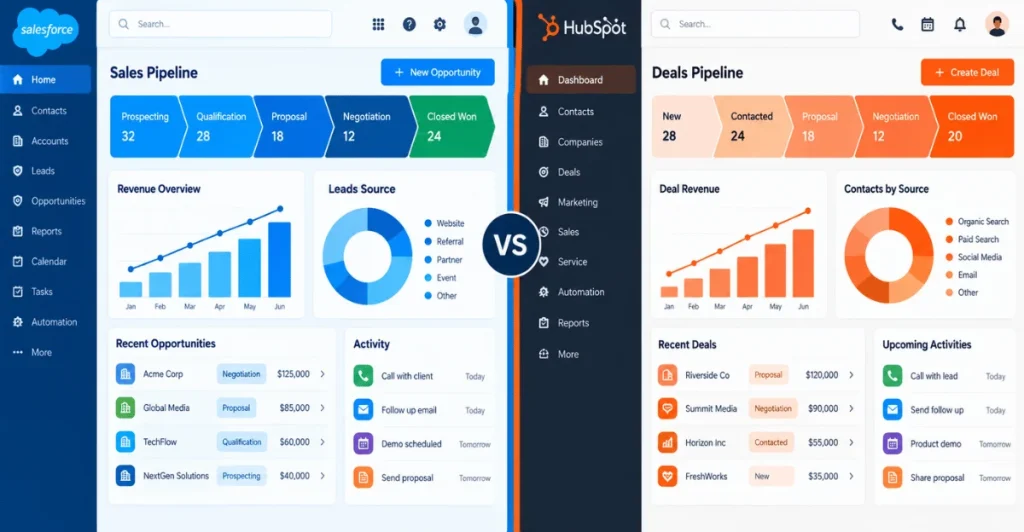
This table is a practical way to understand the difference without treating one CRM as universally suitable for every small
business.
How to Choose Between Salesforce and HubSpot
Before selecting a CRM, evaluate your business using these questions.
1. How large is your team?
A five-person startup may have very different CRM requirements from a 40-person company with dedicated sales and operations teams.
2. How complex is your sales process?
If your sales process has only a few stages, a simpler CRM setup may be enough.
If it includes multiple pipelines, complex approvals, territory management, forecasting, or custom workflows, deeper CRM configuration may become important.
3. How important is marketing?
If marketing, content, lead generation, and sales need to operate closely together, compare the marketing capabilities and pricing of both ecosystems.
4. How much customization do you need?
List your required custom fields, objects, workflows, reports, integrations, and permissions before making the decision.
5. Who will manage the CRM?
Consider whether you have:
- An internal CRM administrator
- A technical team
- A sales operations person
- An external Salesforce or CRM consultant
- No dedicated CRM resource
This can significantly affect implementation and ongoing management.
6. What will you need two years from now?
Avoid choosing a CRM based only on today’s requirements.
Create a simple roadmap covering your expected growth, sales process, customer service requirements, integrations, and reporting needs.
Can a Small Business Use Salesforce?
Yes. Salesforce has dedicated small-business offerings, including Starter Suite and Pro Suite. Salesforce currently positions Starter Suite as a CRM for small businesses covering sales, service, marketing, and commerce-related capabilities.
The important consideration is whether the business will actually use the platform’s capabilities.
A small company with straightforward requirements should compare the cost and management effort of the selected Salesforce edition against its actual needs.
For businesses expecting more complex CRM processes, integrations, or customization, Salesforce can provide a platform that supports those requirements.
Can a Small Business Use HubSpot?
Yes. HubSpot CRM provides free CRM tools and paid plans designed for businesses at different stages. Its free CRM includes capabilities such as contact management, deal pipelines, CRM import, reporting dashboards, and Breeze Assistant.
Its free CRM includes capabilities such as contact management, deal pipelines, CRM import, reporting dashboards, and Breeze Assistant.
As requirements grow, businesses can add paid functionality across Sales, Marketing, Service, Content, Data, and other HubSpot products.
However, businesses should carefully review how pricing changes when they add users, advanced features, contacts, automation, or multiple Hubs.
Salesforce vs HubSpot: Migration and Integration Considerations
Businesses should also consider what happens to their existing data.
CRM migration may involve:
- Contacts
- Accounts
- Leads
- Opportunities
- Activities
- Custom fields
- Historical data
- Marketing information
- Integrations
- User permissions
If a business is moving from HubSpot to Salesforce or connecting Salesforce with another CRM or business application, data mapping and integration planning should be completed before implementation.
A structured Salesforce Integration Services approach can help businesses connect Salesforce with ERP, accounting, marketing, ecommerce, and other systems while maintaining consistent data flow.
Common Mistakes When Choosing a CRM
Small businesses can make CRM selection harder by focusing only on one factor.
Common mistakes include:
- Choosing based only on monthly price
- Buying features the team will not use
- Ignoring implementation requirements
- Not checking integration requirements
- Underestimating data migration
- Ignoring user adoption
- Failing to plan for future growth
- Comparing product names instead of actual features in the selected plans
A better process is to document your requirements first and then compare both platforms against the same list.
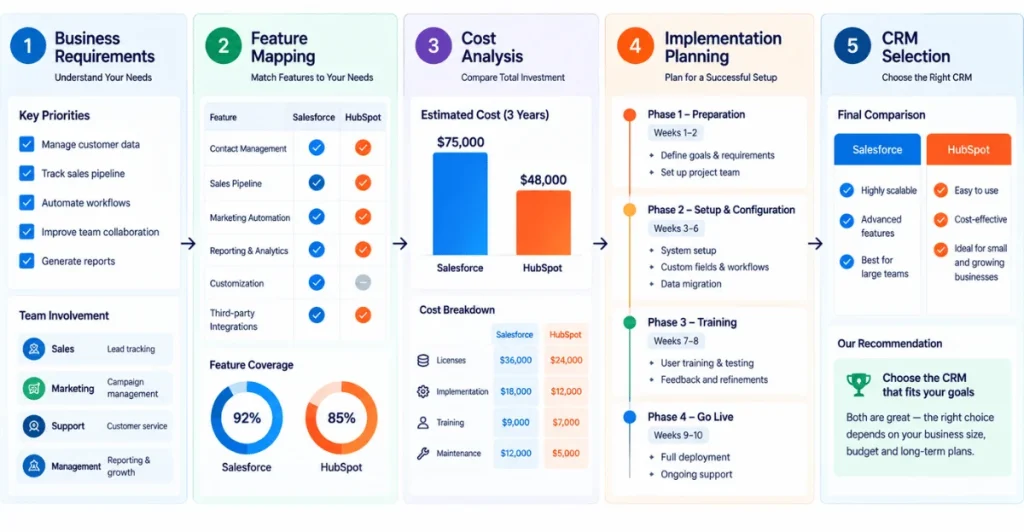
A Simple CRM Selection Framework
Use this five-step process:
Business Requirements → Feature Mapping → Cost Analysis → Implementation Planning → Final Selection
Start by documenting your current process.
Then identify which Salesforce or HubSpot features support each requirement.
After that, calculate the expected subscription and implementation costs.
Finally, consider training, administration, integrations, migration, and future expansion.
For businesses selecting Salesforce, professional Salesforce Implementation Services can help with assessment, planning, migration, configuration, training, and deployment.
Salesforce vs HubSpot for Small Business: Final Considerations
There is no single CRM configuration that fits every small business.
HubSpot provides free CRM tools and a connected ecosystem across sales, marketing, service, content, and customer data. Salesforce provides extensive CRM customization, automation, integrations, and scalability across different business processes.
The better way to approach Salesforce vs HubSpot for Small Business is to start with your own requirements.
If your priorities are simple adoption, integrated marketing, and getting a CRM running with limited configuration, examine HubSpot’s current plans and capabilities.
If your priorities include advanced customization, complex sales processes, deeper CRM governance, or extensive integrations, examine the Salesforce editions and capabilities that match those requirements.
The final decision should be based on your team, workflow, budget, technical resources, and expected growth, rather than simply choosing the platform with the lowest entry price.
FAQs
Is Salesforce or HubSpot easier for a small business?
Ease of use depends on the business process and the team’s technical experience. HubSpot is generally designed around straightforward CRM adoption, while Salesforce provides more configuration options that can require additional planning.
Is Salesforce more expensive than HubSpot?
The answer depends on the specific products, users, features, billing terms, and add-ons selected. Salesforce currently lists Starter Suite at $25 per user per month, while HubSpot provides free CRM tools and multiple paid tiers. Comparing complete packages is more useful than comparing entry prices alone.
Can a small business start with Salesforce?
Yes. Salesforce offers small-business products such as Starter Suite and Pro Suite. Starter Suite currently starts at $25 per user per month and includes CRM capabilities across areas such as sales, service, and marketing.
Can Salesforce and HubSpot work together?
Yes. HubSpot provides a Salesforce integration through its App Marketplace. The exact capabilities depend on the selected Salesforce and HubSpot subscriptions and integration configuration.
Which CRM is better for a growing business?
Growth requirements differ from business to business. Salesforce provides extensive customization and scalability, while HubSpot provides a connected platform that can expand through its different products and subscription tiers. Businesses should compare their expected sales, marketing, service, data, and integration requirements before selecting a platform.
What should a small business check before buying a CRM?
Check the total subscription cost, required features, implementation effort, integrations, data migration, automation, reporting, user adoption, administration requirements, and expected future needs. A CRM should support the way your business operates rather than forcing the business into an unsuitable process.