

Salesforce reporting plays an important role in helping RevOps teams track pipeline, revenue, opportunities, and sales performance. But when reports and dashboards are created without a clear structure, simple reporting tasks can quickly become difficult to manage.
It’s easy to move fast by creating a new report, cloning an existing dashboard, or adding more fields whenever a new requirement comes up. But taking time to organize your Salesforce reporting properly can save hours later. If you’ve ever spent too much time searching through Salesforce reports to find the right field, filter, or dashboard, this guide is for you.
The goal is simple: help your team save time, improve data visibility, and build organized RevOps reporting in Salesforce that remains easier to manage as your reporting needs grow.
1. Reduce and Reuse
We’ve all done it. You can’t find the right Salesforce report, so you create a new one. It feels faster, but it quickly creates reporting clutter. A better approach is to standardize your reports by defining naming conventions, required columns, and filter logic so your Salesforce reports are easier to reuse.
Here’s a quick win: remove redundant columns. If a report is already filtered to “Closed Won,” you may not need a “Stage” column. When reviewing your Salesforce report from left to right, ask yourself:
Who is reading this report?
What story am I trying to tell?
Can I remove anything without losing clarity?
Simplify the report view, collapse detailed rows, and remove unnecessary visual information. Clean and standardized Salesforce reports make it easier for RevOps teams to review data and find the information they need.
For teams that need help structuring their Salesforce reporting setup, Salesforce Consulting Services can help create reporting standards that fit your business requirements.
Example of what not to do:
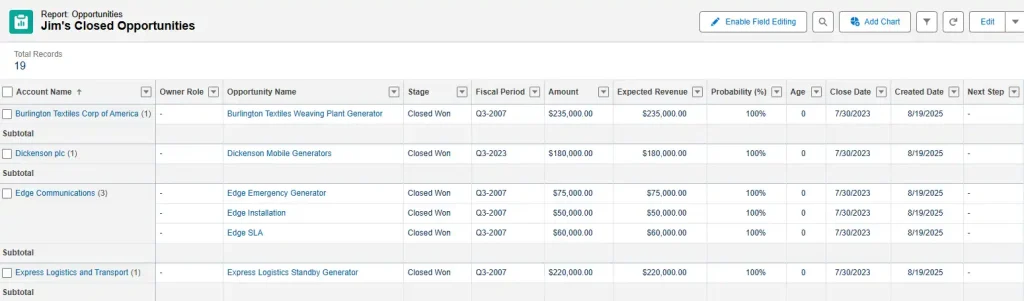
Take note of the factors that can make a Salesforce report cluttered and redundant:
- Incomplete data in important columns.
- The title uses a generic person’s name and does not specify the reporting date range.
- Stage appears in both the title and the filter as Closed Won.
- Multiple revenue columns make it unclear which revenue metric matters most.
- Probability may not be necessary when the opportunity is already Closed Won and has reached 100% in most Salesforce orgs.
Here’s a better example:
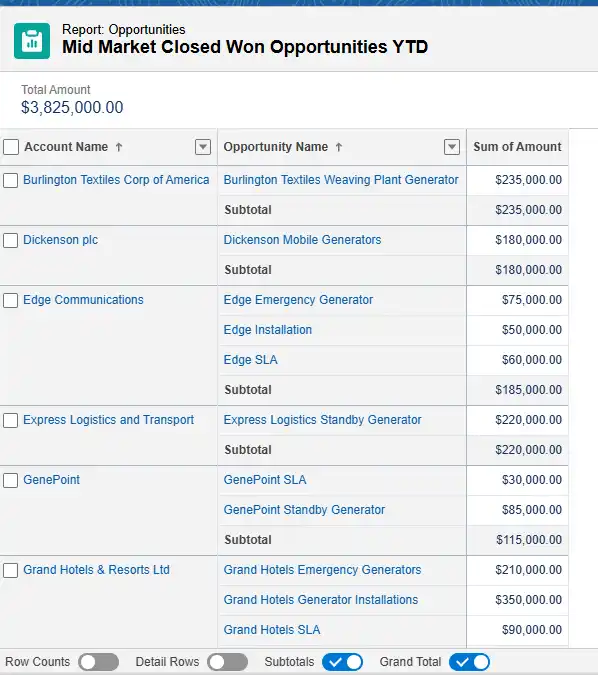
- Descriptive and accurate report title.
- Detailed rows are collapsed.
- One clear revenue metric.
- Opportunities are sub-totaled by Account when useful.
- Relevant columns are organized according to the report’s purpose.
Remember to clean up detailed columns so that when someone drills down into the Salesforce data, the report remains organized and easy to understand, even when additional details are requested.
2. Organize and Label Everything
Small details matter in Salesforce reporting. Titles written in ALL CAPS can feel like someone is shouting, while unclear report names make it difficult to find the information you need. Take a moment to label your Salesforce reports the same way you would organize files for another team member.
Write titles that clearly reflect the main purpose of the report. Instead of “John’s Sales,” use a name such as “Closed Won Opportunities – John.”
Even better, avoid using a specific person’s name when possible. Make the report dynamic by using the “My Opportunities” filter and label it “My Closed Won Opportunities – AE Version.”
Lastly, don’t forget to use the report description field. It can explain what the report is designed to show, who should use it, and which filters are important.
For organizations that need consistent Salesforce setup and report organization, Salesforce Implementation Services can help establish a reporting structure that is easier for teams to manage.
3. Gone in 60 Seconds
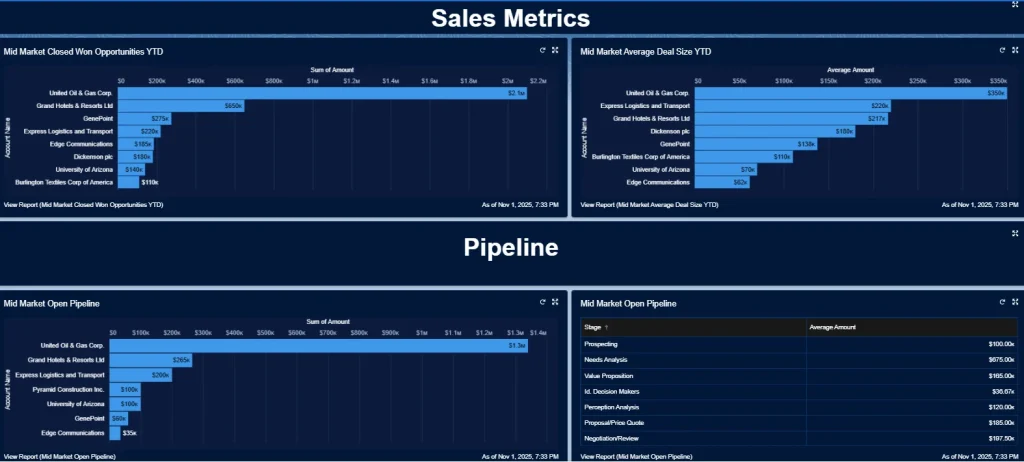
Every Salesforce dashboard should tell one clear story using one source of truth whenever possible. When building a dashboard, start with a reliable dataset and adjust filters for each component. This keeps information consistent whether you are showing open pipeline, closed revenue, or another sales metric.
From there, structure the dashboard so the information follows a logical order, with total sales at the top, followed by pipeline information and then breakdowns by team or segment. The goal is for someone to understand the main story in under a minute. If they need much longer to understand the dashboard, it may be too complicated.
When designing a Salesforce dashboard, think about how people view information. Users generally scan from top to bottom and left to right. Put the most important metrics at the top, remove distractions, and make the dashboard easy to understand within seconds.
A useful dashboard might start by answering, “How much did we sell so far this year in the Mid-Market segment by top accounts?” The next section can provide more detail, such as “What was the average deal size per account?” A separate section can then guide users toward open pipeline reports.
One report can answer an account-based open pipeline question, while another can show the average revenue currently associated with each opportunity stage. These reports can use similar Salesforce reporting data with different filters and dashboard components.
For teams that need better dashboard design and reporting visibility, Salesforce Analytics Services can support the creation of dashboards that present important business information clearly.
4. Create Documentation to Align Your Teams
Nothing slows a RevOps team down faster than multiple versions of the same Salesforce report. When each team creates its own version of the data, it becomes difficult to know which report should be trusted. The solution is a framework, a standard operating procedure (SOP), and an agreed set of reporting rules.
Create clear reporting standards for your Salesforce org. Decide as a team which filters and fields should be included in standard Opportunity, Account, Contact, Lead, and Case reports. Document those rules and store the documentation somewhere the team can easily access it.
Documentation should also explain report naming, required fields, filter logic, dashboard standards, and when existing reports should be reused instead of creating new ones.
When everyone follows the same reporting guidelines, Salesforce reports become more consistent, teams spend less time comparing different versions, and leadership can work from more reliable information.
For teams that need structured Salesforce processes and documentation, Salesforce Administration Services can help maintain reporting standards and keep the Salesforce environment organized.
5. Clean Up and Archive Reports
If nobody has opened a Salesforce report in six months, it may no longer be useful.
Run a “report of reports” using a custom report type with Reports as the primary object and Dashboards as a secondary object. This can help you review report usage and identify dependencies before archiving reports that are no longer needed.
Before removing or archiving a report, check whether it is connected to an active dashboard, used by another team, or required for an existing business process. This prevents useful reporting assets from being removed by mistake.
Over time, regular Salesforce report cleanup reduces reporting clutter and makes it easier to manage the reports and dashboards that teams actually use. A smaller, organized reporting library also makes it easier for RevOps teams to find the right information when they need it.
For ongoing Salesforce environment cleanup and optimization, Salesforce Managed Services can help teams maintain reports, dashboards, and other Salesforce components as reporting requirements change.
Final Thoughts
If you take the time to organize your Salesforce reporting early, you can save your RevOps team from many reporting problems later. That is why these practices are worth building into your regular Salesforce workflow.
“Slow is fast” is not just a simple saying. It is a practical approach to creating reliable, consistent reporting. When your reports, dashboards, filters, and data follow a clear structure, your team can work faster without sacrificing clarity.
Start with one or two of these ideas and apply them to your Salesforce reporting process. Small improvements to report organization, dashboard design, documentation, and cleanup can make daily reporting easier to manage.
As Salesforce connects with more systems and business processes, keeping reporting structured becomes even more important. Salesforce Integration Services can help businesses connect Salesforce with other systems while keeping data flow aligned with reporting requirements.
Good reporting does not need to be complicated. When the data is clear and the structure is right, better decisions become easier to make.
FAQs
1. What is RevOps reporting in Salesforce?
RevOps reporting in Salesforce uses reports and dashboards to track sales pipeline, revenue, opportunities, team performance, and other business data. It helps RevOps teams work with consistent and organized information.
2. How can Salesforce improve RevOps reporting?
Salesforce can improve RevOps reporting by bringing sales data into a structured system where teams can create reports, dashboards, filters, and metrics based on business requirements.
3. How do I organize Salesforce reports for RevOps?
Start by using clear report names, standard filters, required columns, and consistent reporting rules. Remove duplicate reports and archive reports that are no longer needed.
4. What should a Salesforce RevOps dashboard include?
A RevOps dashboard should include the metrics that matter most to the team, such as sales revenue, open pipeline, opportunities, conversion data, and performance by team or segment.
5. Why is Salesforce report documentation important?
Salesforce report documentation helps teams follow the same rules for filters, fields, naming, and reporting logic. This reduces duplicate reports and makes business data easier to understand.
6. How often should Salesforce reports be cleaned up?
Salesforce reports should be reviewed regularly to identify unused, duplicate, outdated, or unnecessary reports. Checking report usage and dependencies can help teams archive reports safely.