

Agentforce Revenue Management, formerly known as Revenue Cloud Advanced (RCA), provides new capabilities for managing revenue processes across the Salesforce platform. Because of this, many Salesforce teams are planning to move from Salesforce CPQ to Revenue Management. However, the migration can introduce metadata, configuration, data, and deployment challenges that require careful planning.
To keep your Salesforce migration project on track, here are three important considerations to include in your Revenue Management migration plan before development and deployment begin.
1. How Will You Keep Project Environments in Sync With Production?
The challenge: Salesforce teams often develop their Revenue Management configuration in separate project environments while keeping these changes isolated from regular business-as-usual (BAU) development.
It is important to keep your project environment aligned with the latest changes in production. This helps ensure that the Revenue Management configuration you are building will work correctly with the existing Salesforce environment when it is released. Without regular synchronization, teams can face deployment errors, conflicts, and unexpected configuration issues.
The challenge becomes greater when your new Revenue Management configuration does not yet exist in production. A standard sandbox refresh can overwrite active migration work, remove in-progress configuration, and create additional rework for the project team.
What to consider: Traditional sandbox refreshes may not always be practical during a Salesforce CPQ migration project. You need a clear approach for keeping environments aligned without losing active development work. This can include selective deployments for specific metadata, regular synchronization of important components, and controlled deployment processes as the Revenue Management configuration changes.
For teams moving from Salesforce CPQ to Revenue Management, Salesforce Data Migration Services can help plan and manage the movement of required data while keeping the migration process structured across Salesforce environments.
2. Are You Equipped to Deploy New and Complex Configuration Data and Metadata Types?
The challenge: Like Salesforce CPQ, Revenue Management relies on metadata and configuration data, which can make deployments more complex. The challenge is not only understanding new metadata types, but also managing configuration data and metadata together during the deployment process.
Salesforce teams can overlook the need for external IDs that connect related configuration data or miss dependencies between metadata and configuration records. Revenue Management can include components such as Product Catalog Management (PCM) and pricing rules, which may depend on specific relationships, dependencies, and deployment sequences that do not always work like standard Salesforce metadata.
What to consider: Make sure your Salesforce DevOps tools and deployment process can support Revenue Management configuration data and metadata types. Give your team enough time to test early deployments and understand how Revenue Management configuration behaves across Salesforce environments. It is also important to review your existing release process to confirm that it can manage configuration and metadata dependencies efficiently.
For teams handling complex Revenue Management deployments, Salesforce DevOps Services can help establish a structured deployment process and reduce issues caused by configuration and metadata dependencies.
3. How Will You Map Existing Custom Configuration to New Revenue Management Functionality?
The challenge: If you are migrating from an existing Salesforce CPQ or billing system, your organization may have years of customizations to review. It is not always clear which custom configurations should be rebuilt, which should be retired, and which can now be replaced by standard Revenue Management functionality.
What to consider: Set aside time at the beginning of the Salesforce CPQ migration to audit your existing configuration. Identify areas where custom logic, objects, or processes overlap with Revenue Management capabilities. This allows your team to rebuild only the functionality that is not already supported, helping reduce unnecessary complexity and making the Salesforce environment easier to maintain.
A detailed configuration review can also help teams make better decisions about legacy customizations before they become part of the new Revenue Management setup. This creates a cleaner foundation and makes it easier to manage future Salesforce updates.
For organizations reviewing existing CPQ customizations before moving to Revenue Management, Salesforce Consulting Services can help assess the current setup and plan the right migration approach.
How iBirds Services Supports Salesforce Revenue Management Implementations
iBirds Services helps Salesforce teams manage Revenue Management projects with a structured approach, from planning and configuration to testing, deployment, and ongoing optimization. Whether the project is small or involves complex CPQ migration requirements, each stage can be planned around the organization’s existing Salesforce environment.
Structured Revenue Management Implementation
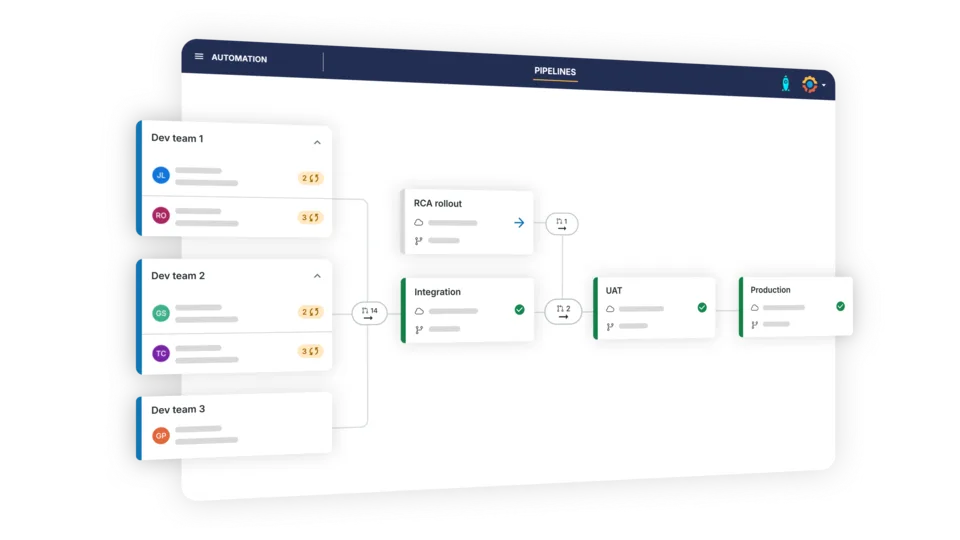
A Revenue Management implementation requires careful planning of configuration, business processes, and Salesforce environments. A structured implementation approach helps teams keep project requirements organized and reduces issues as the new functionality is introduced.
With Salesforce Implementation Services, teams can plan the Revenue Management setup around their existing Salesforce processes and business requirements while keeping the implementation organized from the beginning.
Test Configuration Before Deployment
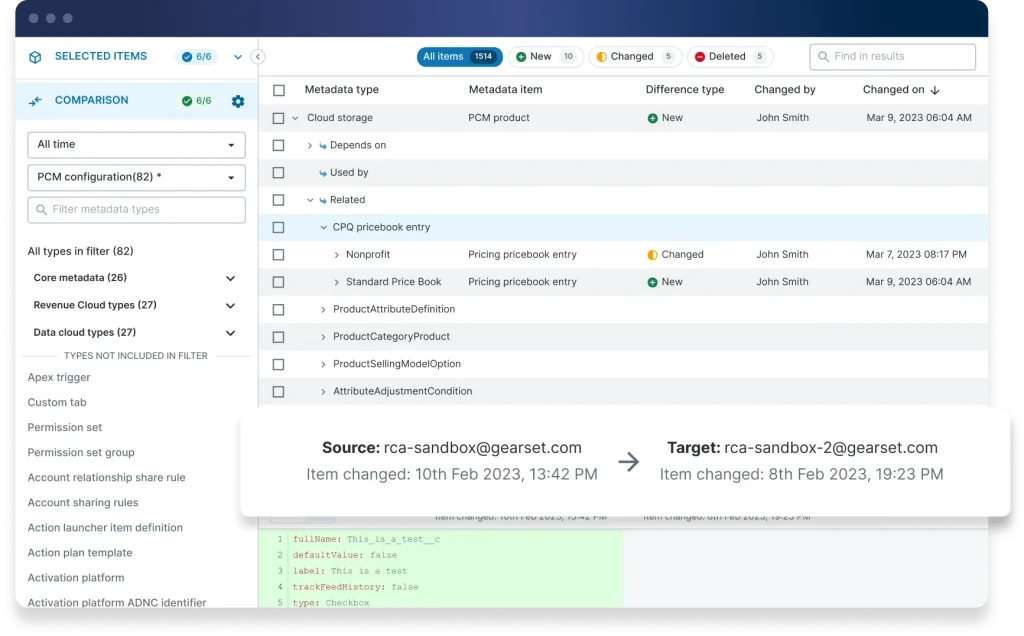
Revenue Management can introduce new configuration, pricing rules, product structures, and dependencies that need to work correctly before they reach production. Testing these components early can help identify configuration issues before they affect business operations.
Salesforce QA Testing Services can help teams validate Revenue Management functionality across different scenarios, check configuration dependencies, and identify issues before production deployment.
Review and Optimize the Salesforce Environment
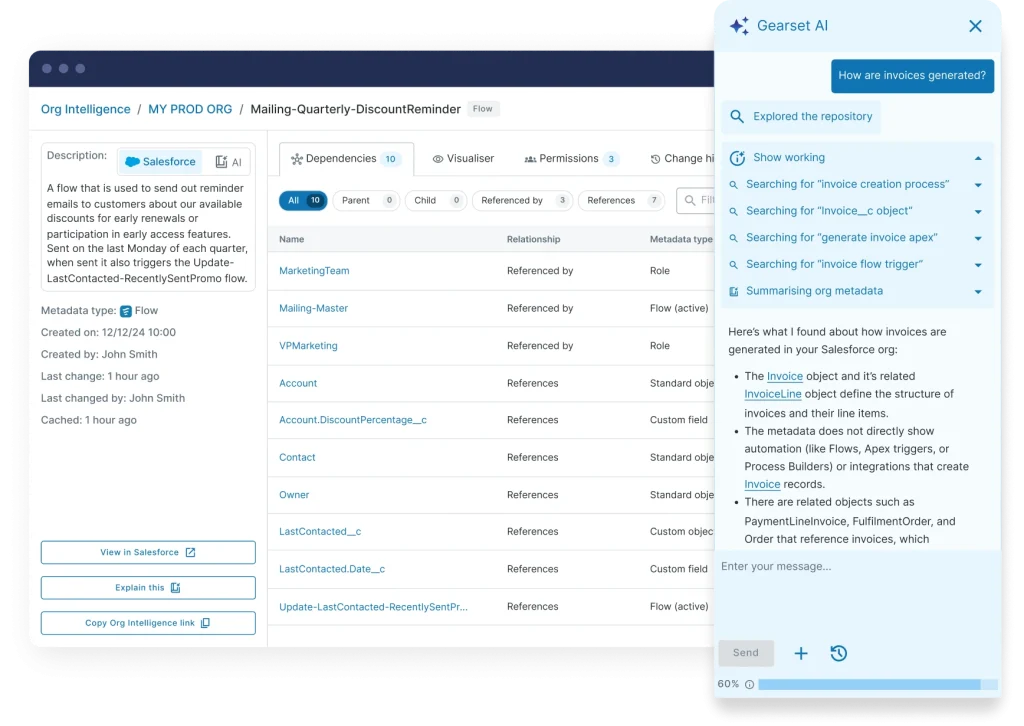
A successful Revenue Management project does not end with the initial migration or deployment. Salesforce teams also need to review how the new functionality performs with existing processes, integrations, and business requirements.
With Salesforce Optimization Services, teams can review the Salesforce environment after implementation, identify areas that need improvement, and keep Revenue Management aligned with changing business requirements.
Make Your Salesforce Revenue Management Migration Successful
Moving from Salesforce CPQ to Revenue Management requires more than replacing one system with another. Environment planning, configuration management, deployment testing, and a clear review of existing customizations all play an important role in the migration process.
With the right Salesforce strategy and implementation approach, teams can reduce unnecessary rework, manage configuration more effectively, and create a stronger foundation for future Revenue Management requirements.
FAQs
1. What is Salesforce CPQ to Revenue Management migration?
Salesforce CPQ to Revenue Management migration involves moving existing CPQ processes, data, configurations, and business requirements into Salesforce Revenue Management while reviewing existing customizations.
2. How do I prepare for a Salesforce CPQ migration?
Start by reviewing your existing CPQ configuration, data, custom logic, integrations, and business processes. Then identify what should be migrated, replaced, or retired.
3. What are the main challenges when migrating from Salesforce CPQ?
Common challenges include managing configuration data, metadata dependencies, existing customizations, data migration, environment synchronization, and deployment testing.
4. How should Salesforce CPQ data be handled during migration?
Salesforce CPQ data should be reviewed and mapped before migration. Teams should identify required records, relationships, external IDs, and dependencies to ensure the data fits the new Revenue Management structure.
5. Why is testing important when moving from Salesforce CPQ?
Testing helps identify configuration, data, integration, and deployment issues before the new Revenue Management functionality reaches production. It also helps confirm that important business processes continue to work correctly.
6. Can existing Salesforce CPQ customizations be reused?
Some customizations may still be required, while others may be replaced by standard Revenue Management functionality. An audit of the existing CPQ environment can help determine what should be retained, rebuilt, or retired.