Salesforce Administration is not only about managing users and fields; it is about protecting business data, ensuring system performance, and building a CRM environment that grows with the organization....
Salesforce Permissions: Your Strongest Defense or Your Biggest Blind Spot? Salesforce permissions are very powerful. When configured correctly, they protect sensitive data and control user access. But when permissions...
What’s Next for Flow? Salesforce Shares What’s Coming Next Salesforce Flow is no longer just a background automation tool. It has been in focus for a long time and...
After spending many years in the Salesforce ecosystem, most experienced Salesforce professionals reach a stage where growth feels slower and opportunities seem limited compared to the pandemic boom. This...
Do you work with someone who moves very fast but struggles with documentation? Or someone who goes deep into technical topics but sometimes misses social signals? You may also...
Salesforce administrators face one persistent challenge across almost every organization—customer data spread across multiple systems. Sales activity exists in Sales Cloud, marketing engagement lives in Marketing Cloud, support interactions...
Dreamforce 2025, the most anticipated event in the Salesforce ecosystem, concluded last week in San Francisco—and it delivered on every expectation. Once again, the city was filled with Trailblazers...
Dreamforce 2025 was a big moment for the Salesforce Admin community, and Admin Keynote Day stood out as one of the most talked-about sessions. If you missed the keynote...
It has been almost three years since artificial intelligence entered the mainstream conversation with the launch of tools like ChatGPT. At that time, AI was expected to completely transform...
Salesforce has officially unveiled Setup Powered by Agentforce, an AI-driven administration upgrade built directly in response to long-standing admin complaints that the current Setup experience was “not acceptable.” The...
In modern Salesforce development, release cycles move faster than most documentation practices. As teams focus on delivering new features, keeping documentation for Salesforce Apex classes current is often postponed...
If your business needs to move data between Salesforce and other platforms, Realtime Salesforce Integrations offer a dependable way to keep operations aligned. Whether it involves syncing QuickBooks, Workday,...
Managing Salesforce data deployments, such as reference data like Price Book entries, alongside metadata has always been challenging. Traditionally, configuration data updates are done manually or through separate scripts...
Smart scheduling is the heart of smooth work. It is more than simple planning. It is how people, rooms, tools, and time come together in the right way. In...
Implementing Salesforce is a decision that has the potential to transform your business. Whether that transformation becomes a success or a challenge depends entirely on how well your implementation...
Developing a clear, maintainable object-permissions strategy is essential to any Salesforce sharing model. Although Salesforce’s timeline around Profiles vs Permission Sets has shifted over time, provisioning permissions via Permission...
Table of Contents TThe State of Salesforce Talent Market Trends 2025 According to the Salesforce Talent Market Trends 2025, the global Salesforce job ecosystem is entering a phase of...
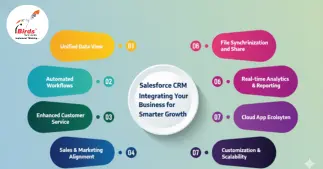
Salesforce CRM Integration connects your business tools for seamless data flow, automation, and collaboration. iBirds Services Pvt Ltd helps organizations across India and the UAE streamline workflows, improve decision-making,...
Salesforce Lightning Experience templates make customizing record pages faster and smarter. This iBirds guide explains proven ways to build clean, responsive layouts that boost navigation, visibility, and team productivity...
Some point, with heavy use, many admins, and a lack of regular maintenance, your Salesforce org will start hitting limits. Limits include those found in System Overview, but in...
If you work as a Salesforce Admin, you might have seen this: you enable a new Salesforce feature, follow the instructions, assign the Permission Set License and matching Permission...
Salesforce is one of the most trusted tools for managing business data. Many companies keep customer data, opportunities, and revenue forecasting inside Salesforce. But commerce – the part where...
Multi-select picklists are a field type in Salesforce. Many Salesforce admins use them because they allow users to select more than one value. This gives flexibility when a single...
Salesforce Flow has grown into one of the most important tools for automation. In the past, one major limitation of Flow was that it worked only inside Salesforce and...