

ServiceNow vs Salesforce Service Cloud: ITSM Platform Comparison
IT Service Management (ITSM) continues to play an important role in helping organizations manage IT services, support operations, and business processes. As businesses adopt cloud technologies, choosing the right ITSM platform has become a key decision for improving service delivery and operational efficiency. Among the leading enterprise solutions, ServiceNow and Salesforce Service Cloud remain two of the most widely used platforms for ITSM.
The comparison between ServiceNow vs Salesforce Service Cloud has become increasingly relevant, especially as organizations look for scalable CRM and ITSM solutions. While both platforms provide a wide range of capabilities for managing IT services, understanding the fundamentals of ITSM helps businesses identify which platform best aligns with their operational requirements.
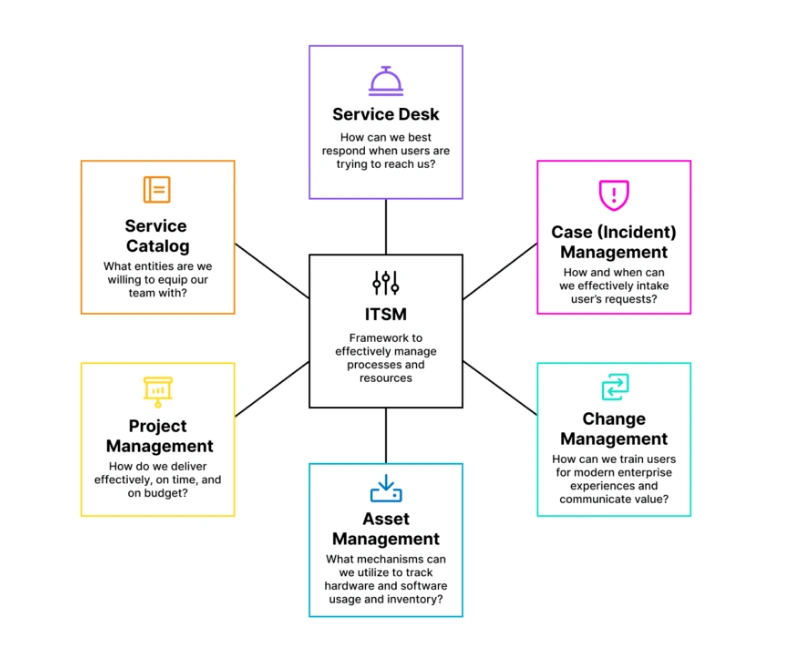
ITSM is a structured approach that includes processes, best practices, and technologies designed to manage IT services efficiently for both internal teams and external customers. Core processes such as case management, knowledge management, and asset management form the foundation of an effective ITSM strategy. Let’s take a closer look at how these processes are supported within Salesforce Service Cloud and compare them with ServiceNow.
Salesforce Service Cloud Implementation Services
Intro to ITSM Processes
Before comparing the capabilities of both platforms, it’s useful to review one of the most important ITSM processes that organizations rely on every day.
1. Case Management
Case management is one of the core functions of IT Service Management. It focuses on receiving, tracking, assigning, and resolving support requests from employees or customers through a centralized system. A typical case moves through multiple stages, from creation and assignment to investigation, resolution, and closure.
Both Salesforce Service Cloud and ServiceNow provide dedicated tools for case management, but each platform approaches the process differently.
ServiceNow Capabilities
ServiceNow provides several features that help organizations capture, assign, and manage support cases efficiently.
- Lists (With Filters): Lists display multiple records in a tabular format, allowing users to sort and filter information based on configurable columns.
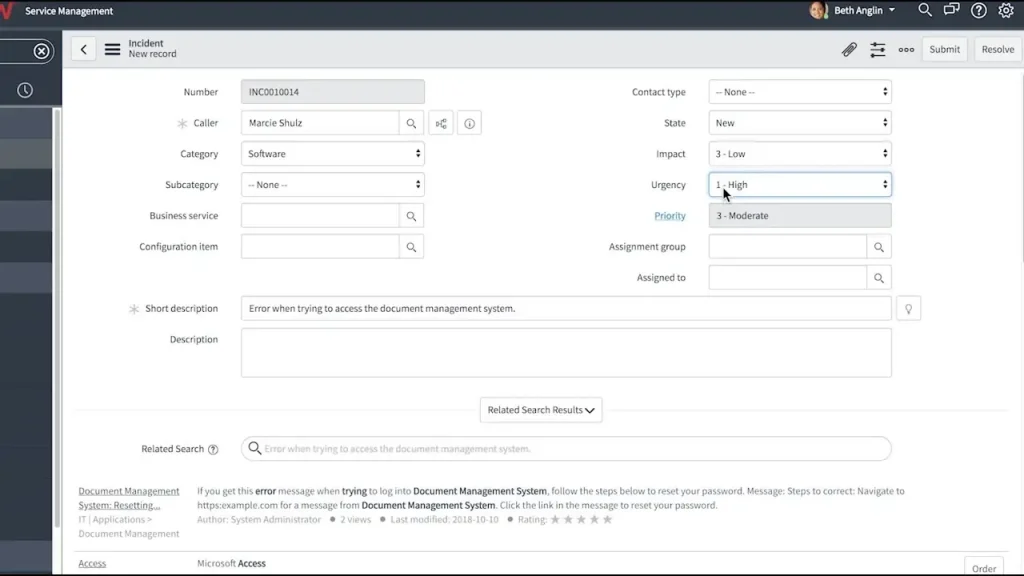
- Forms: Forms provide a detailed view of individual records, enabling users to review and update case information.
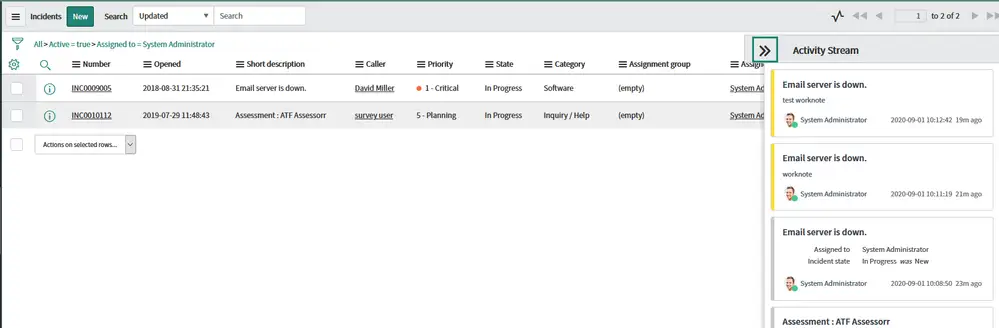
- Activity Stream: Displays comments, work notes, and record history in chronological order, making it easier to follow case progress.
- Assignment Workbench: Helps supervisors review incoming cases and assign them to the most suitable agents.
- Escalation Management: Supports escalation processes by transferring cases to different teams or higher-level support personnel when required.
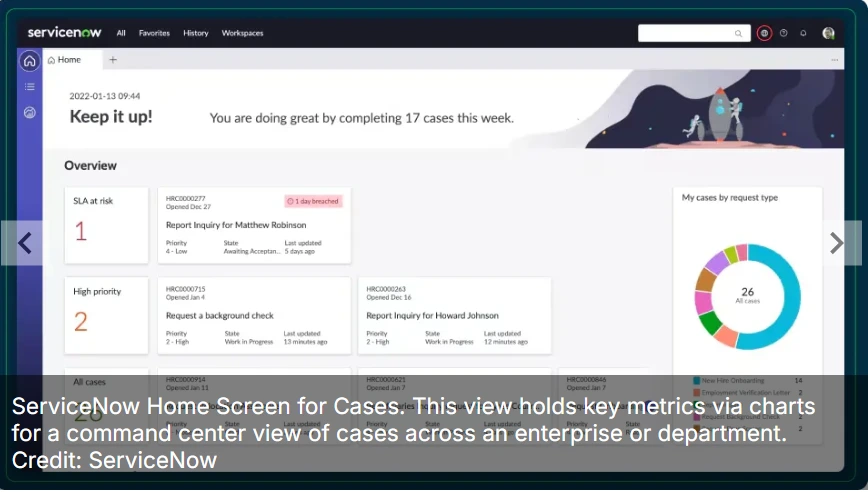
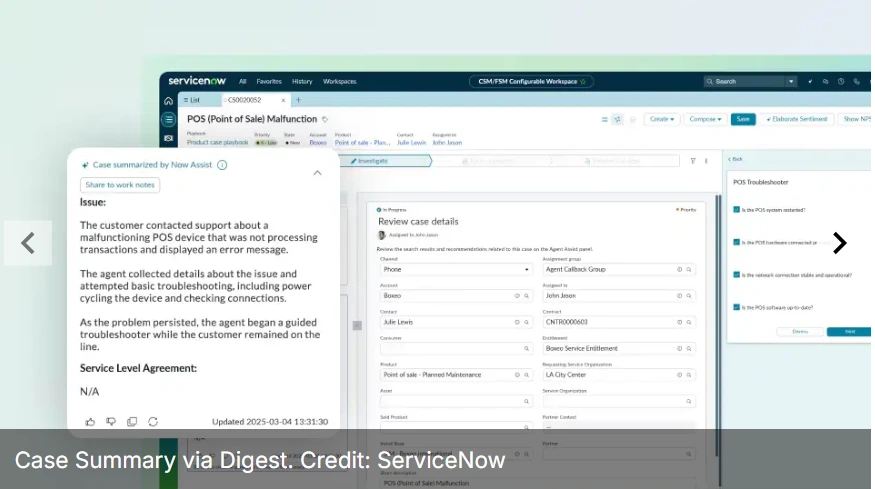
- Case Digests: AI-powered summaries provide a quick overview of case interactions, helping teams review case history more efficiently.
Salesforce Capabilities
Salesforce Service Cloud provides a comprehensive set of features for capturing, routing, and resolving support cases across different teams and departments.
- List Views (With Filters): Customizable record lists that display case information in a tabular format. Users can filter, sort, and customize columns based on business requirements.
- Lightning Record Pages: Salesforce’s standard interface for viewing and managing records. These pages include fields, related lists, quick actions, sections, and other configurable components.
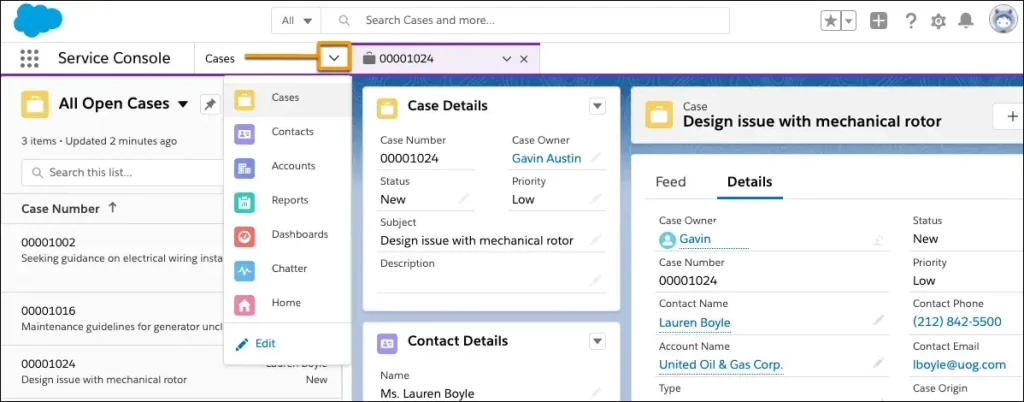
- Service Console: A centralized workspace where service teams can view, manage, transfer, and close cases. The console combines split-view record lists, utility tools, macros, and open case records in one interface.
- Case Assignment Rules: Rule-based automation that routes incoming cases to the appropriate users or queues according to defined case criteria.
- Escalation Rules: Configurable automation that escalates cases to managers or senior support agents based on time conditions or specific case attributes.
- Macros: Predefined automation routines that help service agents perform repetitive actions, such as updating records or creating related tasks with a single click.
The Winner: ServiceNow
ServiceNow offers a highly mature approach to case management. Its features work together seamlessly, providing a consistent experience that supports efficient case handling without adding unnecessary complexity.
The Case for Salesforce
Salesforce Service Cloud delivers a streamlined experience for managing customer support cases. Combining Lightning Record Pages with well-structured List Views allows service teams to organize and work through open cases efficiently. Enhanced Related Lists also help users access connected records and relevant information from a single workspace.
These capabilities enable support teams to trace cases to related solutions, entitlements, contacts, and other business records. While Lightning Record Pages are effective for managing individual cases, organizations handling hundreds of cases require a broader operational view.
For larger support environments, the Service Console acts as a unified workspace where agents can manage multiple cases simultaneously using a split-view interface. This centralized design helps improve navigation and productivity while keeping related information easily accessible.
Salesforce Service Cloud Consulting Services
Service Cloud also includes built-in Case Assignment Rules and Escalation Rules, allowing administrators to configure routing logic without writing code. Cases can be assigned automatically based on predefined criteria and directed to the appropriate users or queues.
Organizations with more advanced routing requirements can create multiple assignment rules and define the sequence in which those rules are evaluated. Escalation Rules are equally flexible, supporting both time-based and condition-based escalations. For example, a medium-priority case that remains open for more than 48 hours can automatically be escalated to a senior support team.
Another valuable feature within Service Cloud is Macros. Salesforce administrators can configure macros using no-code tools to automate repetitive support activities. Bulk macros are especially useful when agents need to update multiple cases that share similar characteristics, helping improve consistency and operational efficiency.
The Case for ServiceNow
According to Gartner, ServiceNow held the leading market share in the ITSM market in both 2023 and 2024. Alongside its strong market position, the platform delivers case management capabilities that closely align with those available in Salesforce Service Cloud. ServiceNow primarily relies on Lists and Forms to help users access, organize, and manage support records efficiently.
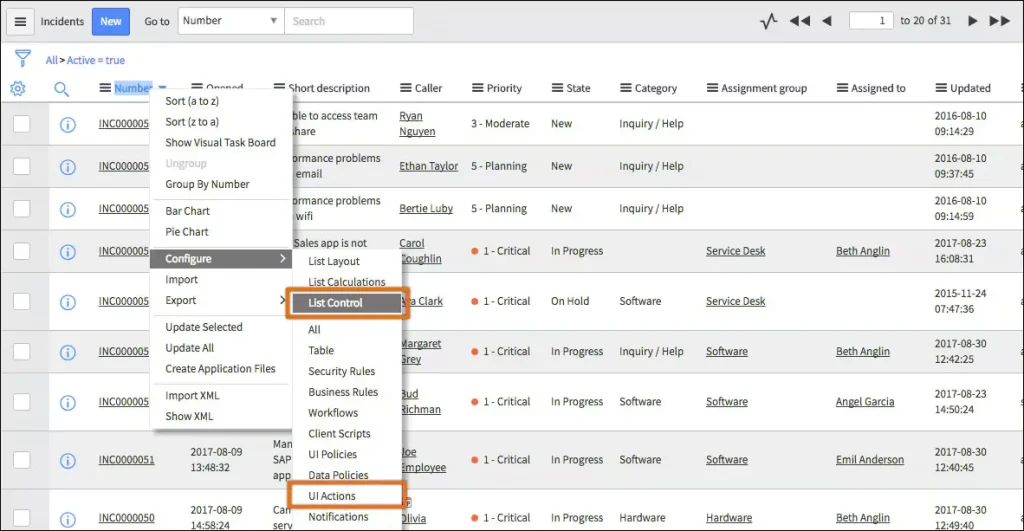
Lists display multiple records in a single view and can be filtered or sorted to highlight the most relevant information. Selecting a record from a list opens a Form, where users can review and update case details based on their assigned permissions. Administrators also control which fields appear on individual forms, allowing different case types to display only the information that users need.
Beyond its core navigation features, ServiceNow includes several capabilities that help support teams manage cases more effectively.
One of its key features is the Activity Stream, which records comments, work notes, and journal entries in chronological order. Since many cases pass through multiple teams over several days or weeks, this timeline provides valuable context for both individual case management and large-scale service operations.
ServiceNow also offers the Assignment Workbench, a rule-based, no-code solution for assigning cases and tasks to support agents. Administrators can define matching criteria, prioritize available agents within an assignment group, and configure skill-based routing when required, helping organizations automate complex case distribution.
Like Salesforce Service Cloud, ServiceNow supports Escalation Management to move cases through predefined escalation processes. Administrators create escalation templates that define how escalations should occur, including approval workflows, data types, and severity levels. These templates help organize and manage escalated cases in a structured manner.
Another notable capability is Customer Service Case Digests. These AI-powered summaries provide regular updates for both internal and external stakeholders throughout the lifecycle of a case or after its closure. Case Digests work alongside case action summaries to deliver periodic status updates while also generating post-case review documents once a case has been resolved.
2. Knowledge Base
A well-structured knowledge base is an essential part of any mature IT organization. It helps businesses store documentation that supports both internal teams and external users by providing accurate, organized, and easily accessible information.
Knowledge bases centralize information for business operations and IT processes while also serving customers through self-service resources, much like an FAQ portal. Although both ServiceNow and Salesforce Service Cloud provide similar knowledge management capabilities, each platform approaches configuration and usability differently.
ServiceNow Capabilities
ServiceNow provides several features for creating, organizing, and maintaining enterprise knowledge bases.
- Knowledge Base: Centralized functionality for creating, managing, and sharing organizational knowledge across the enterprise.
- User Criteria (User Permissions): Configuration-based permission settings that control access to knowledge bases, articles, and other resources.
- Workflows: Workflow automation manages the complete lifecycle of knowledge articles, from creation and approval to retirement.
- Knowledge Categories: Categories help organize articles into logical groups, making information easier to manage and locate.
- Custom Knowledge Homepage: A customizable landing page that allows organizations to tailor the knowledge experience for their users.
Salesforce Capabilities
Salesforce provides a comprehensive set of tools for managing and maintaining Salesforce Knowledge.
- Salesforce Knowledge: A centralized solution for creating, publishing, and maintaining knowledge articles across the organization.
- Knowledge User Permissions: Configuration-driven permissions determine which users can access specific knowledge bases and articles.
- Data Categories: Organize and classify Knowledge Articles by business topics or domains for easier navigation and controlled access.
- Field History Tracking: Records changes made to article fields, providing an audit trail with historical updates.
- Validation Rules: Help maintain data quality by enforcing field-level validation through configurable business logic.
- Article Import: Supports bulk importing of existing knowledge articles into Salesforce Knowledge.
- Multi-Language Support: Allows a single knowledge article to be published in multiple supported languages.
The Winner: Salesforce
Salesforce Knowledge offers a flexible and user-friendly approach to knowledge management. Its configuration options, article management features, and multilingual support make it easier for organizations to maintain documentation while helping users find information efficiently.
The Case for Salesforce
Knowledge management features are relatively similar across both platforms, making this comparison a close one. However, Salesforce Knowledge stands out because it is simple to configure and supports bulk article imports through built-in functionality, helping organizations establish knowledge bases more efficiently.
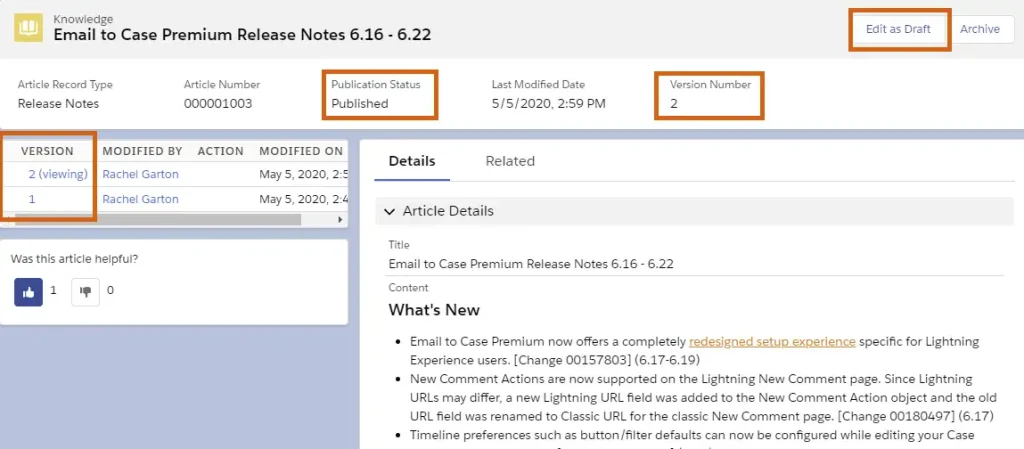
Administrators can configure different article types using customized record pages that match specific business needs, such as hardware support or software guidance. Using Data Categories, articles can be organized by topic or business domain, improving content structure and accessibility.
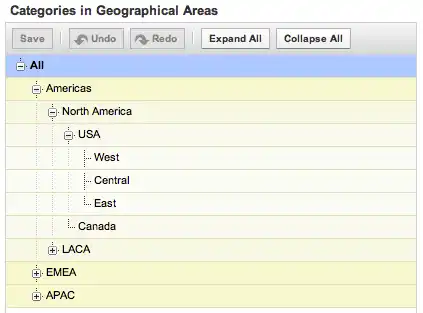
This category-based approach also controls user access while maintaining a logical hierarchy across the knowledge base. In addition, Field History Tracking records every modification made to an article, providing a reliable audit trail with timestamps for improved governance.
Salesforce Knowledge Management Services
The Case for ServiceNow
ServiceNow follows a similar approach to knowledge management by providing structured tools for creating and maintaining knowledge bases. Its Publish/Retire process simplifies article lifecycle management, making it easier to update, publish, and retire documentation as business requirements change.
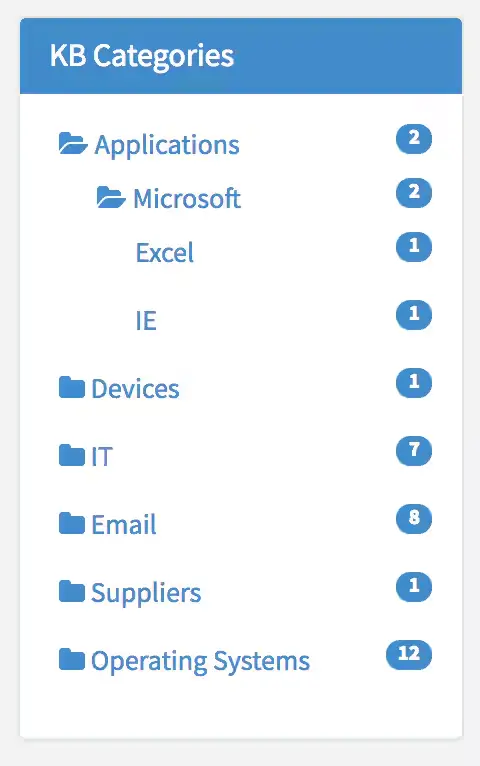
Like Salesforce, ServiceNow organizes articles using categories and subcategories, allowing information to be grouped by topics or business domains for easier navigation.
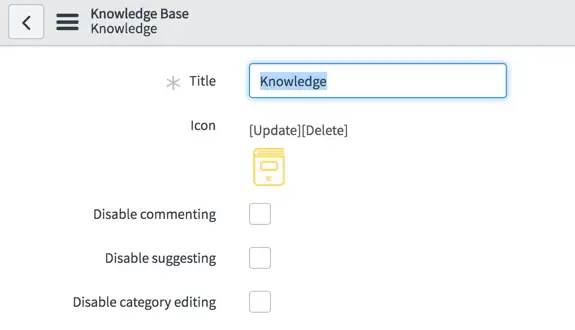
ServiceNow also includes useful usability features, such as the ability to disable article comments or ratings when required. Even with these capabilities, Salesforce provides a more user-friendly knowledge management experience, making it easier for organizations to organize, maintain, and share information across the platform.
3. Virtual Agents
Virtual Agents have become an increasingly important part of modern IT Service Management (ITSM) as advancements in Artificial Intelligence (AI) and Machine Learning (ML) continue to improve enterprise automation. These AI-powered assistants help organizations reduce support workloads by handling common requests, sharing knowledge, and answering frequently asked questions.
Virtual Agents are typically designed to manage a wide range of user requests while providing the option to connect with a live support representative whenever necessary. As AI technology continues to advance, Virtual Agents are expected to support more business scenarios and deliver increasingly intelligent customer and employee experiences.
Both ServiceNow and Salesforce Service Cloud have invested heavily in AI-powered Virtual Agents, but which platform offers the stronger solution?
ServiceNow Capabilities
ServiceNow provides several capabilities for building, managing, and optimizing ITSM Virtual Agents.
- Virtual Agents for ITSM (Virtual Agent Designer): AI-powered conversational assistants that help automate common IT requests, resolve routine issues, and reduce support workloads.
- Topic Recommendations: Intelligent recommendations that guide users toward automated resolutions and relevant support topics.
- Multiple Language Support: Supports multiple languages through configurable user language preferences.
- Live Agent Hand-Off: Allows users to transition from a Virtual Agent to a live support agent while preserving the conversation context.
- Issue Auto Resolution: Enables simple support requests to be resolved automatically without direct agent involvement.
- Conversational Analytics: Measures Virtual Agent performance and provides insights for improving conversation quality and automation.
Salesforce Capabilities
Salesforce delivers several AI-powered tools through Agentforce for building and managing Virtual Agents.
- Agentforce Service Agent: AI-powered service agent designed to assist with customer inquiries and case resolution.
- Omni-Channel: Routes customer requests and cases to the appropriate support teams based on configured assignment rules.
- Prompt Builder: No-code configuration tool for creating and managing generative AI prompts and applications.
- Einstein Trust Layer: Security framework that protects customer data while supporting AI-powered interactions.
- Agentforce Testing Center: Enables administrators to test, validate, and refine AI agents before deployment.
The Winner: Salesforce
Salesforce takes the lead with Agentforce, offering a complete AI platform for creating, testing, deploying, and managing intelligent service agents across multiple business scenarios.
Salesforce Sales Cloud Services
The Case for ServiceNow
ServiceNow’s ITSM Virtual Agents provide a strong self-service experience by helping users resolve common issues through knowledge articles, automated responses, and case information. When required, users can seamlessly transition to a live support agent without losing the conversation history.
Administrators can also install ITSM Virtual Agent Conversations, a collection of plug-ins that simplify the configuration of common ITSM conversations and accelerate Virtual Agent deployment for enterprise environments.
Another valuable capability is Issue Auto Resolution, which allows Virtual Agents to complete simple requests automatically. If users accept the suggested action, the Virtual Agent can complete the process and close the case without requiring assistance from a service representative.
For example, organizations can automate low-value approval scenarios, such as processing small refund requests or handling routine service requests. Once predefined conditions are met, the Virtual Agent completes the workflow without manual intervention.
ServiceNow also includes a Conversational Analytics Dashboard, allowing administrators to monitor Virtual Agent performance over time. The dashboard provides metrics such as frequently discussed topics, conversations transferred to live agents, and completed conversations, helping organizations improve AI-driven support experiences.
The Case for Salesforce
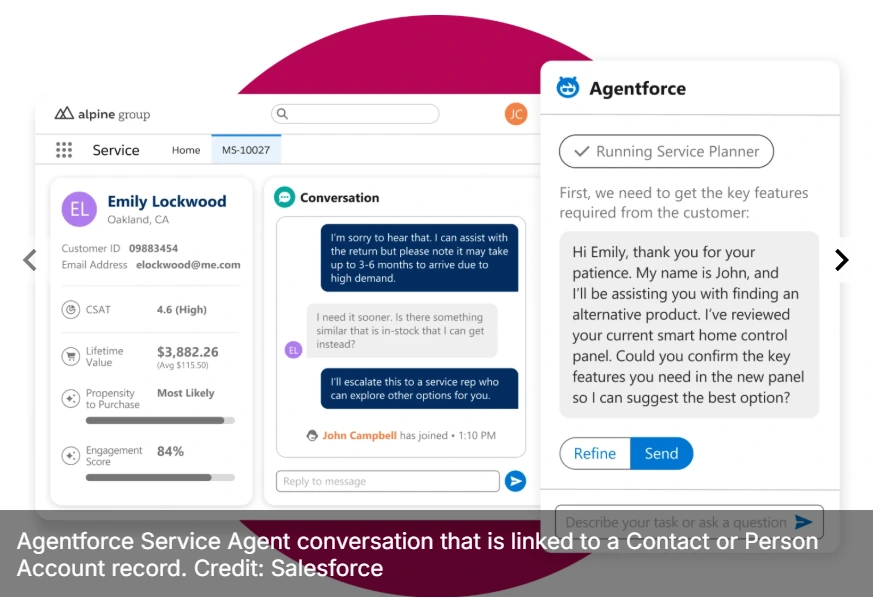
Agentforce has become one of the most significant AI innovations within the Salesforce ecosystem. Built specifically for Salesforce products, Agentforce Service Agent helps organizations automate customer support while integrating directly with Salesforce Service Cloud. Service Agents can be deployed across multiple channels, including customer portals and mobile applications.
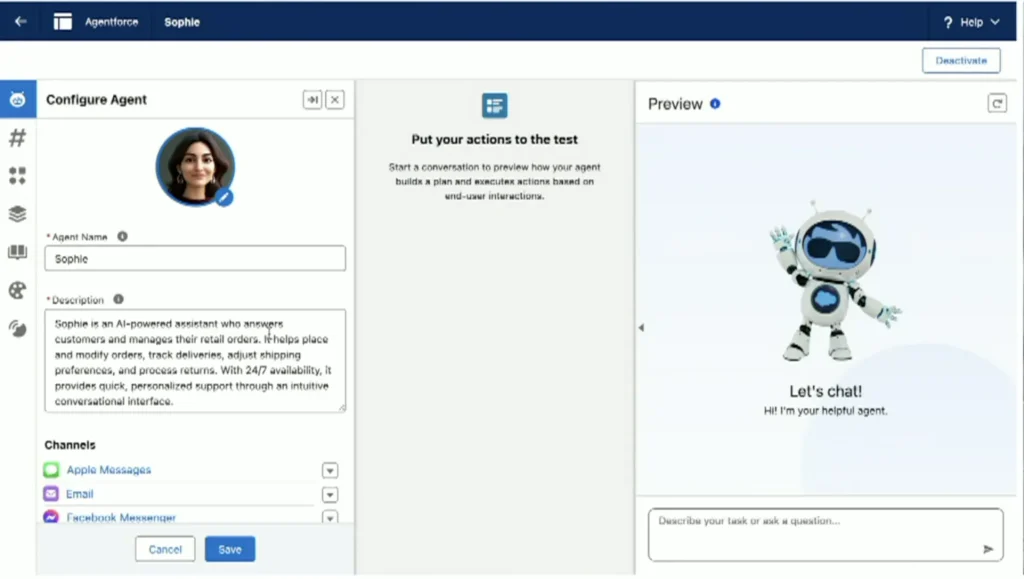
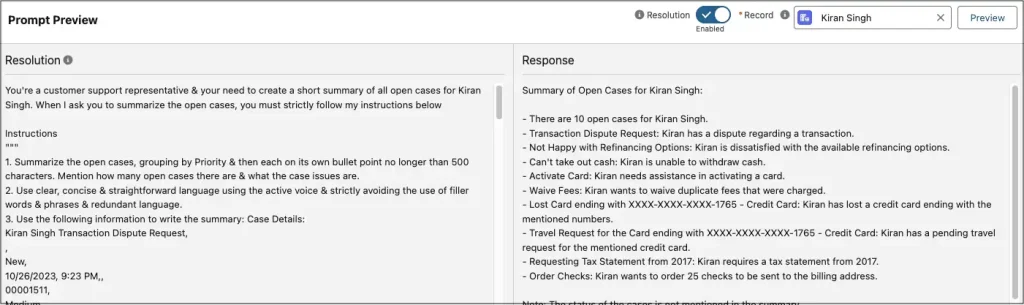
Salesforce administrators familiar with Omni-Channel can easily configure how Agentforce routes conversations between communication channels. Using Prompt Builder, administrators create AI prompts, validate responses, and connect with supported large language models (LLMs), including partner models such as Anthropic.
Salesforce Agentforce Implementation Services
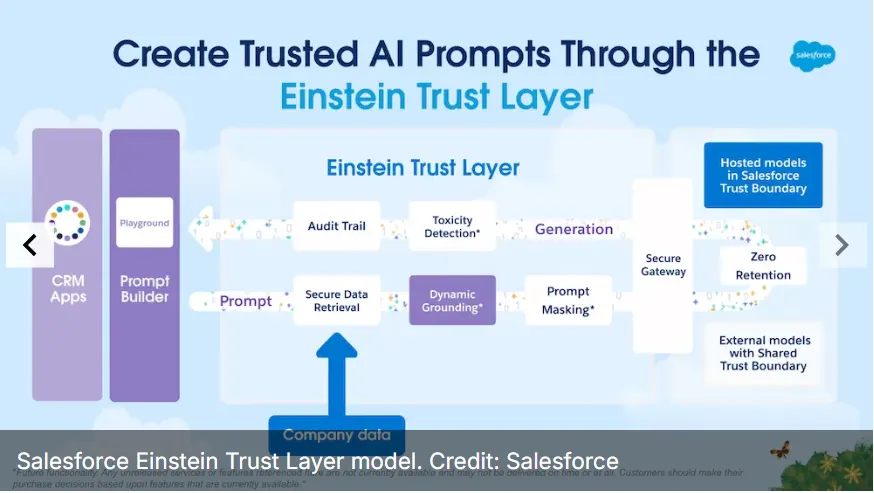
Salesforce also strengthens AI security through the Einstein Trust Layer, which protects customer information throughout AI interactions. The framework is designed to prevent sensitive Salesforce data from being retained or exposed outside the Salesforce environment while supporting trusted AI experiences.
To validate AI performance before production deployment, administrators can use the Agentforce Testing Center. This feature supports batch testing across multiple scenarios, helping teams verify AI responses, improve reliability, and refine Virtual Agents before making them available to end users.
4. Asset Management
Asset management is built on a simple principle: organizations need accurate visibility into their assets to manage them effectively. In IT Service Management (ITSM), asset management focuses on tracking, maintaining, and reporting physical devices, software, and other business assets throughout their lifecycle.
As businesses expand and manage larger digital environments, having a structured asset management strategy becomes increasingly important. While organizations previously relied on spreadsheets and manual processes, modern ITSM platforms provide automation and centralized tools that simplify asset management across the enterprise.
ServiceNow Capabilities
ServiceNow offers several capabilities for creating, managing, and maintaining enterprise assets.
- Flow Designer: Automates business processes based on predefined conditions, events, or schedules.
- Bulk Stock Request: Supports inventory management through the Service Catalog or bulk stock imports using Excel files.
- Return Merchandise Authorization (RMA): Manages product returns and repairs through configurable workflows and automation.
- Reclaim: Automates the recovery of unused hardware and software resources.
- Zero Touch Refresh: Streamlines employee device replacement through automated refresh processes.
Salesforce Capabilities
Salesforce Service Cloud provides multiple tools for managing enterprise assets and inventory.
- Asset Interactive Hierarchy: Visualizes relationships between assets, products, and related business records.
- Advanced Exchange: Automates replacement product workflows while managing customer returns.
- Depot Repair: Tracks repair and maintenance activities for hardware assets managed through centralized repair locations.
- Inventory Search and Transfer: Helps organizations locate, transfer, and manage inventory across multiple warehouses or locations.
- Inventory Replenishment: Configuration-based automation that restocks inventory when predefined thresholds are reached.
The Winner: ServiceNow
ServiceNow continues to lead in ITSM Asset Management by providing mature, purpose-built functionality. While Salesforce offers strong capabilities, ServiceNow remains the more comprehensive solution in this area.
The Case for Salesforce
Over the past several years, Salesforce has expanded its industry-specific cloud offerings, bringing asset management capabilities into products such as Service Cloud, Consumer Goods Cloud, Automotive Cloud, and Communications Cloud. These additions allow organizations across different industries to manage assets within the Salesforce ecosystem.
Within Salesforce Service Cloud, the Asset Interactive Hierarchy enables organizations to group related assets and display their relationships using a visual hierarchy, making enterprise asset management easier to understand and maintain.
Salesforce also supports the complete Asset Service Lifecycle through Advanced Exchange, allowing organizations to manage replacement requests for defective products while tracking approvals, returns, and replacement activities.
For assets requiring repair or maintenance, Depot Repair associates work orders with individual assets, helping service teams monitor repair progress and communicate asset status throughout the maintenance process.
Organizations with larger inventories can also benefit from Inventory Search and Transfer, which helps locate products across warehouses and storage locations while supporting inventory movement between facilities.
Although many of these features extend beyond traditional ITSM scenarios, they can be configured for managing IT hardware and software assets. Inventory Replenishment further strengthens asset management by automating stock replenishment through configurable no-code and low-code workflows.
Salesforce Field Service Implementation Services
The Case for ServiceNow
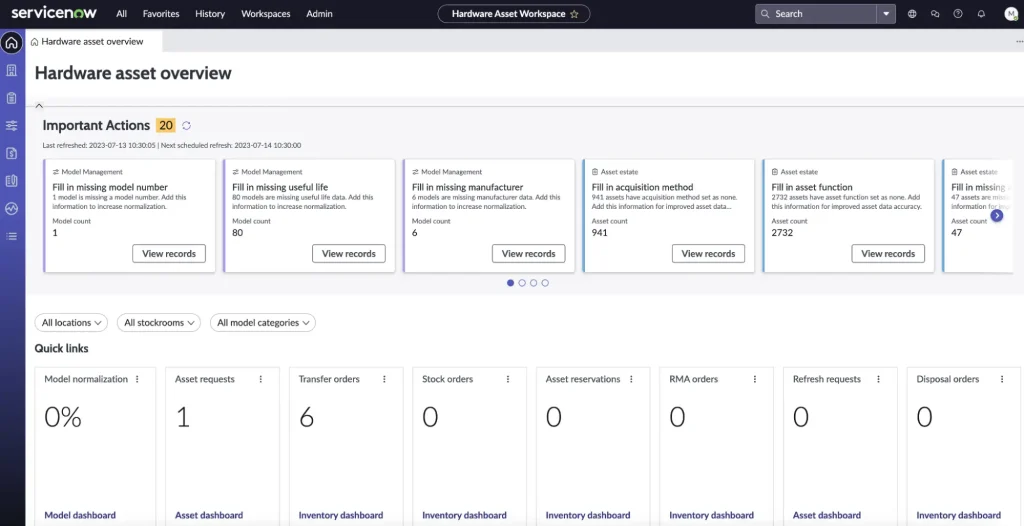
Asset management has long been one of ServiceNow’s strongest capabilities. As a platform originally built around ITSM, ServiceNow provides dedicated dashboards, reporting tools, and built-in functionality that support every stage of the asset lifecycle. Flow Designer plays a central role by automating common asset management processes through configurable workflows.
One practical use of Flow Designer is automating inventory requests and approval processes using a low-code interface. Organizations can also create bulk inventory requests through stock order forms, making it easier to manage warehouse inventory while applying rule-based automation for ordering decisions.
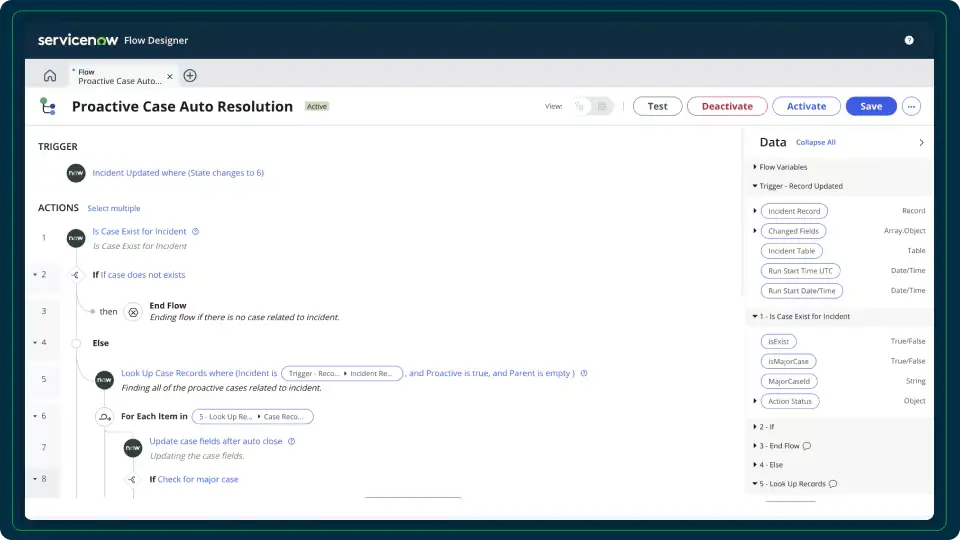
Flow Designer also includes templates for common asset management scenarios, allowing organizations to customize workflows according to their operational requirements.
ServiceNow further supports asset returns and repairs through Return Merchandise Authorization (RMA). Using forms and automated workflows, organizations can manage repair requests, monitor returned assets, and track repair or replacement activities when equipment is sent back to vendors.
The platform also automates damaged asset handling and supports Reclaim processes for recovering unused hardware and software resources. These capabilities help organizations improve software license management while reallocating resources through configurable automation.
Finally, Zero Touch Refresh simplifies employee hardware replacement. Users can request replacement devices through a self-service portal, specify shipping preferences, and monitor request status throughout the fulfillment process.
Summary
Both ServiceNow and Salesforce Service Cloud provide strong capabilities across core ITSM processes, making them leading enterprise platforms for service management. The right choice depends on an organization’s business objectives, operational requirements, and long-term technology strategy.
Organizations evaluating ITSM platforms should clearly define their service management needs before selecting the platform that best aligns with their processes and future growth plans.
This comparison highlights several key ITSM capabilities, but every organization should assess its own requirements before making a platform decision.
Which platform fits your organization’s ITSM strategy better—ServiceNow or Salesforce Service Cloud? Share your thoughts in the comments.
FAQs
1. What is the difference between ServiceNow and Salesforce Service Cloud?
ServiceNow is built primarily for IT Service Management (ITSM), while Salesforce Service Cloud combines customer service capabilities with CRM and ITSM features. The right choice depends on your organization’s business processes and service management requirements.
2. Which platform is better for ITSM: ServiceNow or Salesforce?
ServiceNow offers mature ITSM capabilities for asset management and case management, while Salesforce Service Cloud stands out with AI-powered Agentforce, Salesforce Knowledge, and strong CRM integration.
3. Is Salesforce Service Cloud suitable for IT Service Management?
Yes. Salesforce Service Cloud supports ITSM through case management, knowledge management, asset management, workflow automation, AI-powered service agents, and service operations.
4. Which platform provides better case management?
Both platforms offer advanced case management features. ServiceNow provides a mature ITSM-focused approach, while Salesforce Service Cloud delivers configurable case routing, Service Console, macros, and automation.
5. What is Salesforce Agentforce in Service Cloud?
Salesforce Agentforce is an AI-powered service agent that helps organizations automate customer support, resolve cases, generate AI responses, and improve service operations while using the Einstein Trust Layer for data security.
6. Does ServiceNow support AI-powered Virtual Agents?
Yes. ServiceNow Virtual Agents help automate IT support requests, provide knowledge-based responses, enable live agent handoff, and improve service efficiency using conversational AI.
7. Which platform offers better knowledge management?
Both platforms provide knowledge management capabilities, but Salesforce Knowledge offers flexible article management, multilingual support, data categories, and field history tracking that simplify knowledge sharing.
8. How does asset management work in Salesforce Service Cloud?
Salesforce Service Cloud supports asset management through Asset Interactive Hierarchy, Depot Repair, Advanced Exchange, Inventory Search and Transfer, and Inventory Replenishment for managing the complete asset lifecycle.
9. Why do businesses compare ServiceNow and Salesforce Service Cloud?
Organizations compare these platforms to evaluate ITSM capabilities, AI features, case management, knowledge management, asset management, automation, scalability, and long-term business value.
10. Which organizations should choose Salesforce Service Cloud?
Salesforce Service Cloud is well suited for organizations that want to combine CRM, customer service, AI-powered automation, and ITSM capabilities within a single Salesforce ecosystem.