

Modern businesses often use multiple applications to manage sales, customer service, payments, inventory, and other operations. These systems need to communicate with each other quickly and reliably. However, traditional integrations can become difficult to manage when every application depends on direct communication with another system.
Salesforce Platform Events offer a more flexible solution. They allow Salesforce and external applications to exchange information through an event-driven architecture. Instead of continuously asking another system for updates, applications can publish events and let interested subscribers respond when those events occur.
In this guide, we will explore how Salesforce Platform Events work, how to create and publish them using Apex and Flow, how subscribers receive messages, and how to use them effectively in real-world projects.
What Are Salesforce Platform Events?
Salesforce Platform Events are messages used to communicate important business events between Salesforce applications and external systems. They follow a publish/subscribe model, where one application publishes an event and other applications subscribe to receive it.
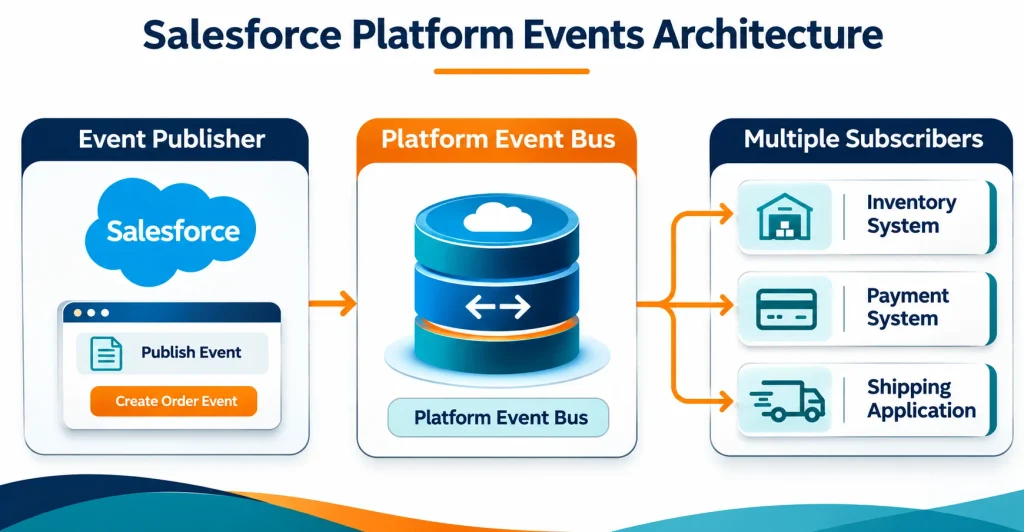
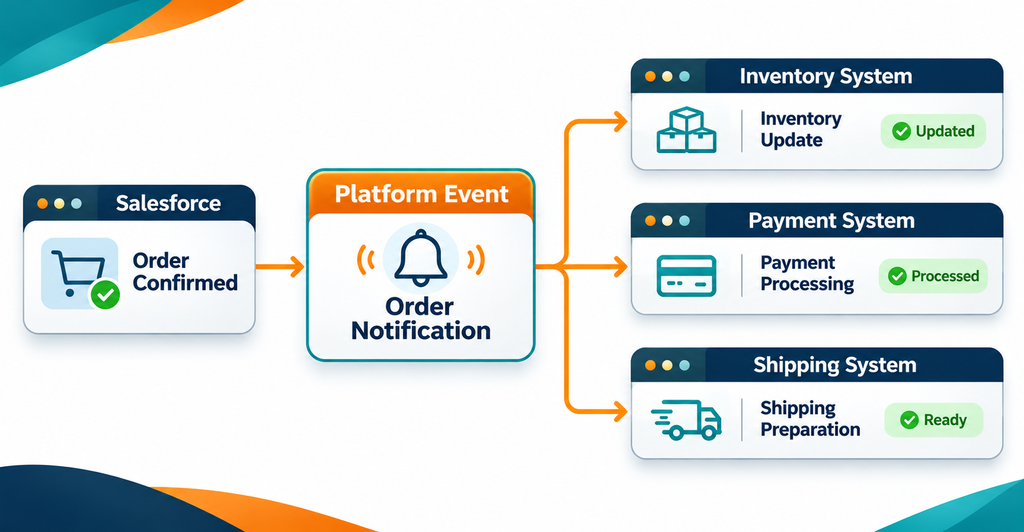
For example, when a customer places an order, Salesforce can publish an Order Created event. Different subscribers can then respond to that event:
- The inventory system updates product availability.
- The payment application starts payment processing.
- The shipping system prepares the delivery.
- The notification service sends an order confirmation.
The publisher does not need to manage each subscriber separately. It simply publishes the event, and the event bus distributes the message to subscribed consumers.
Platform Events are defined similarly to custom objects, but their API names end with __e instead of __c. They are event messages, not ordinary records that users manage through standard Salesforce record pages.
How Do Salesforce Platform Events Work?
Platform Events use an event-driven architecture based on a publish/subscribe communication model.
The process involves three main stages:
- Publisher: An application or process creates and publishes an event message.
- Event Bus: Salesforce receives the message and makes it available to subscribers.
- Subscriber: A Salesforce process or external application receives the message and performs the required action.
For example, imagine a customer updates their delivery address in Salesforce. Salesforce publishes an Address Updated event. A shipping application subscribes to this event and updates the delivery details automatically.
This approach reduces direct dependencies between systems and makes integrations easier to extend.
Key Components of Salesforce Platform Events
Before implementing Platform Events, it is important to understand their main components.
Event: An event represents something important that has happened in a business process, such as an order being created or a payment being completed.
Event Message: This is the information carried by an event. It contains fields that describe what happened.
Event Publisher: The publisher creates and sends the event message. It can be Apex, Salesforce Flow, or an external application.
Event Bus: The event bus is the messaging system that distributes event messages to subscribers.
Event Subscriber: A subscriber receives the event and performs the required action. Subscribers can include Apex triggers, flows, Lightning components, and external applications.
Together, these components allow different systems to communicate without requiring every application to connect directly to every other application.
How to Create a Platform Event in Salesforce
You can create a custom Platform Event directly from Salesforce Setup.
Follow these steps:
- Open Salesforce Setup.
- Search for Platform Events in the Quick Find box.
- Select Platform Events.
- Click New Platform Event.
- Enter the Label, Plural Label, and Description.
- Select the required Publish Behavior.
- Click Save.
- Open the new event and add custom fields under Custom Fields & Relationships.
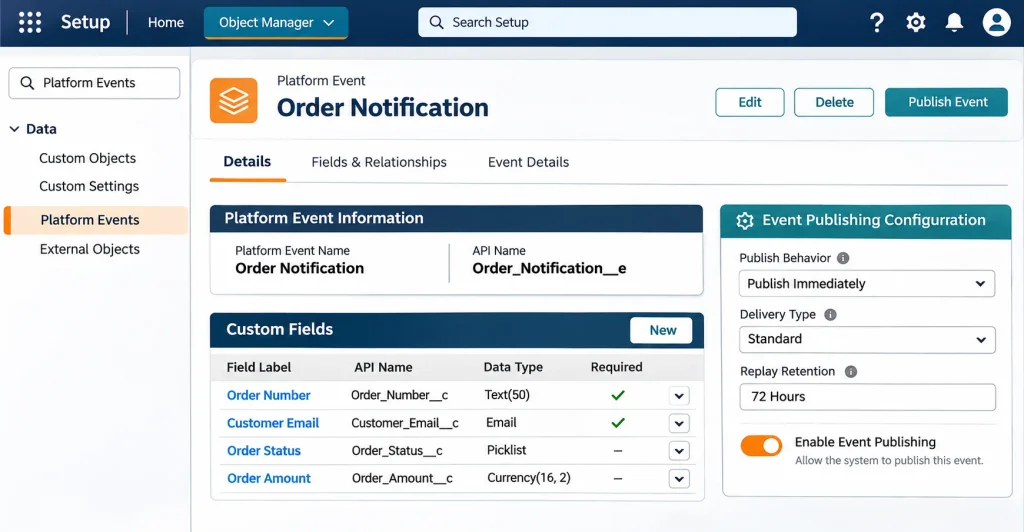
For example, create an event named Order_Notification.
Its API name will be:
Order_Notification__e
You can add fields such as:
| Field Label | API Name | Data Type |
|---|---|---|
| Order Number | Order_Number__c | Text |
| Customer Email | Customer_Email__c | |
| Order Status | Order_Status__c | Text |
| Order Amount | Order_Amount__c | Number |
These fields define the information that will be included in the event message.
How to Publish Salesforce Platform Events
Publishing means sending an event message to the Salesforce event bus. Salesforce supports different publishing methods depending on the application and business requirement.
1. Publish Platform Events Using Apex
Developers can publish Platform Events programmatically using the EventBus.publish() method.
For example, after an order is created, Apex can publish an Order Notification event.
Order_Notification__e orderEvent =
    new Order_Notification__e(
        Order_Number__c = 'ORD-1001',
        Customer_Email__c = '[email protected]',
        Order_Status__c = 'Confirmed',
        Order_Amount__c = 2500
    );

Database.SaveResult result =
    EventBus.publish(orderEvent);

if (result.isSuccess()) {
    System.debug('Event publish request queued successfully.');
} else {
    for (Database.Error error : result.getErrors()) {
        System.debug(error.getMessage());
    }
}
In this example:
- An event instance is created.
- The required information is assigned to its fields.
EventBus.publish()sends the publishing request.Database.SaveResulthelps identify whether the request was successfully queued or encountered an error.
Important: A successful EventBus.publish() result indicates that the publishing request was queued successfully. For high-volume Platform Events, actual publishing happens asynchronously. If you need to track the final publishing result, consider using Apex publish callbacks.
2. Publish Platform Events Using Salesforce Flow
You do not always need Apex code to publish Platform Events. Salesforce Flow provides a declarative option.
Follow these steps:
- Open Flow Builder.
- Create a new record-triggered flow or another suitable flow.
- Select the object and define the trigger conditions.
- Add a Create Records element.
- Select your custom Platform Event as the object.
- Assign values to the event fields.
- Save and activate the flow.
For example, when an order status changes to Confirmed, a flow can publish an Order Notification event.
This method is useful for administrators who want to build event-based automation without writing custom Apex code.
3. Publish Events Using Salesforce APIs
External applications can also publish Platform Events using Salesforce APIs.
For example, an external order management application can authenticate with Salesforce and publish an event when a new order is placed.
Salesforce supports API-based publishing, including the Pub/Sub API and data APIs such as REST API.
For more information about connecting external applications, see our guide on Salesforce API Integration.
How to Subscribe to Salesforce Platform Events
After an event is published, subscribers receive the message and perform the required operations.
Salesforce supports several subscription methods.
1. Subscribe Using Apex Triggers
An Apex trigger can subscribe to a custom Platform Event. Unlike standard object triggers, Platform Event triggers support only the after insert event.
Example:
trigger OrderNotificationTrigger
on Order_Notification__e (after insert) {

    for (Order_Notification__e eventMessage : Trigger.New) {

        System.debug(
            'Order Number: ' + eventMessage.Order_Number__c
        );

        System.debug(
            'Order Status: ' + eventMessage.Order_Status__c
        );
    }
}
When an Order Notification event is published, this trigger receives the message and processes its field values.
You can also extend the trigger to create records, send notifications, or start additional business operations.
2. Subscribe Using Platform Event-Triggered Flows
Salesforce Flow also supports event subscriptions.
To create one:
- Open Flow Builder.
- Select Platform Event-Triggered Flow.
- Choose the Platform Event that should trigger the flow.
- Add the required elements and conditions.
- Use the
$Recordglobal variable to access event message fields. - Save and activate the flow.
For example, a flow can subscribe to a Payment Completed event and automatically update an order record.
This approach is useful when the required automation can be handled with standard Flow elements.
3. Subscribe Using Lightning Web Components
Lightning Web Components can receive Platform Event notifications through the lightning/empApi module.
This is useful when you want to display real-time updates inside a Salesforce interface.
For example, a custom order monitoring component can subscribe to order events and refresh its displayed information when a new message arrives.
The module provides methods such as:
subscribe()– Subscribe to an event channel.unsubscribe()– Stop receiving event messages.onError()– Handle subscription errors.isEmpEnabled()– Check whether the EMP API is available.
4. Subscribe Using External Applications
External applications can subscribe to Salesforce Platform Events using supported event streaming technologies.
For example, a Python, Java, or Node.js application can receive messages from Salesforce and process them outside the platform.
Salesforce provides the Pub/Sub API for publishing and subscribing to event messages. CometD clients can also be used with supported Streaming API channels.
This method is helpful when business operations involve systems that do not run inside Salesforce.
Platform Events vs. Change Data Capture (CDC)
Salesforce Platform Events and Change Data Capture both support event-driven communication, but they serve different purposes.
| Feature | Platform Events | Change Data Capture |
|---|---|---|
| Main purpose | Publish custom business events | Notify subscribers about Salesforce record changes |
| Event creation | Developer-defined | Generated automatically by Salesforce |
| Data source | Custom event fields | Record change information |
| Publishing | Apex, Flow, and APIs | Salesforce record changes |
| Use case | Order confirmed, payment completed | Account updated, contact deleted |
| Custom business logic | You define the event payload | Salesforce generates change notifications |
Example:
Suppose a company wants to notify an external application when a customer completes a payment. A custom Platform Event can publish a Payment Completed message.
However, if the requirement is to notify another application whenever an Account record is updated, Change Data Capture may be more suitable.
Choose Platform Events when you need to publish custom business messages. Choose CDC when you need to track changes to Salesforce records.
7 Practical Use Cases of Salesforce Platform Events
Platform Events can support different business processes across industries.
1. Order Management
When an order is confirmed, Salesforce can publish an Order Created event. Inventory, payment, and shipping applications can subscribe and process their respective tasks.
2. Payment Notifications
A payment application can publish a Payment Completed or Payment Failed event. Salesforce can receive the message and update the related order or payment status.
3. Customer Notifications
When an important customer action occurs, Salesforce can publish an event that triggers an email, notification, or follow-up process.
4. Inventory Management
An external inventory application can publish a Stock Updated event when product availability changes. Salesforce can subscribe and update relevant business information.
5. Third-Party Application Integration
Platform Events help Salesforce exchange information with external applications without creating separate point-to-point connections for every process. This can complement approaches discussed in our Salesforce Integration Patterns guide.
6. Background Processing
You can publish events to start independent processing tasks. For example, after a service request is created, an event subscriber can perform additional processing without placing every operation inside the original transaction.
7. Real-Time Business Monitoring
Applications can publish events when important conditions occur, such as a service failure or a low-stock warning. Subscribers can then trigger alerts or monitoring workflows.
Important Considerations and Best Practices
Platform Events can make integrations more flexible, but they should be designed carefully.
Choose the correct publishing behavior: Salesforce provides Publish Immediately and Publish After Commit. Use Publish After Commit when subscribers need to access records created or updated in the same transaction. Publish Immediately is suitable when the event should be independent of the transaction outcome, such as certain logging scenarios.
Understand event retention: High-volume Platform Events are stored for 72 hours. Subscribers using supported APIs can replay messages within the retention window. Do not treat the event bus as permanent storage.
Handle publishing errors: Check the Database.SaveResult returned by EventBus.publish(). For asynchronous publishing, use publish callbacks when final publishing results need to be tracked.
Design reliable subscribers: Subscribers should handle failures and avoid processing the same business action more than once. Use a suitable business identifier and idempotency checks where duplicate processing could cause problems.
Avoid unnecessary event messages: Publish events when meaningful business actions occur. Too many unnecessary messages can increase processing and event usage.
Monitor event usage: Monitor publishing and delivery allocations, subscriber health, and processing errors. Salesforce provides PlatformEventUsageMetric for event usage monitoring.
Control access: Review the permissions required to publish and subscribe to Platform Events. Make sure users and integrations have only the access they need.
Test your implementation: Test successful publishing, failed publishing, subscriber logic, transaction behavior, and high-volume scenarios before deploying changes to production.
Good event design also depends on managing Salesforce resources carefully. Review our guide to Salesforce Governor Limits to understand how platform limits affect Apex and automation.
Common Platform Events Mistakes to Avoid
Some common implementation mistakes can make event-based integrations unreliable.
- Using the wrong publish behavior: Subscribers may receive an event before the related Salesforce record is committed.
- Assuming publishing is always synchronous: A successful publishing request does not always mean the event has already been delivered.
- Ignoring event retention: Messages older than the supported retention period are not guaranteed to be available for replay.
- Creating duplicate processing: A subscriber should be designed to handle repeated business messages safely.
- Ignoring subscriber errors: A published event is not useful if the subscriber fails and nobody monitors the issue.
- Using events for permanent data storage: Platform Events are designed for messaging, not as a replacement for Salesforce records or a database.
For broader integration reliability, it is also worth reviewing Salesforce Webhooks and understanding how different communication methods fit into an overall integration architecture.
Frequently Asked Questions
1. What are Salesforce Platform Events used for?
Salesforce Platform Events are used to exchange real-time business messages between Salesforce and external applications. They support event-driven communication for processes such as order management, payment updates, inventory notifications, and customer alerts.
2. What is the difference between Platform Events and custom objects?
Custom objects store business records that users can create, view, update, and query. Platform Events are messages published to an event bus. Their API names end with __e, while custom object API names generally end with __c.
3. Can we publish Platform Events using Salesforce Flow?
Yes. You can publish Platform Events using Flow Builder. Add a Create Records element, select the required Platform Event, assign values to its fields, and activate the flow.
4. Can external applications subscribe to Salesforce Platform Events?
Yes. External applications can subscribe using supported technologies such as Salesforce Pub/Sub API and CometD-based clients. This allows applications built with languages such as Python, Java, and Node.js to receive event messages.
5. What is the difference between Publish Immediately and Publish After Commit?
Publish Immediately publishes the event when the publishing call executes, regardless of whether the surrounding Salesforce transaction succeeds. Publish After Commit publishes the event only after the transaction commits successfully. The second option is important when subscribers depend on data created or updated in that transaction.
6. How long are Platform Events stored in Salesforce?
High-volume Platform Event messages are stored for 72 hours. Subscribers using supported APIs can replay messages within this retention window. Salesforce does not guarantee that messages remain available after the retention period.
Conclusion
Salesforce Platform Events provide a flexible way to connect business processes and applications through event-driven communication. With the publish/subscribe model, Salesforce can send important business messages without creating a separate direct connection for every subscriber.
Whether you use Apex, Flow, Lightning Web Components, or external APIs, the right implementation depends on your business requirements. By selecting the correct publishing behavior, handling errors, monitoring event usage, and designing reliable subscribers, you can build integrations that are easier to maintain and extend.
If your organization is planning to improve its Salesforce integration architecture, the right Platform Events strategy can help create a more connected and scalable business environment.v