

Businesses depend heavily on platforms like Salesforce to manage customer data, operations, and internal workflows. As data volume increases, the risk of data breaches, unauthorized access, and compliance issues also rises. Organizations handling sensitive data must implement strong security controls to protect information and meet regulatory requirements.
Salesforce Shield is built for organizations that require higher levels of data protection and compliance. It provides four core components—Platform Encryption, Field Audit Trail, Event Monitoring, and Data Detect. Among these, encryption plays a critical role by securing data at rest and ensuring stored information remains protected within Salesforce data centers.
Salesforce Shield also helps align Compliance & Security Teams with Salesforce Admins, ensuring consistent security practices across the organization. However, enabling Salesforce Shield alone is not enough. It must be combined with proper configuration, monitoring, and continuous improvements to achieve strong data protection.
Tasks that keep your Salesforce Org Secure and Running Smoothly
A Salesforce org requires continuous management to remain secure and efficient. As businesses expand, new users, integrations, customizations, and large datasets are added. Without proper control, these changes can introduce security vulnerabilities and performance issues.
Maintaining a secure system involves protecting sensitive data, tracking field-level changes, and monitoring user activities. At the same time, system performance must remain stable so users can complete their tasks without delays. A balanced approach between security and usability ensures smooth operations.
This guide focuses on the components that make up Salesforce Shield and how they support data protection and system performance. It also highlights ways to maximize the value of Salesforce Shield by applying a structured approach often referred to as the “Shield path to value,” where security is continuously optimized over time.
What Is Salesforce Shield?
Salesforce Shield is an advanced security and compliance solution designed to protect sensitive data and support regulatory requirements. It extends standard Salesforce security features by adding additional layers of protection across the platform.
Salesforce Shield includes four key components:
- Platform Encryption: Encrypts data at rest, ensuring stored data remains secure within Salesforce infrastructure.
- Field Audit Trail: Tracks changes made to fields and retains historical data for up to ten years.
- Event Monitoring: Monitors user activity and helps identify potential threats or unusual behavior.
- Data Detect: Scans the system to identify sensitive data and provides insights for better protection.

These components work together to create a strong security framework across all Salesforce cloud products used by an organization. This ensures consistent protection and reduces data-related risks across different business operations.
Salesforce Shield is available as an add-on product, meaning it requires additional investment beyond standard Salesforce licenses. Organizations can either purchase the full suite or select specific components based on their business and compliance needs. This flexibility allows businesses to design a security strategy that fits their requirements effectively.
Salesforce Shield as an Add-On Product
Salesforce Shield is not included in standard Salesforce licenses. It is an add-on product, which means organizations must purchase it separately.
Businesses have the flexibility to either purchase the complete Shield suite or select individual components based on their specific needs. This makes it suitable for organizations of all sizes.
Why You Need Salesforce Shield
Salesforce provides strong infrastructure support, including hardware, network services, and platform reliability. However, security within Salesforce operates on a shared responsibility model. This means Salesforce manages the infrastructure layer, while the organization is responsible for how data is configured, accessed, and protected within the system.
Any customization, configuration, or data handling inside Salesforce is controlled by the customer. As a result, the risk associated with misconfigured permissions, exposed data, or improper access control falls on the organization itself. This creates a gap where additional security measures are required to ensure data protection and compliance.
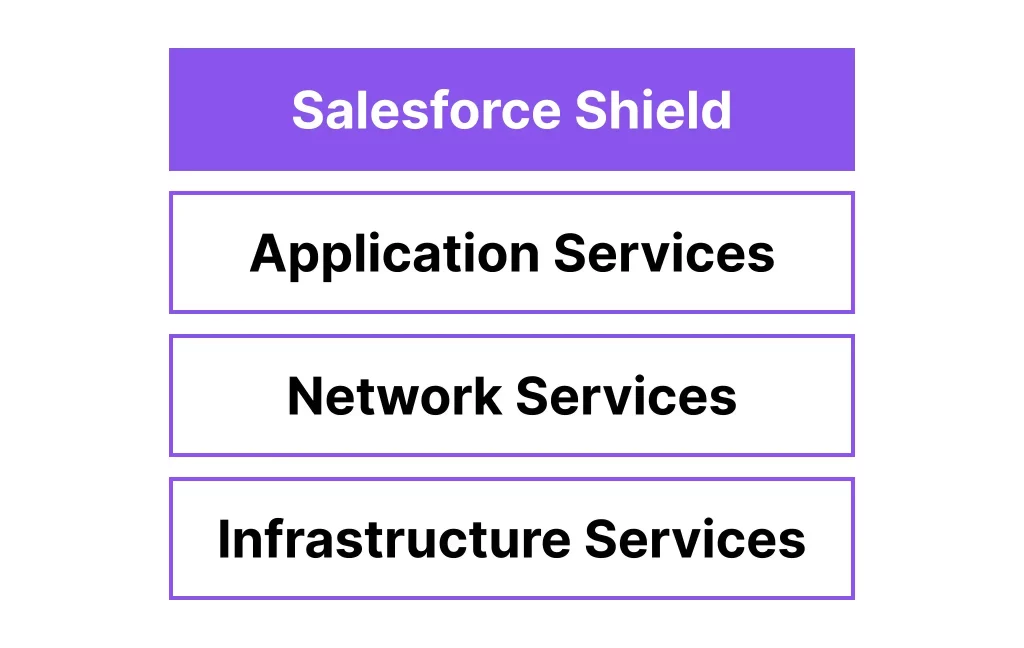
Salesforce Shield addresses this gap by adding an extra layer of protection. It strengthens security controls and helps organizations manage risks associated with the shared responsibility model more effectively. It also introduces capabilities that are not available in standard Salesforce features, which become critical for organizations handling sensitive data or operating in regulated industries.
Secure sensitive patient data effectively with our Salesforce Health Cloud Services built for compliance-driven environments.
The following sections explain the core components of Salesforce Shield in detail.
1. Salesforce Shield Encryption
Salesforce Shield Encryption enables organizations to protect their data using AES 256-bit encryption at the field level. This ensures that sensitive information stored within Salesforce remains secure and unreadable without proper access. Encryption plays a key role in protecting data at rest, meaning data stored in Salesforce data centers is converted into cipher text and cannot be interpreted by unauthorized users, including database-level access.
One of the major advantages of this feature is field-level encryption. Organizations can choose which fields contain sensitive data and apply encryption selectively, instead of encrypting everything. This provides better control and flexibility while maintaining system performance.
Key highlights include:
- AES 256-bit encryption: One of the highest security standards available.
- Field-level encryption: Protects specific sensitive fields instead of the entire database.
- At-rest encryption: Secures stored data by converting it into cipher text.
- Encryption policy for files: Files and attachments are encrypted in a complete (all-or-nothing) manner.
- Encryption key management: Multiple options available for managing encryption keys.
It is important to understand that encryption does not replace access control. Field-level security and permissions still determine who can view or edit data. Encryption works in the background and is mostly invisible to users. However, there are cases where encrypted fields may impact reporting or filtering, especially when those fields are used in reports or list views.
Salesforce Key Options (+ BYOK)
Encryption security depends heavily on how keys are managed. Salesforce provides multiple options for managing encryption keys, allowing organizations to choose based on their security requirements.
- Salesforce-generated keys: A simple option where Salesforce manages the encryption keys.
- Bring Your Own Key (BYOK): Organizations can use their own key management system for greater control. This is commonly used by enterprises with strict security policies.
- Cache-only keys: Provides an additional layer of protection by limiting key exposure, making it suitable for highly security-focused environments.
Each option offers a different level of control and complexity. Organizations with advanced security requirements often move toward BYOK after initial setup.
Probabilistic vs. Deterministic Encryption Schemes
Salesforce Shield supports two encryption schemes that balance security and usability. Both use AES 256-bit encryption but differ in how encrypted values are generated.
- Probabilistic encryption: Uses a randomized initialization vector, making it more secure because the same data will generate different encrypted outputs each time.
Deterministic encryption: Uses a consistent initialization vector for each field, allowing exact-match filtering and better functionality in reports.
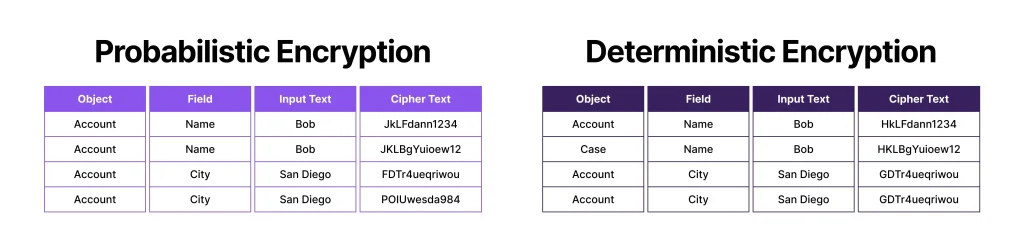
Probabilistic encryption provides stronger protection, while deterministic encryption allows limited filtering capabilities such as exact match. Organizations must choose based on whether security or functionality is the priority.
What Shield Encryption is Not
While Salesforce Shield Encryption is powerful, it has certain limitations that must be understood clearly. It is not designed to replace all security mechanisms but to work alongside them.
- It is not full database encryption; it works at the field level and for files/attachments.
- Files and attachments cannot be selectively encrypted; the encryption policy applies to all.
- It does not mask data in the user interface; users with access can still view the data.
- Existing files require additional steps to be encrypted if the policy is enabled later.
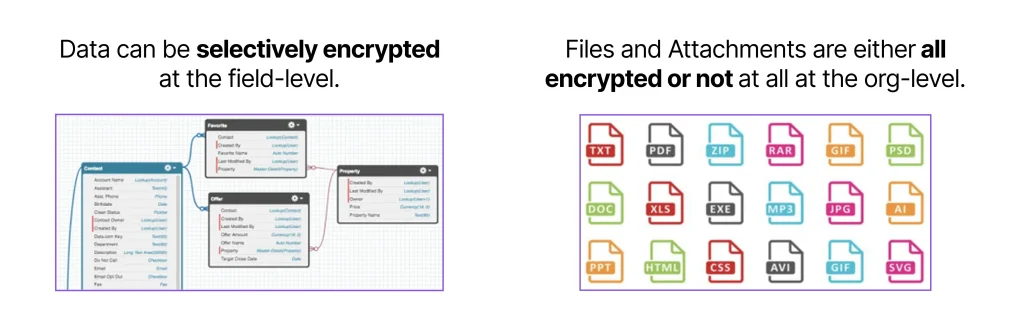
Encryption works together with features like Data Detect and data classification to provide a complete security approach. It helps identify sensitive data and ensures that it is protected effectively.
Salesforce Shield Encryption has also been extended to Data 360 (formerly Data Cloud), allowing integration with External Key Management (EKM). This gives organizations greater control over encryption keys and enhances overall data security across different data platforms.
2. Field Audit Trail
Salesforce Shield Field Audit Trail extends the standard field history tracking capabilities by allowing organizations to retain historical data for up to ten years. In comparison, standard Salesforce field history tracking stores data for a much shorter duration, typically up to 18 months within the platform and 24 months via API access. Both features track changes made to records, including what data was changed, which field was updated, when the change occurred, and which user performed the action.
Long-term data retention plays a critical role in meeting business and compliance requirements. Organizations often need access to historical data for audits, reporting, and regulatory purposes. Without extended tracking, retrieving older data becomes difficult, which can create challenges during compliance checks or internal reviews.
A clear difference exists between standard tracking and Shield Field Audit Trail in terms of capability and flexibility. Standard tracking supports a limited number of fields and does not allow flexible retention policies. In contrast, Shield Field Audit Trail increases the number of trackable fields and provides customizable retention periods based on organizational requirements.
Field tracking policies define how long data is stored, when it is archived, and when it should be deleted. These policies are configured using the metadata API provided by Salesforce, allowing organizations to manage data lifecycle more effectively. This structured approach ensures that important historical data is preserved while maintaining system performance.
3. Salesforce Shield Event Monitoring
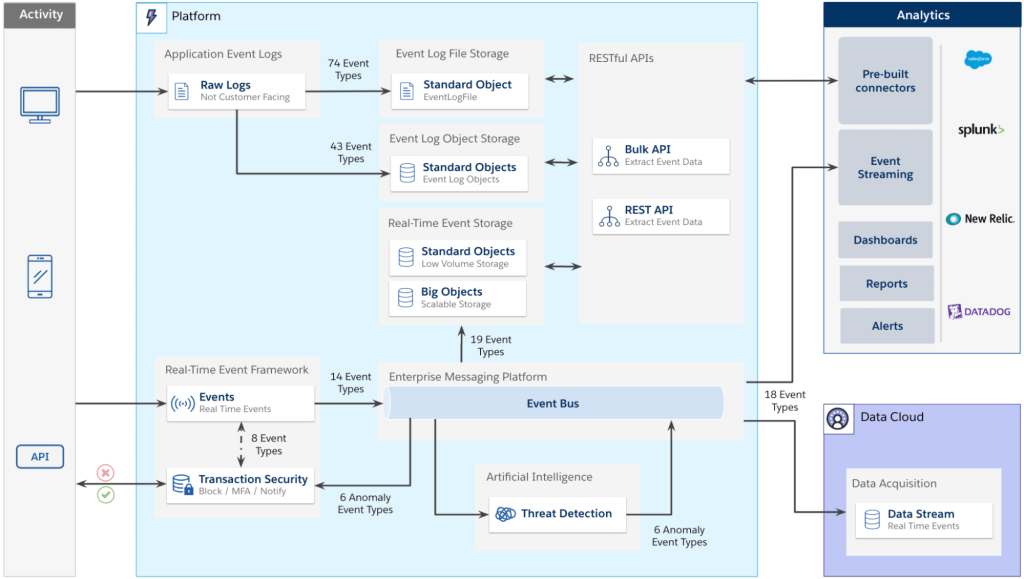
Salesforce Shield Event Monitoring provides detailed visibility into user activity across the system. It tracks events such as logins, data access, report usage, and API interactions. This helps organizations understand how users interact with Salesforce and identify any unusual or potentially risky behavior.
Transaction security policies can be defined to monitor these activities and take action when specific conditions are met. The primary goal is to detect and prevent unauthorized actions in real time, reducing the risk of data breaches or misuse. Event monitoring works across different access points, including web browsers, mobile applications, and APIs.
There are two types of monitoring available:
- Core event monitoring: Provides event data with a delay, useful for analysis and reporting over time.
- Real-time event monitoring: Tracks activities instantly and allows immediate action, such as blocking a user or triggering alerts.
Event monitoring supports both security and performance analysis. From a security perspective, it helps track actions like viewing sensitive records or exporting reports. From a performance standpoint, it can identify slow processes or heavy system usage, helping optimize system efficiency.
Event Monitoring Example
A practical example involves monitoring access to sensitive reports. Suppose a report contains confidential data, such as high-value customer information. If a user attempts to export a large number of records, such as 5,000+ rows, this action can be flagged as suspicious.
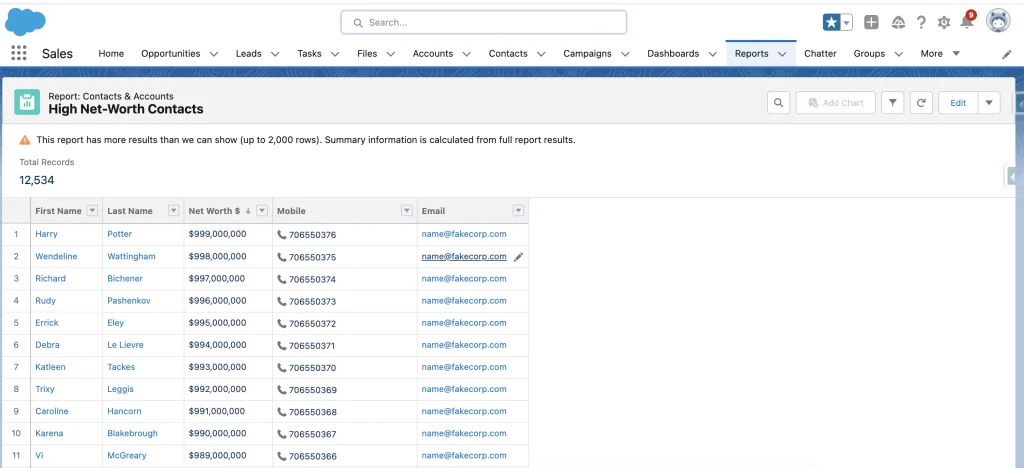
In such cases, the system can block the export action and display a permission-related message to the user. This prevents unauthorized data extraction and ensures that sensitive information remains protected. Each such activity is recorded as an event, which can be reviewed later for analysis and investigation.
Manage and secure guest data efficiently with our Salesforce CRM Cloud Hotel Services built for hospitality businesses.
Event Monitoring Analytics
Salesforce provides built-in analytics tools to analyze event monitoring data. These tools include pre-built dashboards that display key metrics such as user activity, report usage, and data access patterns. Organizations can track trends over time and identify areas that require attention.
Events are stored in the Event Log File object, allowing detailed analysis through queries and reporting. This makes it possible to perform audits, investigate incidents, and understand system behavior at a deeper level.
Many organizations integrate external tools such as Splunk or QRadar to combine Salesforce event data with other systems. This provides a centralized view of security events across the entire technology stack, improving overall monitoring and threat detection.
4. Data Detect
Data Detect is designed to automatically scan your Salesforce database and identify sensitive data stored across different objects and fields. Many organizations store large volumes of customer and business data, and over time, sensitive information can appear in unexpected places. Without proper visibility, it becomes difficult to manage and protect such data effectively.Protect student records and academic data using our Salesforce School Cloud Services tailored for educational institutions.
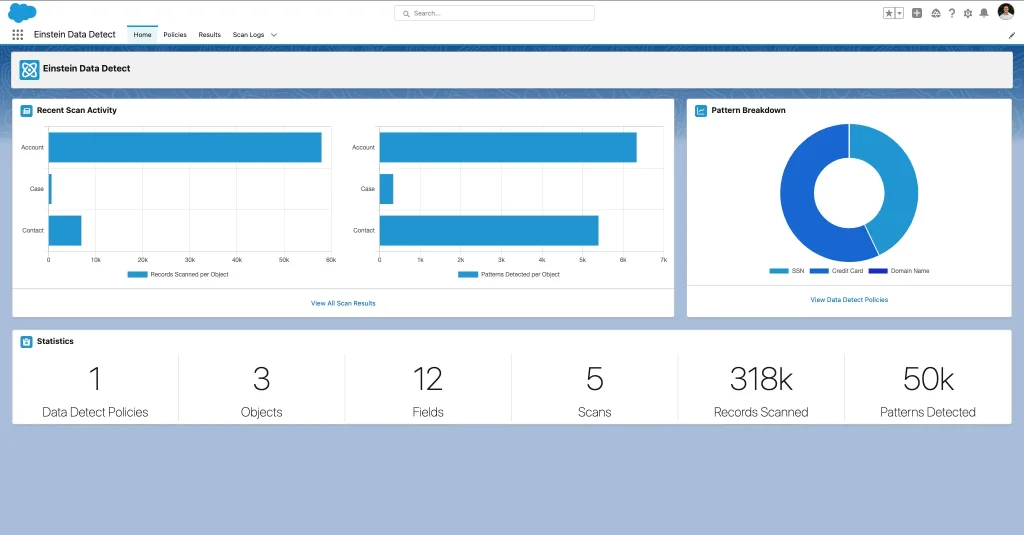
Data Detect helps identify patterns related to sensitive information, including:
- Credit card numbers
- Email addresses
- Social security numbers
- URLs
- IP addresses
This is why Data Detect works closely with Platform Encryption. It helps determine which data needs to be protected by identifying sensitive fields that require encryption at rest. Instead of guessing where sensitive data exists, organizations can rely on Data Detect to provide accurate insights.
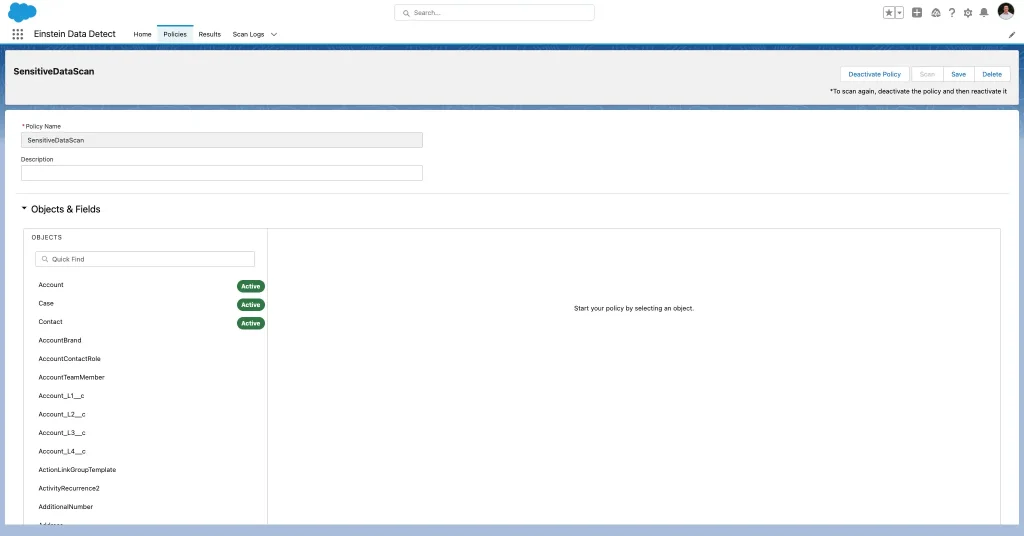
The interface is designed to simplify the scanning process. Organizations can configure scans by selecting specific objects such as Accounts, Cases, and Contacts. Data policies can be defined to detect particular patterns, and fields can be selected based on where sensitive data is likely to exist. This structured approach ensures that scanning is targeted and effective.
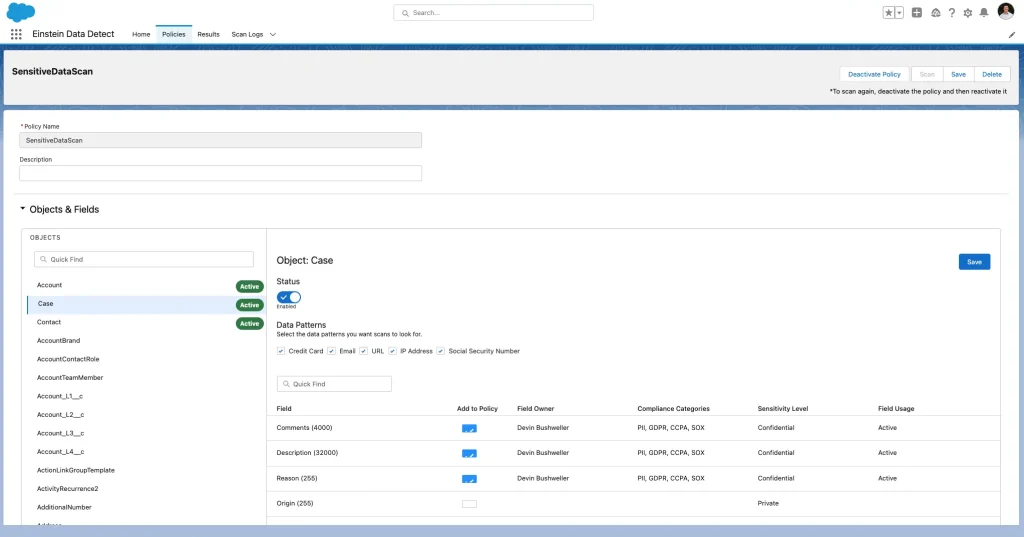
A common scenario involves support teams entering sensitive information in case descriptions or comments. This type of data entry often happens unintentionally, making it difficult to track manually. Data Detect helps identify such cases by scanning the relevant fields and highlighting where sensitive patterns are found.
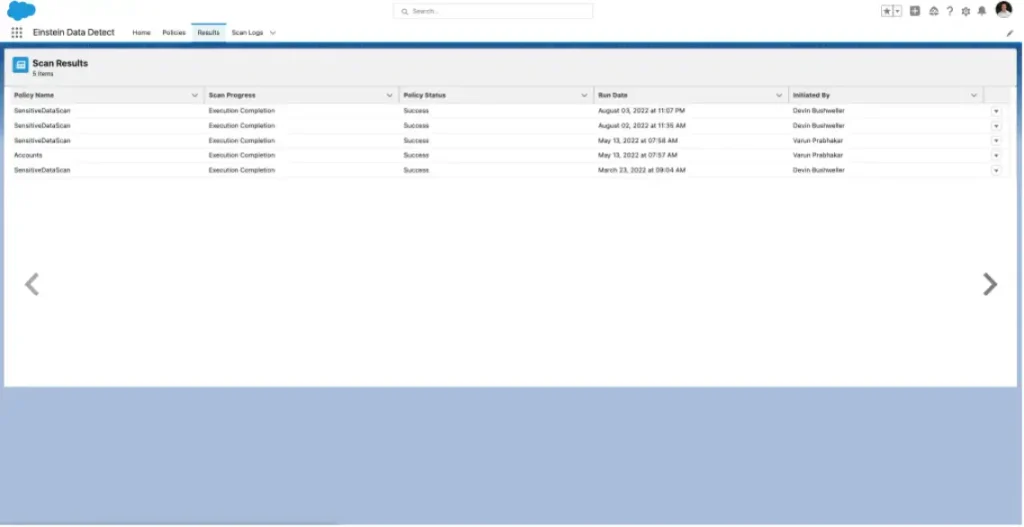
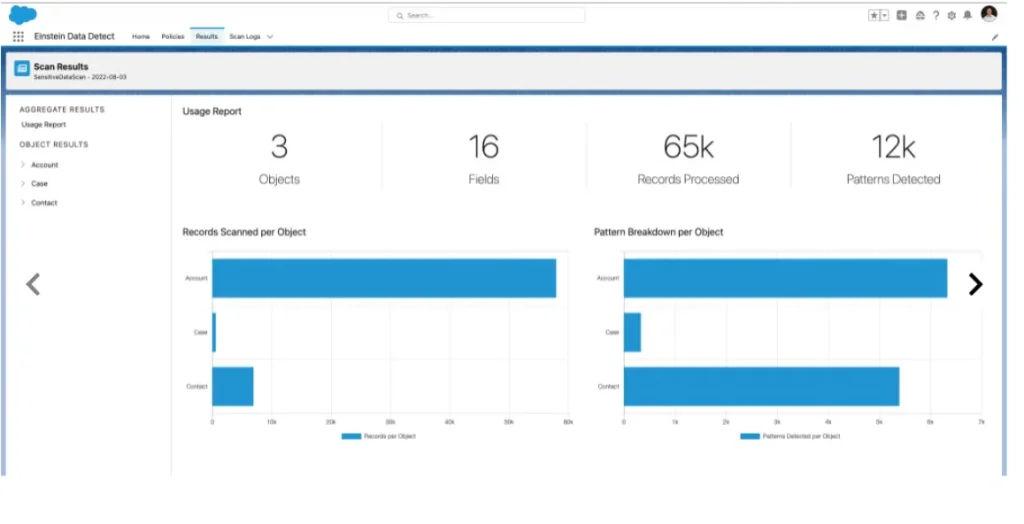
The scan results provide a clear overview of where sensitive data exists within the system. It highlights specific objects and fields that require attention, allowing organizations to review and classify the data properly. For example, if credit card information is detected in a case description field, it indicates that the data is stored in the wrong location and needs to be handled securely.
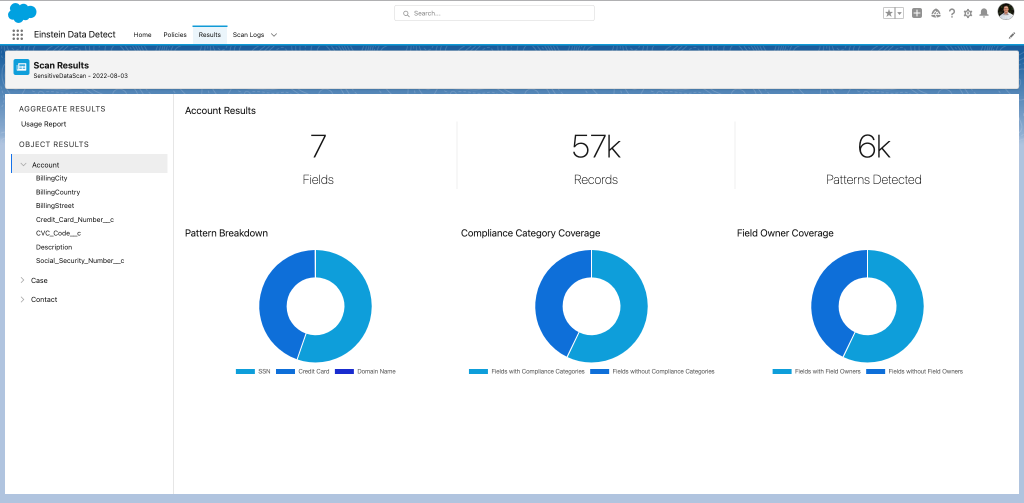
Data Detect plays an important role in identifying hidden risks within the system. It ensures that sensitive data is not left unprotected in unknown areas, helping organizations strengthen their overall data security strategy.
Note: Data Detect is available as a managed package and does not require a minimum amount of data to function effectively. It scans based on the available data in your Salesforce org, regardless of its size, making it suitable for both small and large organizations.
How to Implement Salesforce Shield
Implementing Salesforce Shield depends on the specific needs of each organization. Every business handles data differently, so the approach to security and compliance also varies. Since Salesforce Shield is a significant investment, it is important to ensure that the implementation delivers full value and aligns with business objectives.
Salesforce provides detailed implementation guidance that outlines the considerations required before enabling features like encryption. The process involves multiple steps and requires careful planning, as incorrect configuration can impact system functionality and performance. Maintaining Salesforce Shield over time is equally important, as security requirements continue to evolve.
A structured approach helps simplify implementation. Data Detection and data classification should be used at the beginning to identify sensitive data. This information then guides decisions around Platform Encryption, ensuring that only relevant data is protected while maintaining system efficiency.
Optimize your setup with our Salesforce Implementation Services designed to align your system with business security and compliance needs.
Step 1. Run Data Detect
The first step in implementing Salesforce Shield is identifying sensitive data within the system. Data Detect plays a critical role in this process by scanning the Salesforce org and highlighting where sensitive information exists.
Data Detect works based on policies that define what data should be scanned. These policies allow organizations to set a time range and specify which objects and fields should be analyzed. Patterns such as email addresses, credit card numbers, and other sensitive data types can be included in the scan configuration.
Once the scan is complete, the results provide a clear view of where sensitive data is stored. This helps organizations decide what needs to be protected using other Shield components. Starting with Data Detect ensures that security efforts are focused on the most critical areas.
Step 2: Platform Encryption
Platform Encryption requires careful setup, starting with assigning the correct permissions. This is done by creating Permission Sets that include access to manage encryption keys and application settings. Only authorized users should be granted these permissions to maintain security.
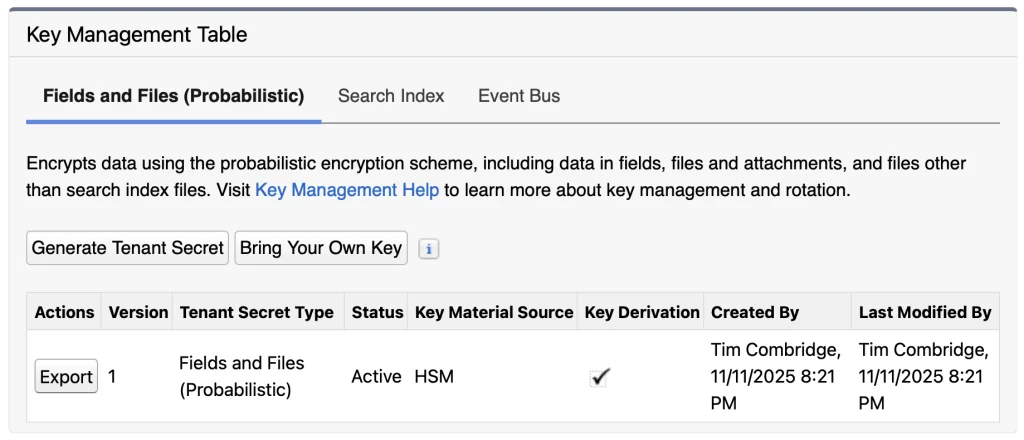
The next step involves generating a tenant secret, which is used to create encryption keys. Organizations can choose between Salesforce-generated keys or using their own keys through the Bring Your Own Key (BYOK) option. Each approach offers different levels of control depending on security requirements.
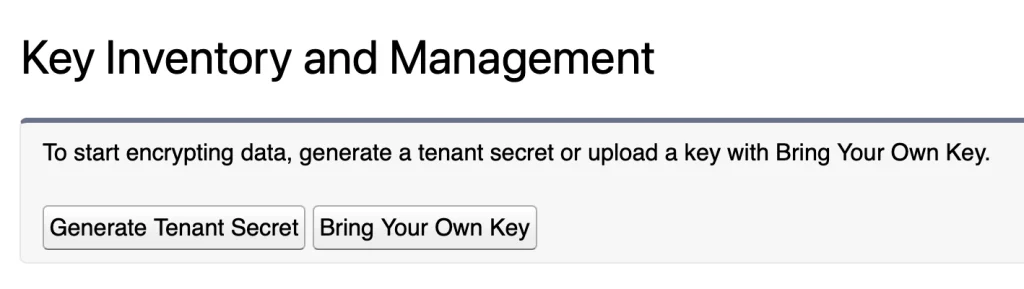
Once the key is generated, it should be securely stored using export functionality. Proper key management is critical, as losing access to keys can impact data accessibility. Regular key rotation is recommended to maintain strong security practices.
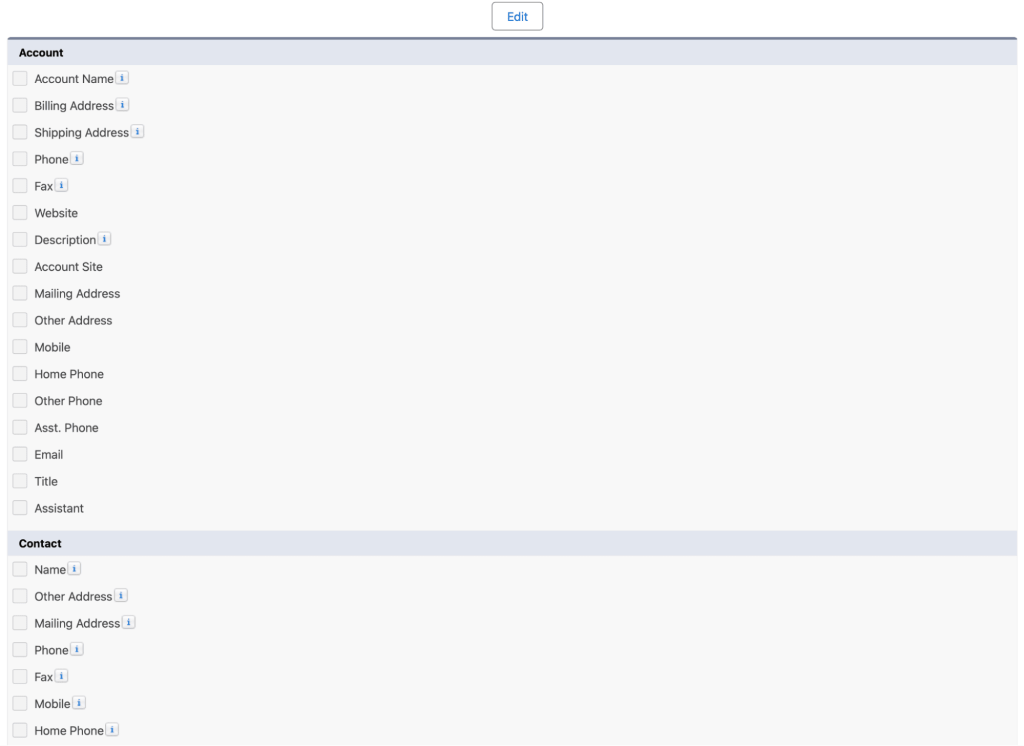
After setting up the keys, encryption can be applied through the Encryption Settings page. Organizations can select specific standard fields and extend
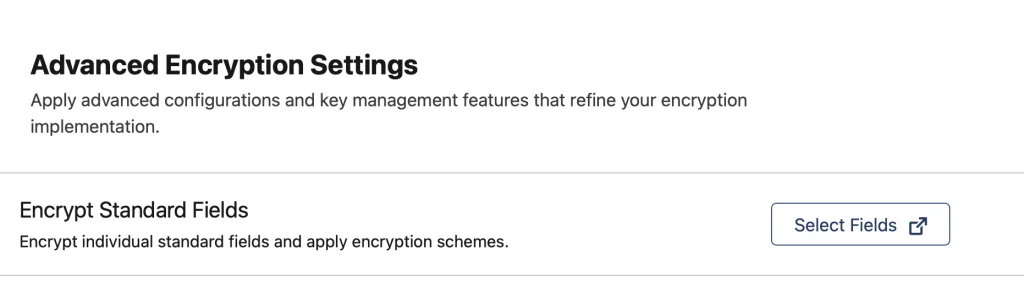
encryption to files, attachments, and other data types. This step ensures that sensitive data is protected across different areas of the system.
Step 3: Field Audit Trail
Field Audit Trail setup requires working with metadata rather than a standard user interface. This makes the process more technical compared to other Shield components. Configuration is done using XML files that define how long data should be stored and when it should be archived or deleted.
Ensure secure data handling in higher education systems with our Salesforce School and University Cloud Services.
There are four main parameters used in this configuration. The archiveAfterMonths value defines how long data remains active before being archived. The archiveRetentionYears value specifies how long archived data should be retained. The description field is used to document the policy, while gracePeriodDays provides additional time before the first archive process occurs.
These settings are applied to object metadata using tools like Salesforce CLI. This approach allows organizations to manage data retention policies in a structured way. Proper configuration ensures that historical data is available for compliance while preventing unnecessary data accumulation.
Step 4: Event Monitoring
Event Monitoring setup is more user-friendly compared to Field Audit Trail. It begins with creating a Permission Set that allows users to access event monitoring data. This ensures that only authorized users can view and manage activity logs.
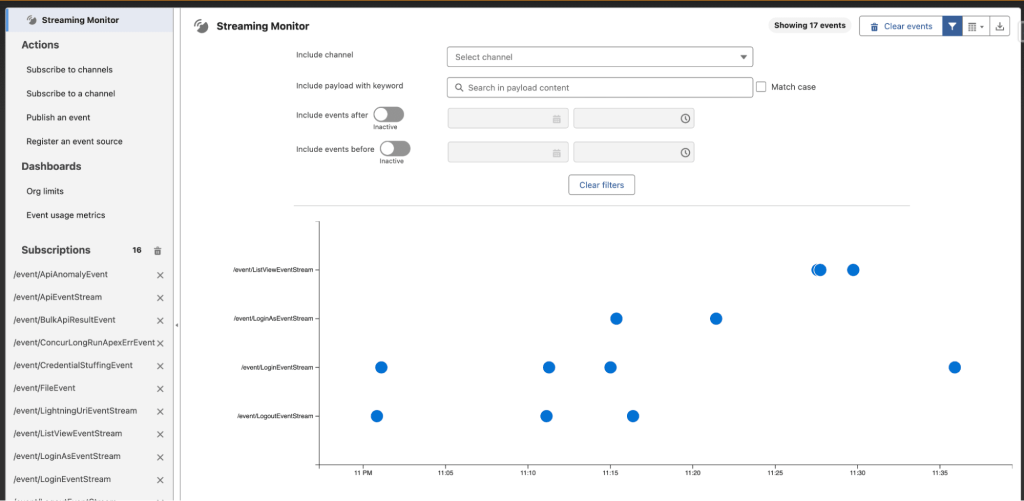
After assigning permissions, event logging must be enabled from the Event Monitoring Settings page. This allows Salesforce to start generating event log files that capture user activities across the system. Administrators can then configure which events should be tracked based on business requirements.
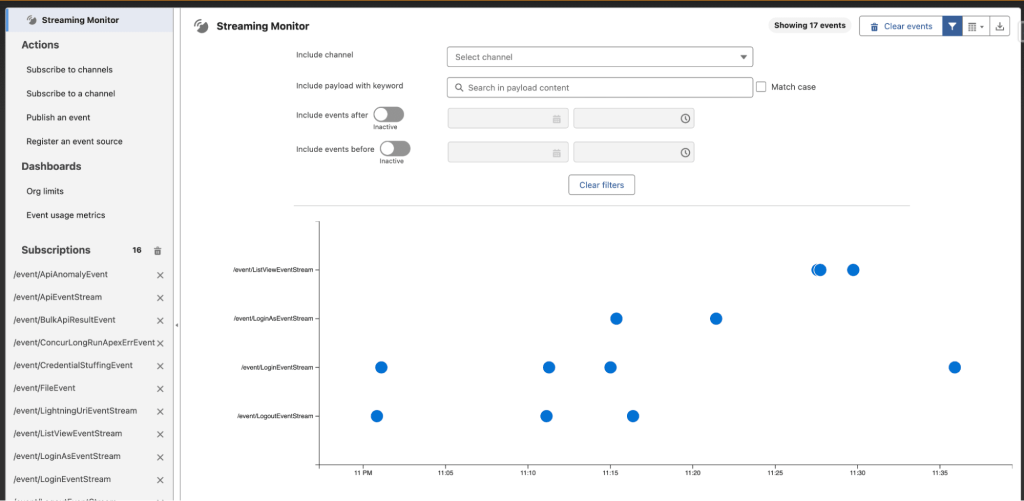
To monitor events effectively, tools such as Streaming Monitor from the AppExchange can be used. These tools help filter and display event data in real time, making it easier to identify unusual behavior. By tracking events continuously, organizations can detect potential risks early and take appropriate action to protect their data.
Salesforce Shield Pricing
Salesforce Shield is available as an add-on product, which means it is not included in standard Salesforce CRM licenses and requires an additional investment. Unlike traditional pricing models that are based on per-user, per-month costs, Salesforce Shield follows a different approach. Its pricing is calculated as a percentage of the overall Salesforce spend of an organization, making it more aligned with the scale of usage.
This pricing model is beneficial for organizations of different sizes, especially small to medium businesses, as it adjusts based on how extensively Salesforce is used. Instead of paying a fixed cost per user, companies pay according to their overall platform investment, which helps in better budget planning.
Strengthen data control across operations with our Enterprise Resource Planning Services integrated with secure Salesforce solutions.
Organizations also have flexibility when it comes to purchasing. They can either choose the complete Shield package, which includes all components, or select individual features such as Platform Encryption, Event Monitoring, Field Audit Trail, or Data Detect based on their specific compliance and security needs. This allows businesses to implement only what is necessary without over-investing in unused features.
For accurate and updated pricing details, organizations should refer to Salesforce’s official pricing resources, as costs may vary based on region, licensing agreements, and product updates.
How Do I Know if I have Salesforce Shield?
Checking whether Salesforce Shield is enabled in your organization is a simple process. Salesforce provides built-in options that allow administrators to verify the availability of Shield features without requiring additional tools.
One way to confirm this is by using the Quick Find search in Salesforce Setup. By searching for “Platform Encryption,” you can quickly determine if Shield is active. If the option appears in the setup menu, it indicates that your organization has access to Salesforce Shield capabilities.
Another method involves reviewing the license information. Within Setup, navigating to the Company Information section allows you to view all assigned licenses. By checking the User Licenses section, you can confirm whether the Salesforce Shield license is included in your organization’s subscription.
These methods help administrators quickly verify access and ensure that the required security features are available for use.

Options for Masking Salesforce Data
Salesforce Shield focuses on encrypting data at rest, meaning the data is protected when stored within Salesforce infrastructure. However, encryption alone does not hide data from users within the interface. To control what users can see, additional techniques are required.
Field-level security is considered the most effective method for restricting access to sensitive information. It allows administrators to define which users can view or edit specific fields, ensuring that only authorized individuals have access to critical data.
In addition to built-in features, many organizations use third-party backup solutions that offer sandbox seeding capabilities. These tools can mask or randomize data when it is copied from production environments to testing environments. This helps protect sensitive information during development and testing activities.
Salesforce also provides its own solution, such as Data Mask & Seed, which serves a similar purpose by anonymizing data in sandbox environments. However, if the goal is to hide or obfuscate data directly within the user interface, organizations may need to consider alternative approaches beyond Shield encryption.
Getting Skilled Up on Salesforce Shield
Working with Salesforce Shield requires a strong understanding of security concepts, which can make the learning process more complex compared to standard Salesforce administration. Security is a specialized domain, and implementing Shield effectively requires knowledge of data protection, compliance requirements, and system configuration.
For Salesforce Admins, this presents both a challenge and an opportunity. Gaining expertise in Salesforce Shield can significantly enhance their skill set and open up advanced career opportunities in security and compliance roles.
Organizations are encouraged to work with experienced partners or professionals who have expertise in Salesforce security implementations. This helps ensure that Shield is configured correctly and delivers the intended value.
Training resources such as Trailhead provide structured learning paths that cover Salesforce Shield and related security topics. These resources help administrators build confidence and understand how to apply security best practices in real-world scenarios. Over time, gaining hands-on experience with Shield strengthens both technical and strategic understanding.
Final Thoughts
Salesforce Shield plays an important role in strengthening data security, but it requires proper planning and ongoing management. It is not a one-time setup, and maintaining security controls over time is essential for consistent protection.
Focusing on the right data is key. Identifying sensitive and high-risk information helps apply security measures more effectively, while avoiding unnecessary complexity for low-risk data. Data classification, encryption, and monitoring together create a strong foundation for managing risks.
With the right strategy and expert guidance from iBirds Services, businesses can implement Salesforce Shield more efficiently and ensure their Salesforce environment remains secure, scalable, and compliant.
FAQs
1. What is Salesforce Shield?
Salesforce Shield is a security solution that provides encryption, monitoring, and auditing capabilities. It helps protect sensitive data and ensure compliance. It is mainly used by enterprises handling critical information.
2. What are the components of Salesforce Shield?
It includes Platform Encryption, Field Audit Trail, Event Monitoring, and Data Detect. Each component plays a role in data protection. Together they create a complete security system.
3. How does Event Monitoring work?
Event Monitoring tracks user activities in real time. It helps detect suspicious behavior. Admins can take action immediately.
4. Is Salesforce Shield worth it?
Yes, for businesses dealing with sensitive data. It provides advanced security features. It helps reduce risk and improve compliance.
5. Does Salesforce Shield mask data?
No, it encrypts data but does not mask it. Masking requires additional tools. Both are important for full security.